

The execution of a C# program starts with a single thread called the main thread that is automatically run by the CLR and Operating System.
From the main thread, we can create other threads for doing the desired task in the program. The process of developing a program for execution with multiple threads is called multithreaded programming and the process of execution is called multithreading.
In C# there're the following 2 kinds of threads.
- Foreground Thread
- Background Thread
1. Foreground Thread
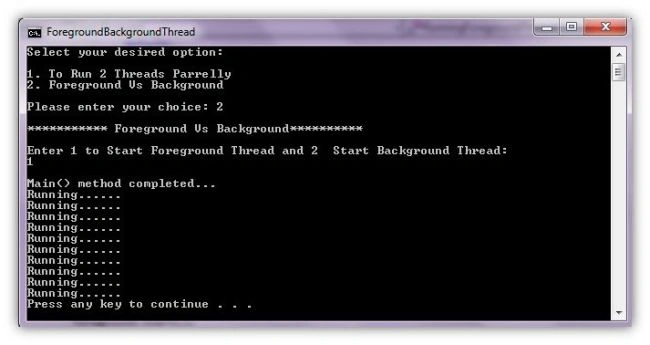
- Foreground threads are those threads that keep running even after the application exits or quits.
- It has the ability to prevent the current application from terminating.
- The CLR will not shut down the application until all Foreground Threads have stopped.
2. Background Thread
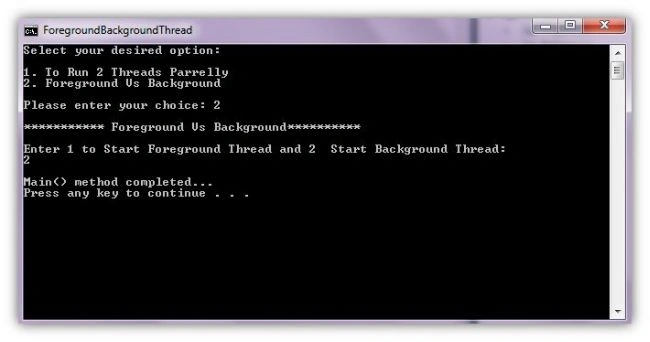
- Background Threads are those threads that will quit if our main application quits. In short, if our main application quits, the background thread will also quit.
- Background threads are views by the CLR and if all foreground threads have terminated, any and all background threads are automatically stopped when the application quits.
By default every thread we create is a Foreground Thread.
Let's look at an example.
In this example we'll create 2 Threads and will run those threads in parallell and we'll also see how Foreground and Background threads work.
Create a new Console project ForegroundBackgroundThread.
Program.cs
- using System;
- using System.Collections.Generic;
- using System.Linq;
- using System.Text;
- using System.Threading;
- namespace ForegroundBackgroundThread
- {
- class Program
- {
- static void Print1()
- {
- Console.WriteLine("Print1() running on {0} Thread", Thread.CurrentThread.Name);
- for (int i = 1; i < 10; i++)
- {
- Console.WriteLine("Executing Print1.... ");
- Thread.Sleep(1000);
- }
- }
- static void Print2()
- {
- Console.WriteLine("Print2() running on {0} Thread", Thread.CurrentThread.Name);
- for (int i = 1; i < 10; i++)
- {
- Console.WriteLine("Executing Print2....");
- Thread.Sleep(1000);
- }
- }
- static void Main(string[] args)
- {
- Console.Title = "ForegroundBackgroundThread";
- Thread t1 = new Thread(Print1);
- Thread t2 = new Thread(Print2);
- t1.Name = "Primary";
- t2.Name = "Secondary";
- Console.WriteLine("Select your desired option: \n");
- Console.WriteLine("1. To Run 2 Threads Parrelly");
- Console.WriteLine("2. Foreground Vs Background");
- Console.Write("\nPlease enter your choice: ");
- int choice = int.Parse(Console.ReadLine());
- Console.WriteLine();
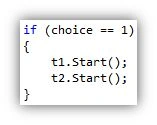
- if (choice == 1)
- {
- t1.Start();
- t2.Start();
- }
- if (choice == 2)
- {
- Console.WriteLine("*********** Foreground Vs Background**********");
- Console.WriteLine();
- Console.WriteLine("Enter 1 to Start Foreground Thread and 2 Start Background Thread: ");
- int number = int.Parse(Console.ReadLine());
- Console.WriteLine();
- switch (number)
- {
- case 1:
- RunningForegroundThread();
- break;
- case 2:
- RunningBackgroundThread();
- break;
- default:
- break;
- }
- }
- Console.WriteLine("Main() method completed...");
- }
- static void Delay()
- {
- for (int i = 0; i < 10; i++)
- {
- Console.WriteLine("Running......");
- Thread.Sleep(1000);
- }
- }
- static void RunningForegroundThread()
- {
- Thread foreground = new Thread(Delay);
- foreground.Start();
- }
- static void RunningBackgroundThread()
- {
- Thread background = new Thread(Delay);
- background.IsBackground = true;
- background.Start();
- }
- }
- }




Balakrishnan GPosted Jan 27, 2017, 3:04 PM
Nice and very easy to understand. Thanks
Prakash TripathiPosted Jul 17, 2015, 12:45 PM
Nice take.
Vithal WadjePosted Oct 11, 2014, 1:52 AM
good one keep it up
Muhammad Taqi Hassan BukhariPosted Aug 1, 2014, 7:54 AM
nice one