

Introduction
LinkedList<T> represents the doubly linked list, where T is any specific datatype. It represents the collection of nodes, and each node contains an element. Each node is linked to the preceding node and the following node. The doubly linked list only knows the first and the last node. There are various operations that we can perform in the LinkedList.
In this article, I explain how to create a LinkedList and how we perform the operations on a LinkedList. For this, the following steps are used.
Step 1. Open Visual Studio 2010 and click on File->New->Project
click on the Console application. Give the name of the project as LinkedList.
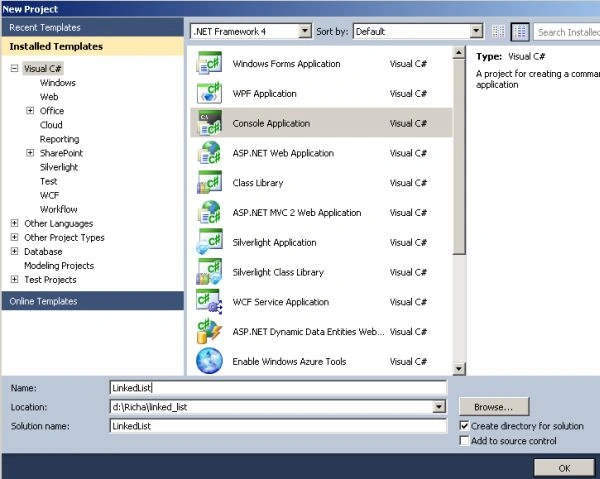
Step 2. Creation of the LinkedList
The LinkedList can be created as.
using System;
using System.Collections.Generic;
namespace LinkedListExample
{
    class Program
    {
        static void Main(string[] args)
        {
            // Creation of an empty linked list
            LinkedList<string> linkedList = new LinkedList<string>();
            string[] courses = { "MCA", "BCA", "MBA", "BBA", "BTech", "MTech" };
            // Creation of a linked list with initial elements
            LinkedList<string> linkedlist1 = new LinkedList<string>(courses);
            // Your code here
        }
    }
}
Some of the methods that we use for adding the elements to the list are.
- AddFirst(): It adds the node at the first position in the LinkedList.
- AddLast(): It adds the node at the last position in the LinkedList.
- AddBefore(): It adds the node before the given node.
- AddAfter(): It adds the node after the given node.
Now to add the nodes on the empty list that I created, named LinkedList, write the following code.
using System;
using System.Collections.Generic;
namespace LinkedListExample
{
    class Program
    {
        static void Main(string[] args)
        {
            // Creation of an empty linked list
            LinkedList<string> linkedList = new LinkedList<string>();
            // Add an element at the first position
            linkedList.AddFirst("one");
            // Add a node at the last position
            var nodeThree = linkedList.AddLast("three");
            // Add a node before the given element
            linkedList.AddBefore(nodeThree, "two");
            // Add a node after the given node
            linkedList.AddAfter(nodeThree, "four");
            // Your code here
        }
    }
}
Display both the list
To display both lists, write the code as.
using System;
using System.Collections.Generic;
namespace LinkedListExample
{
    class Program
    {
        static void Main(string[] args)
        {
            // Creation of an empty linked list
            LinkedList<string> linkedList = new LinkedList<string>();
            string[] courses = { "MCA", "BCA", "MBA", "BBA", "BTech", "MTech" };
            // Creation of a linked list with initial elements
            LinkedList<string> linkedlist1 = new LinkedList<string>(courses);
            // Add an element at the first position
            linkedList.AddFirst("one");
            // Add a node at the last position
            var nodeThree = linkedList.AddLast("three");
            // Add a node before the given element
            linkedList.AddBefore(nodeThree, "two");
            // Add a node after the given node
            linkedList.AddAfter(nodeThree, "four");
            // Display the first list (linkedList)
            Console.WriteLine("The first list is as:");
            foreach (string value in linkedList)
            {
                Console.WriteLine(value);
            }
            // Display the second list (linkedlist1)
            Console.WriteLine("The second list is as:");
            foreach (string list in linkedlist1)
            {
                Console.WriteLine(list);
            }
        }
    }
}
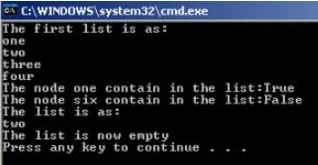
Output
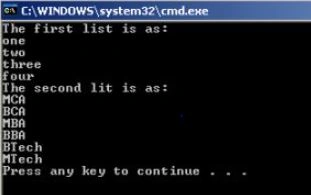
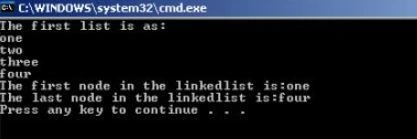
Richa GargPosted Sep 11, 2012, 1:35 AM
Hi Gaurav,Yes the function Contains finds any node/or record in your linkedlist.It will checked whether the particular node/record is in the linkedlist or not.
Gaurav GuptaPosted Jun 1, 2012, 12:54 AM
hi, Is linkedList has any function to search records.