

This chapter is taken from book "Programming Windows Phone 7" by Charles Petzold published by Microsoft press. http://www.charlespetzold.com/phone/index.html
This word "attribute" has different meanings in .NET and XML; here I'm talking about the .NET attribute, which refers to some additional information that is associated with a class or a member of that class.
If you want to get more explicit in your markup, you can include a property element for the Children property:
<Grid
x:Name="ContentPanel"
Grid.Row="1"
Margin="12,0,12,0">
<Grid.Children>
<TextBlock
Text="Hello, Windows Phone
7!" />
</Grid.Children>
</Grid>
Similarly, PhoneApplicationPage derives from UserControl, which also has a ContentProperty attribute:
[ContentPropertyAttribute("Content", true)]
public class UserControl : Control
The ContentProperty attribute of UserControl is the Content property. (That sentence makes more sense when you see it on the page rather than when you read it out load!)
Suppose you want to put two TextBlock elements in a Grid, and you want the Grid to have a LinearGradientBrush for its Background. You can put the Background property element first within the Grid tags followed by the two TextBlock elements:
<Grid
x:Name="ContentPanel"
Grid.Row="1"
Margin="12,0,12,0">
<Grid.Background>
<LinearGradientBrush>
<GradientStop
Offset="0"
Color="LightCyan" />
<GradientStop
Offset="1"
Color="LightPink" />
</LinearGradientBrush>
</Grid.Background>
<TextBlock
Text="TextBlock #1"
HorizontalAlignment="Left"
/>
<TextBlock
Text="TextBlock #2"
HorizontalAlignment="Right"
/>
</Grid>
It's also legal to put the two TextBlock elements first and the Background
property element last:
<Grid
x:Name="ContentPanel"
Grid.Row="1"
Margin="12,0,12,0">
<TextBlock
Text="TextBlock #1"
HorizontalAlignment="Left"
/>
<TextBlock
Text="TextBlock #2"
HorizontalAlignment="Right"
/>
<Grid.Background>
<LinearGradientBrush>
<GradientStop
Offset="0"
Color="LightCyan" />
<GradientStop
Offset="1"
Color="LightPink" />
</LinearGradientBrush>
</Grid.Background>
</Grid>
But putting the Background property element
between the two TextBlock elements simply won't work:
<Grid
x:Name="ContentPanel"
Grid.Row="1"
Margin="12,0,12,0">
<TextBlock
Text="TextBlock #1"
HorizontalAlignment="Left"
/>
<!-- Not
a legal place for the property element! -->
<Grid.Background>
<LinearGradientBrush>
<GradientStop
Offset="0"
Color="LightCyan" />
<GradientStop
Offset="1"
Color="LightPink" />
</LinearGradientBrush>
</Grid.Background>
<TextBlock
Text="TextBlock #2"
HorizontalAlignment="Right"
/>
</Grid>
The precise problem with this syntax is revealed when you put in the missing property elements for the Children property of the Grid:
<Grid
x:Name="ContentPanel"
Grid.Row="1"
Margin="12,0,12,0">
<Grid.Children>
<TextBlock
Text="TextBlock #1"
HorizontalAlignment="Left"
/>
</Grid.Children>
<!-- Not
a legal place for the property element! -->
<Grid.Background>
<LinearGradientBrush>
<GradientStop
Offset="0"
Color="LightCyan" />
<GradientStop
Offset="1"
Color="LightPink" />
</LinearGradientBrush>
</Grid.Background>
<Grid.Children>
<TextBlock
Text="TextBlock #2"
HorizontalAlignment="Right"
/>
</Grid.Children>
</Grid>
Now it's obvious that the Children property is being set twice-and that's clearly illegal.
Resources Collection
Computer programming is all about the avoidance of repetition. XAML would seem to be a particularly treacherous area for repetition because it's just markup and not a real programming language. The most generalized solution to repetitive markup is the Silverlight style. But a prerequisite to styles is a more generalized sharing mechanism. This is called the resource, and right away we need to distinguish between the resources.
XAML resources are always instances of a particular .NET class or structure, either an existing class or structure or a custom class and the sharing of resources immediately disqualifies many classes from being defined as XAML resources.
Here's a Resources collection for a page class that derives from PhoneApplicationPage:
<phone:PhoneApplicationPage ...>
<phone:PhoneApplicationPage.Resources>
...
</phone:PhoneApplicationPage.Resources>
...
</phone:PhoneApplicationPage>
The resources defined in the Resources collection on a FrameworkElement are available only within that element and nested elements; the resources defined in the Application class are available throughout the application.
Sharing Brushes
Let's suppose your page contains several TextBlock elements, and you want to apply the same LinearGradientBrush to the Foreground of each of them. This is an ideal use of a resource the resource must be defined before it is used, and it can only be accessed by the same element or a nested element.
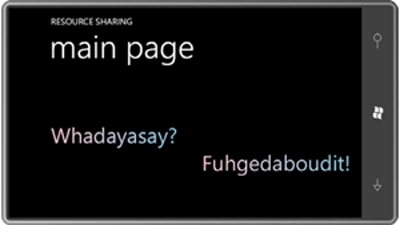
The ResourceSharing project defines all resources and references them in two TextBlock elements. Here's the complete resource section:
<phone:PhoneApplicationPage.Resources>
<LinearGradientBrush
x:Key="brush">
<GradientStop
Offset="0"
Color="Pink" />
<GradientStop
Offset="1"
Color="SkyBlue" />
</LinearGradientBrush>
<Thickness
x:Key="margin">
12 96
</Thickness>
<system:Double
x:Key="fontsize">
48
</system:Double>
</phone:PhoneApplicationPage.Resources>
J RiveroPosted Feb 22, 2011, 6:12 PM
...I have been reading your posts for years and until today I am posting a wholehearted THANK YOU. You have made my life easier. And you know that. J. Rivero