

Introduction
In this article we are going to see what Choosers are in Windows Phone 7 development and the different type of chooser tasks available. In our earlier article we have seen about Launchers and the different tasks involved with the launchers and a sample application on how to use the Launchers. Similarly here in this article we will see about choosers in detail.
Choosers in Windows Phone 7 is an API used to launch some of the built in applications using which the user can perform some task related to the application launched. Unlike launchers, here using choosers we can perform some task and pass data to get the task completed as per the requirement. Basically the choosers will be supplied with some data and status to do some manipulations accordingly. Some of the example of using the choosers are selecting particular photo from the photo hub, saving a ringtone etc.
Choosers have some general steps to launch a particular application and steps are as follows
- Creating an instance of the task
- Identifying the callback method to run after the task completes
- Setting the parameters to organize the task
- Calling the show method to invoke the task
- Implementing the completed event handler to get the data and status.
Let us see the list of Choosers available and the usage of each and every chooser tasks to get some clear idea on when to use each task to get a better performance.
Chooser Tasks
- Email Address Chooser Task - This task is used to launch the Contact application to select a particular contact's email address to do some manipulations within the application from which this task is called.
- Save Contact Task - This task is used to launch the contact application in order to save the contact details of a contact to the contact details section.
- Save Email Address Task - This task is used to launch the contact application in order to save an email address of a contact to the contact details section.
- Save Phone Number Task - This task is used to launch the contact application in order to save a phone number to the contact details from the application which triggered this task.
- Camera Capture Task - This task is used to launch the in-built camera application to capture a photo and use it with the application from which the task is called.
- Game Invite Task - This task is used to launch an invite screen for a multi player games application. This invitation will be sent asynchronously so that the task makes use of the invitation response to get connected for playing games across the sessions.
- Address Chooser Task - This task is used to launch the Contact application to select a particular contact's physical address selected by the user to do some manipulations within the application from which this task is called.
- Photo Chooser Task - This task is used to launch the Photo Chooser application using which we can select a photo from the hub and use it for manipulations within the application from which we can trigger this task.
- Phone Number Chooser Task - This task is used to launch the contact application to select a particular contact's phone number to do some manipulations within the application from which this task is called.
- Save Ringtone Task - This task is used to save an audio file as a ringtone to the system's ringtone list if the audio file meets the requirement for it to be considered as a ringtone. This task will launch the ringtone application and set the ringtone properties to be used within the device profile or within some specific group or a contact.
Now let us take a small example on how to use one of the Chooser task and in our upcoming articles we will see in depth on each and every task. Let us create a Phone number chooser application to select a contact and make a call.
Steps
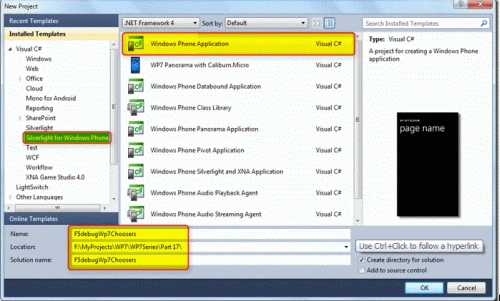
Open Visual Studio 2010 and create a new Silverlight for Windows Phone 7 Application with a valid project name as shown in the screen below.
Now let us add a button to invoke the Phone Number Chooser task and call a select a particular contact number, write the below code on the click event of the button as shown in the screen below. Also note that we need to add the below Using Directive in order to use the PhoneNumberChooser task (using Microsoft.Phone.Tasks; ) PhoneNumberChooser Task invokes the contacts application to get the selected contact by the user. The chooser works asynchronously so that the completed event must be subscribed before launching the chooser. Once the chooser task returns the Phone Number then the PhoneCallTask is used to make the phone call to the user selected Phone number as shown in the code.
XAML Code
<Grid x:Name="LayoutRoot" Background="Transparent">
<Grid.RowDefinitions>
<RowDefinition Height="Auto"/>
<RowDefinition Height="*"/>
</Grid.RowDefinitions>
<!--TitlePanel contains the name of the application and page title-->
<StackPanel x:Name="TitlePanel" Grid.Row="0" Margin="12,17,0,28">
<TextBlock x:Name="ApplicationTitle" Text="F5DEBUG WP7 TUTORIALS" Style="{StaticResource PhoneTextNormalStyle}"/>
<TextBlock x:Name="PageTitle" Text="Choosers" Margin="9,-7,0,0" Style="{StaticResource PhoneTextTitle1Style}"/>
</StackPanel>
<!--ContentPanel - place additional content here-->
<Grid x:Name="ContentPanel" Grid.Row="1" Margin="12,0,12,0">
<Button Content="Choose Contact" Height="189" HorizontalAlignment="Left" Margin="74,85,0,0" Name="button1" VerticalAlignment="Top" Width="297" Click="button1_Click" />
</Grid>
</Grid>


Vipendra VermaPosted Apr 21, 2012, 7:17 AM
Thank you for providing me good knowledge about how to read data from SQL server in SharePoint. Can you explain how to read data from Oracle in SharePoint.
Abhishek DubeyPosted Apr 3, 2012, 4:14 PM
thanks Karthikeyan