

Content types in SharePoint can be considered to be a reusable collection of metadata, Workflows, Event Receivers etc.: Thus, content types can be said to govern the behavior of the list or library, it is attached to. We can create the content types at the list level, as well as, the site level. Site Level Content Types can be created out of the box, as well as programmatically. However, the list level content types can be created only by deploying it as a list definition or by programmatic object model.
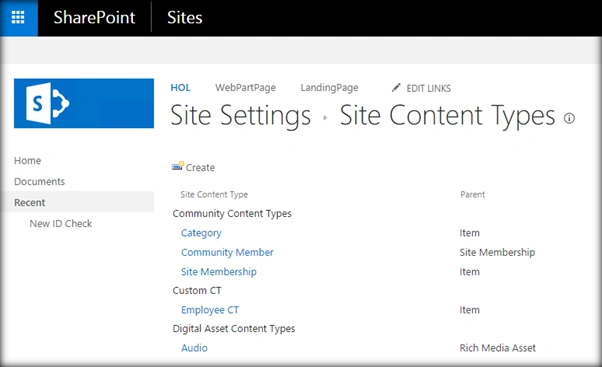
We can create and delete the site content types out of the box from the site content type page, as shown, above in SharePoint 2016. Let’s see, how we can do the same programmatically, using JavaScript object model.
Internal Implementation
Scope of the article is,
- List all existing content type
- Create a new site content type
- Delete an existing content type
All of these operations will be done, using JavaScript object model.
List all existing Content Types
Let’s see, how to list all the existing content types, using JSOM.
- Add reference to jQuery file.
- <script language="javascript" type="text/javascript" src="//ajax.googleapis.com/ajax/libs/jquery/1.8.1/jquery.min.js"></script>
- <script language="javascript" type="text/javascript">
- Within Document ready function, call SP.SOD.executeFunc, so as to load the on demand script SP.js . Call the main starting point function say: ‘listAllListCT’
- SP.SOD.executeFunc('sp.js', 'SP.ClientContext', listAllListCT);
- Instantiate the client context, Web and content type instance.
- var clientContext = new SP.ClientContext.get_current();
- oRootWeb = clientContext.get_site().get_rootWeb();
- oWebContentTypes=oRootWeb.get_contentTypes();
- Load the client context and execute the batch.
- clientContext.load(oWebContentTypes);
- clientContext.executeQueryAsync(QuerySuccess, QueryFailure);
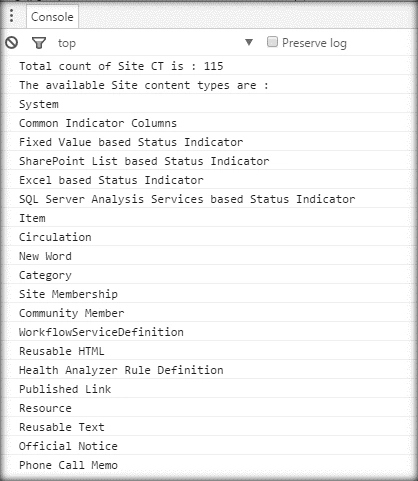
- In the case of success, call-back gets the content type enumerator collection and loops through it.
Output- var oWebCTEnumerator = oWebContentTypes.getEnumerator();
- console.log("Total count of Site CT is : " + oWebContentTypes.get_count() + '\n');
- console.log("The available Site content types are : ");
- while (oWebCTEnumerator.moveNext()) {
- console.log(oWebCTEnumerator.get_current().get_name() + '\n');
- }
Full Code
- <script language="javascript" type="text/javascript" src="//ajax.googleapis.com/ajax/libs/jquery/1.8.1/jquery.min.js"></script>
- <script language="javascript" type="text/javascript">
- $(document).ready(function() {
- SP.SOD.executeFunc('sp.js', 'SP.ClientContext', listAllListCT);
- });
- var oWebContentTypes;
- function listAllListCT() {
- //Get Client Context,Root Web of Site,Site CT Collection Objects
- var clientContext = new SP.ClientContext.get_current();
- oRootWeb = clientContext.get_site().get_rootWeb();
- oWebContentTypes = oRootWeb.get_contentTypes();
- //Load Client Context and Execute the batch
- clientContext.load(oWebContentTypes);
- clientContext.executeQueryAsync(QuerySuccess, QueryFailure);
- }
- function QuerySuccess() {
- //Get Web Enumerator and loop through the CT Collection
- var oWebCTEnumerator = oWebContentTypes.getEnumerator();
- console.log("Total count of Site CT is : " + oWebContentTypes.get_count() + '\n');
- console.log("The available Site content types are : ");
- while (oWebCTEnumerator.moveNext()) {
- console.log(oWebCTEnumerator.get_current().get_name() + '\n');
- }
- }
- function QueryFailure(sender, args) {
- console.log('Request failed - ' + args.get_message());
- }
- </script>
Add Content Type
Now, let’s see how to add a new site content type.
- Add reference to jQuery file.
- <script language="javascript" type="text/javascript" src="//ajax.googleapis.com/ajax/libs/jquery/1.8.1/jquery.min.js"></script>
- <script language="javascript" type="text/javascript">
- Within document ready function, call SP.SOD.executeFunc, so as to load the on demand script SP.js . Call the main starting point function say: ‘addSiteCT’.
- SP.SOD.executeFunc('sp.js', 'SP.ClientContext', addSiteCT);
- Instantiate the client context, Web and list instance.
- clientContext = new SP.ClientContext.get_current();
- var oWeb = clientContext.get_web();
- Get Site Content type Collection and Parent Site Content type Object.
- oSiteContentTypeCollection = oWeb.get_contentTypes();
- var oSiteCT = oSiteContentTypeCollection.getById("0x0101");
- Create site content type instatntiating ContentTypeCreationInformation object.
- var newSiteCT = new SP.ContentTypeCreationInformation();
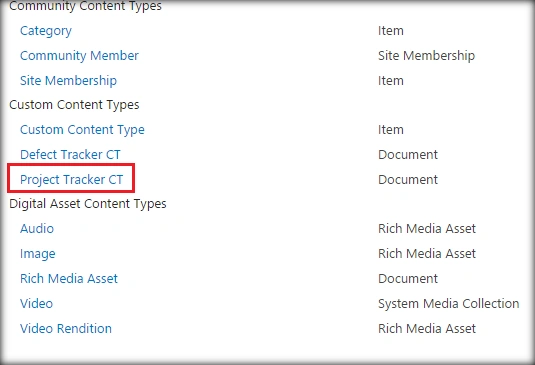
- newSiteCT.set_name('Project Tracker CT');
- newSiteCT.set_parentContentType(oSiteCT);
- newSiteCT.set_group("Custom Content Types");
- newSiteCT.set_description('This is a Project Tracker Content Type');
- oSiteContentTypeCollection.add(newSiteCT);
- Load the client context and execute the batch.
Output- clientContext.load(oSiteContentTypeCollection);
- clientContext.executeQueryAsync(QuerySuccess, QueryFailure);
Full Code
- <script language="javascript" type="text/javascript" src="//ajax.googleapis.com/ajax/libs/jquery/1.8.1/jquery.min.js"></script>
- <script language="javascript" type="text/javascript">
- $(document).ready(function() {
- SP.SOD.executeFunc('sp.js', 'SP.ClientContext', addSiteCT);
- });
- function addSiteCT() {
- //Get Client Context and Web object
- clientContext = new SP.ClientContext.get_current();
- var oWeb = clientContext.get_web();
- //Get Site CT Collection and Parent Site CT Object
- oSiteContentTypeCollection = oWeb.get_contentTypes();
- var oSiteCT = oSiteContentTypeCollection.getById("0x0101");
- //Create Site CT and add to the Site CT Collection
- var newSiteCT = new SP.ContentTypeCreationInformation();
- newSiteCT.set_name('Project Tracker CT');
- newSiteCT.set_parentContentType(oSiteCT);
- newSiteCT.set_group("Custom Content Types");
- newSiteCT.set_description('This is a Project Tracker Content Type');
- oSiteContentTypeCollection.add(newSiteCT);
- //Load Client Context and Execute the batch
- clientContext.load(oSiteContentTypeCollection);
- clientContext.executeQueryAsync(QuerySuccess, QueryFailure);
- }
- function QuerySuccess() {
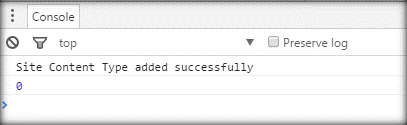
- console.log("Site Content Type added successfully");
- }
- function QueryFailure(sender, args) {
- console.log('Request failed - ' + args.get_message());
- }
- </script>
Delete the existing Site Content type
We can delete the content type, either by using its ID or by getting the content type collection and deleting the specific content type by looping through it. The content type ID can be obtained from the content type page’s address bar.
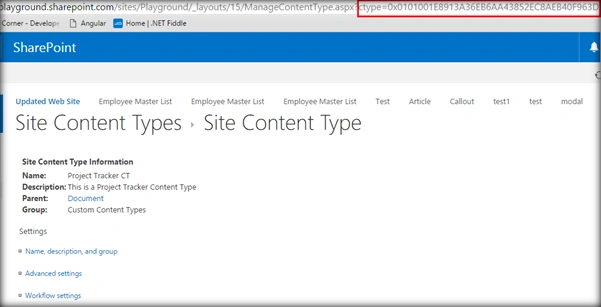
Once we get the content type ID, we can call the ‘deleteObject’ method on the content type object, as shown in the code, given below:
- oSiteContentTypeCollection = oWeb.get_contentTypes();
- var oSiteCT = oSiteContentTypeCollection.getById("0x0101001E8913A36EB6AA43852EC8AEB40F963D");
- //Delete the content type
- oSiteCT.deleteObject();
- <script language="javascript" type="text/javascript" src="//ajax.googleapis.com/ajax/libs/jquery/1.8.1/jquery.min.js"></script>
- <script language="javascript" type="text/javascript">
- $(document).ready(function() {
- SP.SOD.executeFunc('sp.js', 'SP.ClientContext', deleteSiteCT);
- });
- function deleteSiteCT() {
- //Get Client Context and Web object
- clientContext = new SP.ClientContext.get_current();
- var oWeb = clientContext.get_web();
- //Get Site CT Object to delete
- oSiteContentTypeCollection = oWeb.get_contentTypes();
- var oSiteCT = oSiteContentTypeCollection.getById("0x0101001E8913A36EB6AA43852EC8AEB40F963D");
- //Delete the content type
- oSiteCT.deleteObject();
- //Execute the batch
- clientContext.executeQueryAsync(QuerySuccess, QueryFailure);
- }
- function QuerySuccess() {
- console.log("Site Content Type has been deleted successfully");
- }
- function QueryFailure(sender, args) {
- console.log('Request failed - ' + args.get_message());
- }
- </script>
SharePoint Implementation
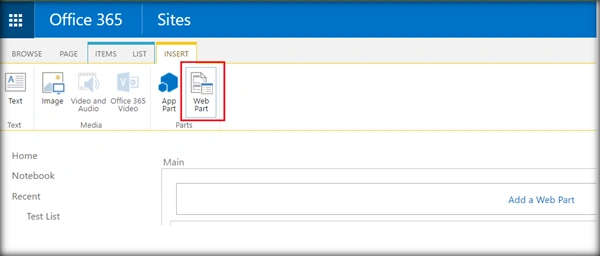
- Go to the edit settings of the SharePoint page and click Web part from Insert tab.
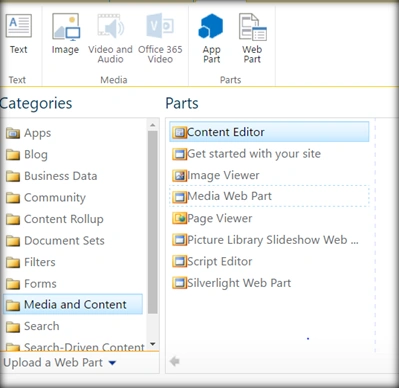
- Add Content Editor Web part.
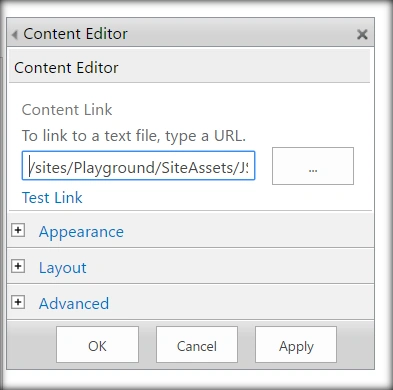
- Click on Edit Web art from Content Edit Web part. Assign the URL of the script text file and click Apply.
Output
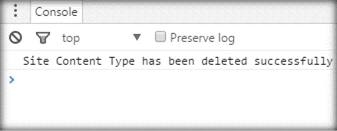
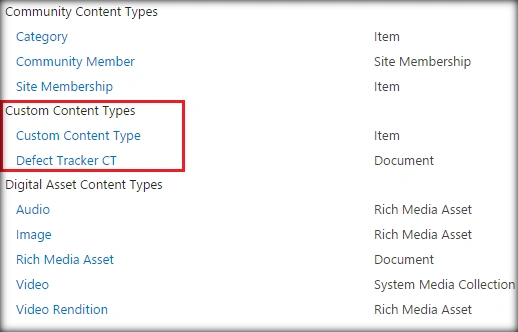
Thus, as you can see the Projects Tracker CT has been removed from the site content types.
Summary
In this article, we saw, how to list out all the site content types. Create a new site content type and delete an existing content type, using JavaScript object model. This has been tried and tested in both SharePoint 2016 and Office 365(SharePoint Online).
Vignesh ManiPosted Aug 23, 2016, 9:13 AM
Nice
Prasanna MuraliPosted Aug 22, 2016, 10:17 AM
Nice one....
Humayun Kabir MamunPosted Aug 22, 2016, 8:00 AM
Nice...
Ramesh PalaniappanPosted Aug 22, 2016, 1:45 AM
Good One
Tarun DPosted Aug 22, 2016, 12:26 AM
Nice one. Thanks for sharing..