

This article has been excerpted from the book "A Programmer's Guide to ADO.NET in C#".
DataView and DataViewManager define the ListChanged event, which occurs when a row is added to or deleted from a DataView and DataViewManager object. The ListChangedEventHandler method handles the ListChanged event; it's as follows:
public delegate void ListChangedEventHandler(object sender, ListChangedEventArges e);
Where the sender is the source of the event and e is ListChangedEventArgs, which contains the event data. Table 9-8 defines ListChangedEventArgs members.
Table 9-8. The ListChangedEventArgs members
| MEMBER | DESCRIPTION |
|
ListChangedType
|
Returns the way that lists changed
|
|
NewIndex
|
Returns the new index of the item in the list
|
|
OldIndex
|
Returns the old index of the item in the list
|
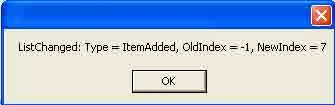
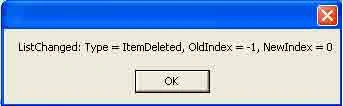
Listing 9-15 shows the OnListChanged event handler.
Listing 9-15.The OnListChanged event handler
- protected static void OnListChanged(object sender, System.ComponentModel.ListChangedEventArgs args) {
- MessageBox.Show("ListChanged: Type = " + args.ListChangedType +
- ", OldIndex = " + args.OldIndex +
- ", NewIndex = " + args.NewIndex);
- }
To test this application, you can create a Windows application and write the code in Listing 9-16 on the form load or a button-click event handler. As you can see from Listing 9-16, the code creates a DataView object, adds a new row to DataView, and then removes the first row from DataView. The adding and removing of rows is responsible for firing the OnListChanged event handler.
Listing 9-16. Adding, updating, and deleting rows of a DataView

Join the conversation! Your thoughts help the community grow.