

- How to create a DateTime
- Understand DateTime properties
- How to add and subtract date and time using DateTime
- Find days in a month and year
- How to compare two dates, times or DateTime
- How to format dates and times
1. How to create a DateTime in C#
There are several ways to create a DateTime object. A DateTime object can have a Date, Time, Localization, culture, milliseconds, and kind. The value of DateTime is between 12:00:00 midnight, January 1, 0001 to 11:59:59 P.M., December 31, 9999 A.D.
The code in Listing 1 uses various constructors of DateTime structure to create DateTime objects.
// Create a DateTime from date and time
DateTime dob = new DateTime(1974, 7, 10, 7, 10, 24);

// Create a DateTime from a String
string dateString = "7/10/1974 7:10:24 AM";
DateTime dateFromString =
    DateTime.Parse(dateString, System.Globalization.CultureInfo.InvariantCulture);
Console.WriteLine(dateFromString.ToString());

// Empty DateTime
DateTime emptyDateTime = new DateTime();

// Just date
DateTime justDate = new DateTime(2002, 10, 18);

// DateTime from Ticks
DateTime justTime = new DateTime(1000000);

// DateTime with localization
DateTime dateTimeWithKind = new DateTime(1974, 7, 10, 7, 10, 24, DateTimeKind.Local);

// DateTime with date, time and milliseconds
DateTime dateTimeWithMilliseconds = new DateTime(2010, 12, 15, 5, 30, 45, 100);
Listing 1
2. C# DateTime Properties
The Date and the Time properties of DateTime get the date and the time of a DateTime. Some self-explanatory DateTime properties are Hour, Minute, Second, Millisecond, Year, Month, and Day.
Here is a list of some other properties with their brief description.
- DayOfWeek property returns the name of the day in a week.
- DayOfYear property returns the day of a year.
- TimeOfDay property returns the time element in a DateTime.
- Today property returns the DateTime object that has today's values. Time value is 12:00:00.
- Now property returns a DateTime object that has right now date and time values.
- UtcNow property returns a DateTime in Coordinated Universal Time (UTC)
- A tick represents one hundred nanoseconds or one ten-millionth of a second. Ticks property of DateTime returns the number of ticks in a DateTime.
- Kind property returns a value that indicates whether the time represented by this instance is based on local time, Coordinated Universal Time (UTC), or neither. The default value is unspecified.
The code listed in Listing 2 creates a DateTime object and reads its properties.
DateTime dob = new DateTime(1974, 7, 10, 7, 10, 24);
Console.WriteLine("Day:{0}", dob.Day);
Console.WriteLine("Month:{0}", dob.Month);
Console.WriteLine("Year:{0}", dob.Year);
Console.WriteLine("Hour:{0}", dob.Hour);
Console.WriteLine("Minute:{0}", dob.Minute);
Console.WriteLine("Second:{0}", dob.Second);
Console.WriteLine("Millisecond:{0}", dob.Millisecond);
Console.WriteLine("Day of Week:{0}", dob.DayOfWeek);
Console.WriteLine("Day of Year: {0}", dob.DayOfYear);
Console.WriteLine("Time of Day:{0}", dob.TimeOfDay);
Console.WriteLine("Tick:{0}", dob.Ticks);
Console.WriteLine("Kind:{0}", dob.Kind);
Listing 2
The output of Listing 2 looks like Figure 1.
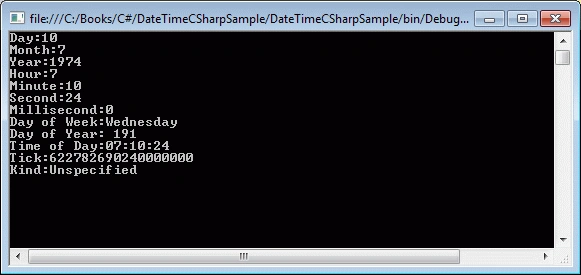
Figure 1
3. Adding and Subtracting DateTime in C#
DateTime structure provides methods to add and subtract date and time to and from a DateTime object. The TimeSpan structure plays a major role in addition and subtraction.
We can use Add and Subtract methods to add and subtract date and time from a DateTime object. First we create a TimeSpan with a date and/or time values and use Add and Subtract methods.
The code listed in Listing 3 adds and subtracts 30 days from today and displays the day on the console.
DateTime aDay = DateTime.Now;
TimeSpan aMonth = new System.TimeSpan(30, 0, 0, 0);
DateTime aDayAfterAMonth = aDay.Add(aMonth);
DateTime aDayBeforeAMonth = aDay.Subtract(aMonth);
Console.WriteLine("{0:dddd}", aDayAfterAMonth);
Console.WriteLine("{0:dddd}", aDayBeforeAMonth);
Listing 3
The DateTime structure has methods to add years, days, hours, minutes, seconds, milliseconds and ticks. The code listed in Listing 4 uses these Addxxx methods to add various components to a DateTime object.
// Add Years and Days
aDay.AddYears(2);
aDay.AddDays(12);
// Add Hours, Minutes, Seconds, Milliseconds, and Ticks
aDay.AddHours(4.25);
aDay.AddMinutes(15);
aDay.AddSeconds(45);
aDay.AddMilliseconds(200);
aDay.AddTicks(5000);
Listing 4
The DateTime structure does not have similar Subtract methods. Only Subtract method is used to subtract the DateTime components. For example, if we need to subtract 12 days from a DateTime, we can create another DateTime object or a TimeSpan object with 12 days and subtract it from the DateTime. Alternatively, we can use a minus operator to subtract a DateTime or TimeSpan from a DateTime.
The code snippet in Listing 5 creates a DateTime object and subtracts another DateTime and a TimeSpan object. Code also shows how to subtract just days or hours or other components from a DateTime.
DateTime dob = new DateTime(2000, 10, 20, 12, 15, 45);
DateTime subDate = new DateTime(2000, 2, 6, 13, 5, 15);

// TimeSpan with 10 days, 2 hrs, 30 mins, 45 seconds, and 100 milliseconds
TimeSpan ts = new TimeSpan(10, 2, 30, 45, 100);

// Subtract a DateTime
TimeSpan diff1 = dob.Subtract(subDate);
Console.WriteLine(diff1.ToString());

// Subtract a TimeSpan
DateTime diff2 = dob.Subtract(ts);
Console.WriteLine(diff2.ToString());

// Subtract 10 Days
DateTime daysSubtracted = new DateTime(dob.Year, dob.Month, dob.Day - 10);
Console.WriteLine(daysSubtracted.ToString());

// Subtract hours, minutes, and seconds
DateTime hms = new DateTime(dob.Year, dob.Month, dob.Day, dob.Hour - 1, dob.Minute - 15, dob.Second - 15);
Console.WriteLine(hms.ToString());
Listing 5
4. Find Days in a Month
The DaysInMonth static method returns the number of days in a month. This method takes a year and a month in numbers from 1 to 12. The code snippet in Listing 6 gets the number of days in Feb month of year 2002. The output is 28 days.
int days = DateTime.DaysInMonth(2002, 2);
Console.WriteLine(days);
Listing 6
Using the same approach, we can find out total number of days in a year. The GetDaysInAYear method in Listing 7 takes a year and returns total number of days in that year.
private int GetDaysInAYear(int year) {
    int days = 0;
    for (int i = 1; i <= 12; i++) {
        days += DateTime.DaysInMonth(year, i);
    }
    return days;
}
Listing 7
5. Compare Two DateTime In C#
The Compare static method is used to compare two DateTime objects. If result is 0, both objects are the same. If the result is less than 0, then the first DateTime is earlier; otherwise the first DateTime is later.
The code snippet in Listing 8 compares two DateTime objects.
DateTime firstDate = new DateTime(2002, 10, 22);
DateTime secondDate = new DateTime(2009, 8, 11);
int result = DateTime.Compare(firstDate, secondDate);

if (result < 0)
    Console.WriteLine("First date is earlier");
else if (result == 0)
    Console.WriteLine("Both dates are same");
else
    Console.WriteLine("First date is later");
Listing 8
The CompareTo method can also be used to compare two dates. This method takes a DateTime or object. The code snippet in Listing 9 compares two DateTime objects using the CompareTo method.
DateTime firstDate = new DateTime(2002, 10, 22);
DateTime secondDate = new DateTime(2009, 8, 11);
int compareResult = firstDate.CompareTo(secondDate);
if (compareResult < 0)
    Console.WriteLine("First date is earlier");
else if (compareResult == 0)
    Console.WriteLine("Both dates are same");
else
    Console.WriteLine("First date is later");
Listing 9
6. Format C# DateTime
I have to admit; the folks at Microsoft have done a great job of providing DateTime formatting solutions. Now you can format a DateTime to any kind of string format you can imagine.
The GetDateTimeFormats method returns all possible DateTime formats for the current culture of a computer. The code snippet in Listing 10 returns an array of strings of all possible standard formats.
DateTime dob = new DateTime(2002, 10, 22);
string[] dateFormats = dob.GetDateTimeFormats();
foreach (string format in dateFormats)
    Console.WriteLine(format)
Listing 10
The code snippet in Listing 10 generates output as in Figure 2.
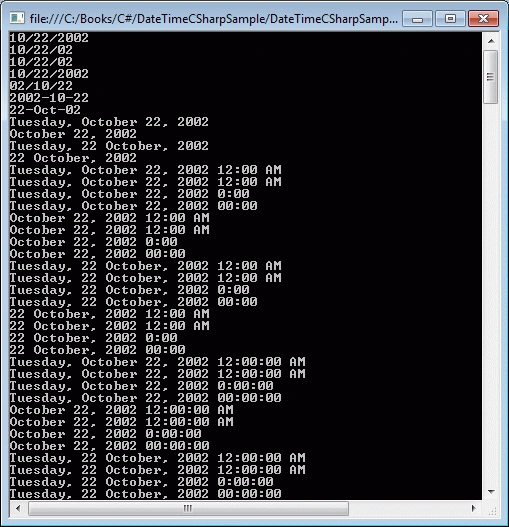
Figure 2
The GetDateTimeFormats method also has an overload that takes a format specifier as a parameter and converts a DateTime to that format. It is very important to understand the DateTime format specifiers to get the desired formats. Table 1 summarizes the formats and their codes.
| Code | Pattern | Format | Sample |
| "d" | Sort date | ||
| "D" | Long date | ||
| "f" | Full date time. Short time. | ||
| "F" | Full date time. Long time. | ||
| "g" | Generate date time. Short time. | ||
| "G" | General date time. Long time. | ||
| "M", 'm" | Month/day. | ||
| "O", "o" | Round-trip date/time. | ||
| "R", "r" | RFC1123 | ||
| "s" | Sortable date time. | ||
| "t" | Sort time. | ||
| "T" | Long time. | ||
| "u" | Universal sortable date time. | ||
| "U" | Universal full date time. | ||
| "Y", "y" | Year month. |
Table 1
The code snippet in Listing 11 uses some of the DateTime format specifiers.
DateTime dob = new DateTime(2002, 10, 22);
// DateTime Formats: d, D, f, F, g, G, m, o, r, s, t, T, u, U,
Console.WriteLine("----------------");
Console.WriteLine("d Formats");
Console.WriteLine("----------------");
string[] dateFormats = dob.GetDateTimeFormats('d');
foreach (string format in dateFormats)
    Console.WriteLine(format);
Console.WriteLine("----------------");
Console.WriteLine("D Formats");
Console.WriteLine("----------------");
dateFormats = dob.GetDateTimeFormats('D');
foreach (string format in dateFormats)
    Console.WriteLine(format);

Console.WriteLine("----------------");
Console.WriteLine("f Formats");
Console.WriteLine("----------------");
dateFormats = dob.GetDateTimeFormats('f');
foreach (string format in dateFormats)
    Console.WriteLine(format);

Console.WriteLine("----------------");
Console.WriteLine("F Formats");
Console.WriteLine("----------------");
dateFormats = dob.GetDateTimeFormats('F');
foreach (string format in dateFormats)
    Console.WriteLine(format);
Listing 11
The code snippet in Listing 11 generates output as in Figure 3
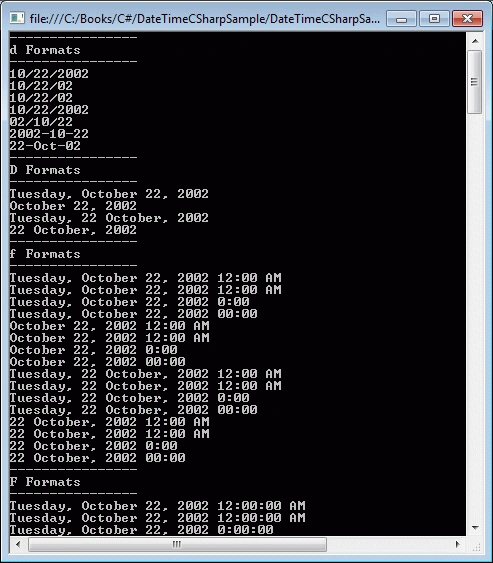
Figure 3
We can also format a DateTime by passing the format specifier in the ToString() method of DateTime. The code snippet in Listing 12 formats a DateTime using ToString() method.
Console.WriteLine(dob.ToString("r"));
Listing 12
The code snippet in Listing 13 uses some of the DateTime format specifiers within the ToString() method to format a DateTime.
DateTime dob = new DateTime(2002, 10, 22);
Console.WriteLine("d: "+ dob.ToString("d"));
Console.WriteLine("D: "+ dob.ToString("D"));
Console.WriteLine("f: "+ dob.ToString("f"));
Console.WriteLine("F: "+ dob.ToString("F"));
Console.WriteLine("g: " + dob.ToString("g"));
Console.WriteLine("G: " + dob.ToString("G"));
Console.WriteLine("m: " + dob.ToString("m"));
Console.WriteLine("M: " + dob.ToString("M"));
Console.WriteLine("o: " + dob.ToString("o"));
Console.WriteLine("O: " + dob.ToString("O"));
Console.WriteLine("r: " + dob.ToString("r"));
Console.WriteLine("R: " + dob.ToString("R"));
Console.WriteLine("s: " + dob.ToString("s"));
Console.WriteLine("t: " + dob.ToString("t"));
Console.WriteLine("T: " + dob.ToString("T"));
Console.WriteLine("u: " + dob.ToString("u"));
Console.WriteLine("U: " + dob.ToString("U"));
Console.WriteLine("y: " + dob.ToString("y"));
Console.WriteLine("Y: " + dob.ToString("Y"));
Listing 13
The code snippet in Listing 13 generates output as in Figure 4.
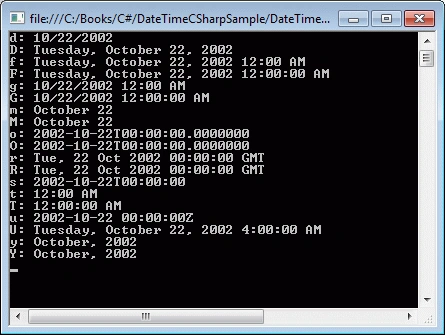
Figure 4
Here is a detailed DateTime Formats in C#.
7. Get Leap Year and Daylight Saving Time
The IsDayLightSavingTime() and IsLeapYear() methods can be used to determine if a DateTime is DayLightSaving time and leap year respectively. The code snippet in Listing 14 shows how to use these methods.
DateTime dob = new DateTime(2002, 10, 22);
Console.WriteLine(dob.IsDaylightSavingTime());
Console.WriteLine(DateTime.IsLeapYear(dob.Year));
Listing 14
8. How to convert a string to DateTime
The Parse method is used to convert a string to a DateTime object. The string passed on the Parse method must have a correct DateTime format. Conversion from a DateTime to a string is done using the ToString() method.
The code snippet in Listing 15 converts a string to a DateTime.
string dt = "2010-10-04T20:12:45-5:00";
DateTime newDt = DateTime.Parse(dt);
Console.WriteLine(newDt.ToString());
Listing 15
9. How to convert C# DateTime
The DateTime structure is full of self-explanatory conversion methods that convert a DateTime to a specified type. These methods are ToBinary, ToFileTime, ToLocalTime, ToLongDateString, ToLongTimeString, ToOADate, ToShortDateString, ToShortTimeString, ToString, and ToUniversalTime.
The code snippet in Listing 16 uses some of these methods to convert a DateTime to specified types.
DateTime dob = new DateTime(2002, 10, 22);
Console.WriteLine("ToString: " + dob.ToString());
Console.WriteLine("ToBinary: " + dob.ToBinary());
Console.WriteLine("ToFileTime: " + dob.ToFileTime());
Console.WriteLine("ToLocalTime: " + dob.ToLocalTime());
Console.WriteLine("ToLongDateString: " + dob.ToLongDateString());
Console.WriteLine("ToLongTimeString: " + dob.ToLongTimeString());
Console.WriteLine("ToOADate: " + dob.ToOADate());
Console.WriteLine("ToShortDateString: " + dob.ToShortDateString());
Console.WriteLine("ToShortTimeString: " + dob.ToShortTimeString());
Console.WriteLine("ToUniversalTime: " + dob.ToUniversalTime());
Listing 16
The code snippet in Listing 11 generates output looks like Figure 5.
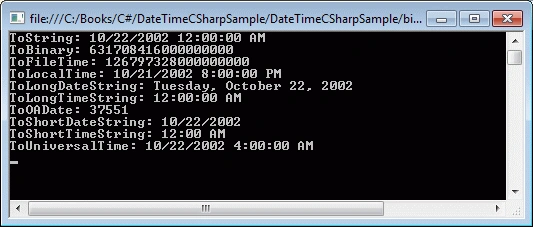
Figure 5
10. C# TimeZone Sample
Here is code sample on TimeZone (source MSDN)
// Example of selected TimeZone class elements.
using System;
using System.Globalization;
class TimeZoneDemo {
    static void Main() {
        const string dataFmt = "{0,-30}{1}";
        const string timeFmt = "{0,-30}{1:yyyy-MM-dd HH:mm}";
        Console.WriteLine("This example of selected TimeZone class " + "elements generates the following \n" + "output, which varies depending on the " + "time zone in which it is run.\n");
        // Get the local time zone and the current local time and year.
        TimeZone localZone = TimeZone.CurrentTimeZone;
        DateTime currentDate = DateTime.Now;
        int currentYear = currentDate.Year;
        // Display the names for standard time and daylight saving
        // time for the local time zone.
        Console.WriteLine(dataFmt, "Standard time name:", localZone.StandardName);
        Console.WriteLine(dataFmt, "Daylight saving time name:", localZone.DaylightName);
        // Display the current date and time and show if they occur
        // in daylight saving time.
        Console.WriteLine("\n" + timeFmt, "Current date and time:", currentDate);
        Console.WriteLine(dataFmt, "Daylight saving time?", localZone.IsDaylightSavingTime(currentDate));
        // Get the current Coordinated Universal Time (UTC) and UTC
        // offset.
        DateTime currentUTC = localZone.ToUniversalTime(currentDate);
        TimeSpan currentOffset = localZone.GetUtcOffset(currentDate);
        Console.WriteLine(timeFmt, "Coordinated Universal Time:", currentUTC);
        Console.WriteLine(dataFmt, "UTC offset:", currentOffset);
        // Get the DaylightTime object for the current year.
        DaylightTime daylight = localZone.GetDaylightChanges(currentYear);
        // Display the daylight saving time range for the current year.
        Console.WriteLine("\nDaylight saving time for year {0}:", currentYear);
        Console.WriteLine("{0:yyyy-MM-dd HH:mm} to " + "{1:yyyy-MM-dd HH:mm}, delta: {2}", daylight.Start, daylight.End, daylight.Delta);
    }
}
Summary
C# DateTime structure is used to represent and work with dates and time in .NET. In this chapter, I demonstrated how to create a DateTime object and use it in your application. I also discussed various properties of the DateTime and how to add and subtract dates and times. After that I discussed how to compare, format, and convert dates and times.
Further Readings
Here are some more articles on DateTime you may want to check out,
Uday DodiyaPosted Sep 15, 2022, 4:25 AM
Nice article sir
Swesh SPosted Sep 14, 2022, 1:28 PM
Awesome article!
Dhanush KPosted Apr 5, 2022, 4:15 PM
Very informative
Mohsin AzamPosted Mar 12, 2021, 6:44 AM
Good article.
Varun SetiaPosted Oct 22, 2020, 12:15 AM
Very informative
Varun SetiaPosted Oct 22, 2020, 12:14 AM
One of the important concept
Tahir AlviPosted Feb 5, 2020, 5:46 AM
One of the best article on C# DateTime. It equally well for beginner and advance user.
Pankajkumar PatelPosted Aug 6, 2019, 11:34 PM
Good one article
Amit MohantyPosted Jul 7, 2019, 11:16 PM
Useful information.
Mohammed IbrahimPosted Jan 19, 2016, 11:15 AM
nice
Ankur MistryPosted Dec 25, 2015, 2:16 AM
very useful stuff for new programmers
Joe WilsonPosted Dec 24, 2015, 1:56 PM
Thank you very much.
Mohamed Gani MnPosted Nov 6, 2015, 11:27 AM
Make it simple
Shakti SaxenaPosted Oct 15, 2015, 7:56 AM
Thanks
Kiranteja JallepalliPosted Oct 14, 2015, 12:47 AM
simple and nice,most widley used concept for realworld.
Raja TPosted Oct 13, 2015, 2:23 AM
Nice Sir, Thanks for sharing
Sujeet SumanPosted Oct 12, 2015, 12:16 PM
Nice explained sir............
Mohammed IbrahimPosted Oct 12, 2015, 12:08 PM
nice
Sabyasachi MishraPosted Oct 12, 2015, 11:48 AM
Very good and well explained
RakeshPosted Oct 12, 2015, 11:34 AM
Ever green concept to all developer thanks to share sir
Manas MohapatraPosted Oct 12, 2015, 11:22 AM
Very Informative article...
Vipul MalhotraPosted Oct 12, 2015, 10:58 AM
nice article Sir
Sibeesh VenuPosted Oct 12, 2015, 8:26 AM
Great tutorial Sir.
Rajeesh MenothPosted Oct 12, 2015, 8:14 AM
Thanks for sharing
Mukesh KumarPosted Oct 12, 2015, 7:49 AM
Great Article Sir with full description...
Harshad PansuriyaPosted Oct 12, 2015, 7:41 AM
Nice one Sir
Nilesh JadavPosted Oct 12, 2015, 7:30 AM
Great Work sir !!
Mahesh ChandPosted Oct 12, 2015, 7:10 AM
Thanks guys.
kareem soomroPosted Oct 29, 2014, 3:15 AM
Very good article and nicely described.
sonu alamPosted Aug 31, 2014, 1:41 AM
THANKS
Abhishek YadavPosted Aug 3, 2014, 11:07 PM
Thanks Mahesh !!!
Abhishek YadavPosted Aug 3, 2014, 10:48 PM
Thanks for this Article Mahesh, it covers almost everything about DateTime Type, But is there any way to get the Time Zone of current computer or any country's timezone ??
Guest UserPosted Aug 3, 2014, 8:02 PM
Hi Mahesh, this article provides good depth into DateTime. Generally I've seen developers struggling in conversion et al issues. I've bookmarked this article for reference. Good job!
Herschelle NiokPosted Aug 3, 2014, 3:57 AM
Dear Sir, I have a C# File ; In the file I want time zone as per Indian Standard time zone (+5:30 GMT) in the file now It is as DateTime.Now.ToUniversalTime(); could you help me ???
Musab AlRianiPosted Jun 23, 2013, 7:11 AM
that is very helping,thank you
Mario Manuel GonzalezPosted Jun 18, 2013, 12:48 PM
Excelente, gracias por tu ayuda
Vijay PrativadiPosted Sep 15, 2012, 12:55 PM
Good Working..Easy to understand.
Santosh Kumar KotnalaPosted Feb 6, 2011, 11:11 PM
Good article.Cover allmost every and small thing that any developer need..........
Mahesh ChandPosted Jan 28, 2011, 8:58 AM
Thanks guys!
Suthish NairPosted Jan 27, 2011, 3:26 AM
I was preparing same article about DateTime. Now this one is far better than mine :)... Also, about Empty DateTime code... DateTime emptyDateTime = new DateTime(); emptyDateTime.ToString() wil return==> "1/1/0001 12:00:00 AM", not empty.
Sivaraman DhamodaranPosted Jan 27, 2011, 1:14 AM
It is not C# Date time. It is all about C# Date and Time. Cover almost everything a developer want to know.