
Introduction
This article is based on queries in the newsgroup:
Query 1 :"In my application i am using dropdownlist to display all categories from a table. When the user clicks this control I display all records in that category. Category table also contains column called color.
I wanted display some categories in dropdown list different color and others in different color using ASP.NET."-Anonymous
So data in the database along with the desired output is as given below
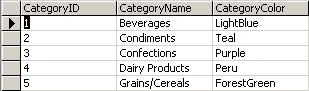
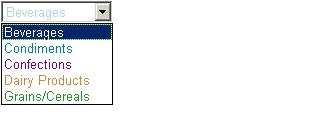
Note: The dropDownList has a bug which prevent us from assigning the style property to each item in the DropDownList.
So as stated by the MS Article the alternative method to achieve this is by using the tag given below:
- <SELECT id="DropDownList1" name="DropDownList1" runat="server"></SELECT>
- Fill the DataSet
- Populate the DropDownList with the DataSet
- Navigate through the DropDownList to give appropriate color to each item in the dropdown.
C#
- SqlConnection mycn;
- SqlDataAdapter myda;
- DataSet ds;
- String strConn;
- private void Page_Load(object sender, System.EventArgs e)
- {
- if (!IsPostBack)
- {
- strConn = "Data Source=localhost;uid=sa;pwd=;Initial Catalog=northwind";
- mycn = new SqlConnection(strConn);
- myda = new SqlDataAdapter("Select * FROM CategoryTable ", mycn);
- ds = new DataSet();
- myda.Fill(ds, "Table");
- DropDownList1.DataSource = ds.Tables[0];
- DropDownList1.DataTextField = ds.Tables[0].Columns["CategoryName"].ColumnName.ToString();
- DropDownList1.DataValueField = ds.Tables[0].Columns["CategoryId"].ColumnName.ToString();
- DropDownList1.DataBind();
- for (int i = 0; i < DropDownList1.Items.Count; i++)
- {
- DropDownList1.Items[i].Attributes.Add("style", "color:" + ds.Tables[0].Rows[i]"CategoryColor"].ToString() );
- }
- }
- Dim myconnection As SqlConnection
- Dim myda As SqlDataAdapter
- Dim ds As DataSet
- Private Sub Page_Load(ByVal sender As System.Object, ByVal e As System.EventArgs) Handles MyBase.Load
- myconnection =New SqlConnection("Server=localhost;uid=sa;password=;database=northwind;")
- myda =New SqlDataAdapter("Select * from CategoryTable ", myconnection)
- ds =New DataSet
- myda.Fill(ds, "AllTables")
- DropDownList1.DataSource = ds
- DropDownList1.DataSource = ds.Tables(0)
- DropDownList1.DataTextField = ds.Tables(0).Columns("CategoryName").ColumnName.ToString()
- DropDownList1.DataValueField = ds.Tables(0).Columns("CategoryId").ColumnName.ToString()
- DropDownList1.DataBind()
- Dim i As Integer
- For i = 0 To DropDownList1.Items.Count - 1
- DropDownList1.Items(i).Attributes.Add("style", "color:" + ds.Tables(0).Rows(i)"CategoryColor").ToString())
- Next
- End Sub
To solve this the concept remains same only thing we need to do is use the ListBox and navigate through each and every record in dataset to have item with appropriate color. So lets consider the Products Table in Northwind Database and expect the output as below:
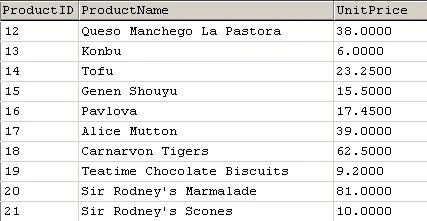

Tag that we use:
- <SELECT id="listBox1" size="10" runat="server" NAME="listBox1"></SELECT>
- Populate the dataset
- Navigate through the Rows checking for the value in the DataBase and the specific value (in our case its set to 25)
- Depending on the value assign the style property for each item in the ListBox
Code given below:
C#
- SqlConnection mycn;
- SqlDataAdapter myda;
- DataSet ds;
- String strConn;
- private void Page_Load(object sender, System.EventArgs e)
- {
- if (!IsPostBack)
- {
- strConn = "Data Source=localhost;uid=sa;pwd=;Initial Catalog=northwind";
- mycn = new SqlConnection(strConn);
- myda = new SqlDataAdapter("Select * FROM Products ", mycn);
- ds = new DataSet();
- myda.Fill(ds, "Table");
- for (int i = 0; i < ds.Tables[0].Rows.Count - 1; i++)
- {
- listBox1.Items.Add(new ListItem(ds.Tables[0].Rows[i]["UnitPrice"].ToString(), ds.Tables[0].Rows[i]["ProductID"].ToString()));
- if (Convert.ToDouble(ds.Tables[0].Rows[i]["UnitPrice"].ToString()) <= 25)
- {
- listBox1.Items[i].Attributes.Add("style", "color:red");
- }
- else
- {
- listBox1.Items[i].Attributes.Add("style", "color:green");
- }
- }
- }
- }
- Dim myconnection As SqlConnection
- Dim myda As SqlDataAdapter
- Dim ds As DataSet
- Private Sub Page_Load(ByVal sender As System.Object, ByVal e As System.EventArgs) Handles MyBase.Load
- myconnection =New SqlConnection("Server=localhost;uid=sa;password=;database=northwind;")
- myda =New SqlDataAdapter("Select * from Products ", myconnection)
- ds =New DataSet
- myda.Fill(ds, "AllTables")
- Dim i As Integer
- For i = 0 To ds.Tables(0).Rows.Count - 1
- listBox1.Items.Add(New ListItem(ds.Tables(0).Rows(i)("UnitPrice"), ds.Tables(0).Rows(i)("ProductID")))
- If ds.Tables(0).Rows(i)("UnitPrice") <= 25 Then
- listBox1.Items(i).Attributes.Add("style", "color:red")
- Else
- listBox1.Items(i).Attributes.Add("style", "color:green")
- End If
- Next
- End Sub
As we have done the coding for assigning style property to each item we might as well complete the code to develop a Color Picker in ASP.NET as below:
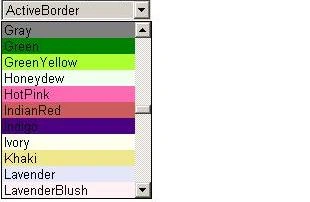
So the control we use is
- <SELECT id="DropDownList1" name="DropDownList1" runat="server"></SELECT>
And code for this is as below:
Method 1
We'll use the namespace System.Reflection to get the FieldInfo (i.e. Colors)
C#
- using System.Reflection;
- Imports System.Reflection
C#
- private void Page_Load(object sender, System.EventArgs e)
- {
- if (!IsPostBack)
- {
- foreach (FieldInfo col in typeof(KnownColor).GetFields())
- {
- if (col.FieldType == typeof(KnownColor))
- {
- DropDownList1.Items.Add(new ListItem(col.Name, col.Name));
- }
- }
- }
- for (int i = 0; i < DropDownList1.Items.Count; i++)
- {
- DropDownList1.Items[i].Attributes.Add("style", "background-color:" + DropDownList1.Items[i].Text);
- }
- }
- Private Sub Page_Load(ByVal sender As System.Object, ByVal e As System.EventArgs) Handles MyBase.Load
- If Not Page.IsPostBack Then
- Dim col As FieldInfo
- For Each col In GetType(KnownColor).GetFields
- If col.FieldType Is GetType(Drawing.KnownColor) Then
- DropDownList1.Items.Add(New ListItem(col.Name, col.Name))
- End If
- Next
- End If
- Dim i As Integer
- For i = 0 To DropDownList1.Items.Count - 1
- DropDownList1.Items(i).Attributes.Add("style", "background-color:" + DropDownList1.Items(i).Text)
- Next
- End Sub
Method 2
The other way this can be done is by using Namespace System.ComponentModel and TypeDescripter Class.
C#
- using System.ComponentModel;
- Imports System.ComponentModel
- private void Page_Load(object sender, System.EventArgs e)
- {
- if (!IsPostBack)
- {
- foreach (Color c in TypeDescriptor.GetConverter(typeof(Color)).GetStandardValues())
- {
- ListItem li = new ListItem();
- li.Text = TypeDescriptor.GetConverter(c).ConvertToString(c);
- this.DropDownList1.Items.Add(li);
- }
- }
- for (int i = 0; i < DropDownList1.Items.Count; i++)
- {
- DropDownList1.Items[i].Attributes.Add("style", "background-color:" + DropDownList1.Items[i].Text);
- }
- }
- Private Sub Page_Load(ByVal sender As System.Object, ByVal e As System.EventArgs) Handles MyBase.Load
- If Not Page.IsPostBack Then
- Dim c As Color
- For Each c In TypeDescriptor.GetConverter(GetType(Color)).GetStandardValues()
- Dim li As New ListItem
- li.Text = TypeDescriptor.GetConverter(c).ConvertToString(c)
- Me.DropDownList1.Items.Add(li)
- Next c
- End If
- Dim i As Integer
- For i = 0 To DropDownList1.Items.Count - 1
- DropDownList1.Items(i).Attributes.Add("style", "background-color:" + DropDownList1.Items(i).Text)
- Next
- End Sub
Erik N Minnie LlanosPosted Feb 14, 2021, 1:45 AM
I am building a currency converter and I want to add a way to prevent selecting the same currency in the drop down lists.
Ramesh PalaniappanPosted Aug 22, 2016, 11:34 AM
Nice
kalu singh raoPosted Jul 7, 2016, 1:40 AM
Nice...
Thiruppathi RPosted Jun 3, 2016, 2:45 AM
Nice..
anil babuPosted Oct 31, 2012, 5:08 AM
I have one requirement Drop down list to choose types: NFC/RFID reader when user choose reader show description in Label Description for RFID Reader : Reading range 6-12 Meteres. Description for NFC Reader : Reading Range 3-5 mm.
DurgaPosted Feb 14, 2011, 7:09 AM
Hi, I am using a dropdown where I bind the items from the database.I have two items from the db for eg: Say I have "One" and "Two" as items in the dropdown, now I want to add an item dynamically from my C# program say "-select One-" and this item should be the default item in the dropdown on every page load. Please help me for the same.
vidya m pPosted May 9, 2010, 9:42 AM
i have 2 radio button if i select one corresponding field with drop down list have to get enabled and wen i select the other....the other option have to get enabled... example... complaint urgency (two radio button) complaint class ( dropdownlist of classes) urgency (drop down list of urgency) when i select the radio button complaint the complaint class have to get enabled and when i select urgency the corresponding field have to get enabled vidya
Anjaneya PrasadPosted Dec 25, 2009, 6:08 AM
i need to display all the details in textboxes like ename,sal,job,location etc by selecting eno using dropdownlist... plsss help me
bhayyasaheb kamblePosted May 8, 2009, 4:52 AM
i want code of drop down list .. for ex. if select state than city list will be enabled ...
Jeff WollschlagerPosted Jan 21, 2009, 10:50 AM
I have a dropdown list that displays a a returned items from a dataset. How might I make that a unique list of values if the dataset returns a duplicates?
shashi sahayPosted Feb 26, 2008, 2:25 AM
I am using dropdownlist in my ecommerce sit.I want when i click on dropdown only information for click item will display either in text box or in grid
sravanthi reddyPosted Aug 30, 2007, 3:08 AM
i have two drop down in one have category and other subcategory. now i if i select category automatically the subcategory should display in dropdown 2.evrything should come from database only.plz help me out.. script i am using is c#.net.if i click on submit button the detials should display in grid view using backend.