

Introduction
Today we'll learn to work with the DropDownList in the MVC 5 using jQuery. Suppose you need to display the states stored in the DropDownList that are dependent upon on the selected value in another DropDownList named Country.
In that context, here we'll create this scenario in the ASP.NET Web Application based on the MVC 5 Project Template using jQuery. In this article you will learn to create the MVC application and work with the controller and view in it. We'll also use the Razor syntax in the MVC Views.
So, let's start with the following sections:
- Creating MVC application
- Working with a Controller
- Working with a View
- Running the application
Creating MVC Application
In this section we'll create the ASP.NET MVC application using the following procedure.
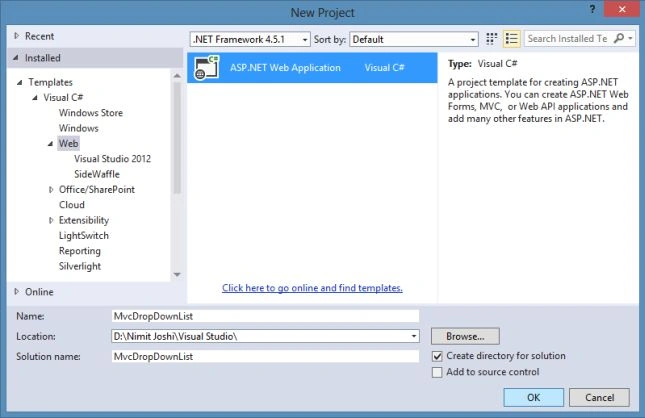
Step 1: Open Visual Studio and click on "New Project" and enter the application name as "MvcUsers".
Step 2: Select the MVC Project Template.
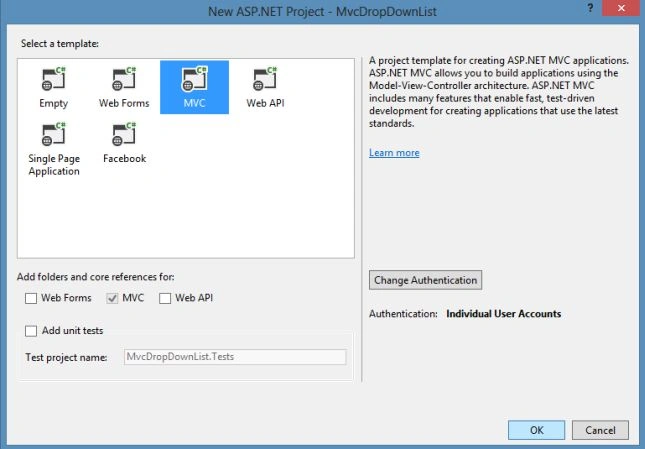
That's it for the MVC application creation. Visual Studio automatically creates the MVC 5 application and adds files and folders to it.
Note: I am using Visual Studio 2013 to develop the MVC 5 application. You can create this using MVC 4 also.
Working With Controller
Now we'll add the new scaffolded MVC empty controller here using the following procedure.
Step 1: Just right-click on the Controllers folder and add a New Scaffolded item.
Step 2: Select MVC Controller- Empty.
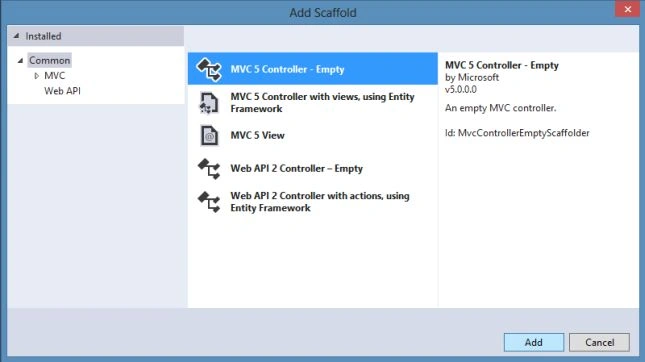
Step 3: Enter the controller name as SampleController and modify the Index() with the code below:
- public ActionResult Index() {
- List < string > ListItems = new List < string > ();
- ListItems.Add("Select");
- ListItems.Add("India");
- ListItems.Add("Australia");
- ListItems.Add("America");
- ListItems.Add("South Africa");
- SelectList Countries = new SelectList(ListItems);
- ViewData["Countries"] = Countries;
- return View();
- }
In the code above you can see that the ListItems is a generic string that holds the country names. The DropDownList Html helper in MVC View displays its data in the form of a SelectList object. The object of SelectList is passed to the view using the Countries ViewData variable.
Step 4: Add another method named States() in the same controller with the following code:
- public JsonResult States(string Country) {
- List < string > StatesList = new List < string > ();
- switch (Country) {
- case "India":
- StatesList.Add("New Delhi");
- StatesList.Add("Mumbai");
- StatesList.Add("Kolkata");
- StatesList.Add("Chennai");
- break;
- case "Australia":
- StatesList.Add("Canberra");
- StatesList.Add("Melbourne");
- StatesList.Add("Perth");
- StatesList.Add("Sydney");
- break;
- case "America":
- StatesList.Add("California");
- StatesList.Add("Florida");
- StatesList.Add("New York");
- StatesList.Add("Washignton");
- break;
- case "South Africa":
- StatesList.Add("Cape Town");
- StatesList.Add("Centurion");
- StatesList.Add("Durban");
- StatesList.Add("Jahannesburg");
- break;
- }
- return Json(StatesList);
- }
In the preceding States() you can see that this accepts the country name and returns the StatesList as JsonResult. This method returns the JsonResult because this will be called using the jQuery. This method returns the states that are based on the country value. Finally, the states generic list is returned to the caller using the Json() method.
Working With View
We've completed the work with the controller, now its time to work with the View. Follow the procedure described below.
Step 1: At first we've add the View for the Index() as defined in the SampleController.cs. So, right-click on the Sample folder to add a View.
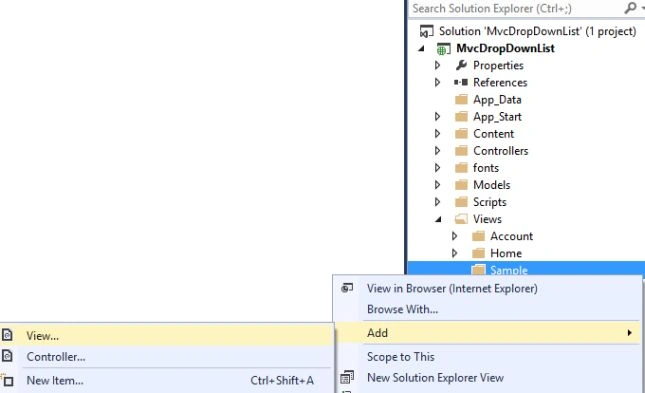
Step 2: Enter the View name as Index.
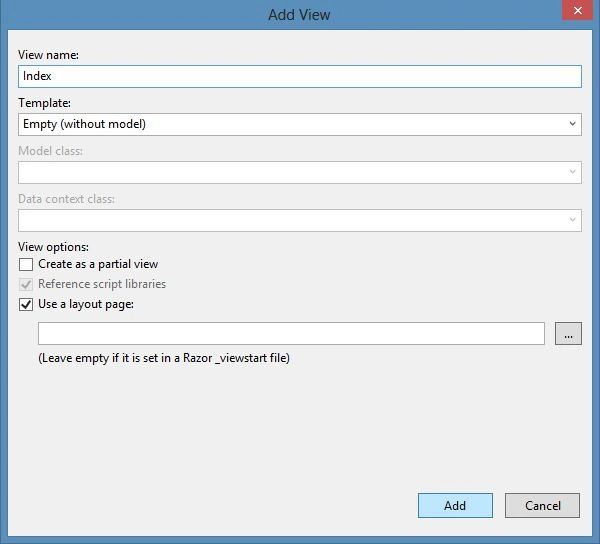
Step 3: Replace the code with the code below:
- @ {
- ViewBag.Title = "Index";
- } < h2 > Index < /h2> < script src = "~/Scripts/jquery-1.10.2.js" > < /script> < script > $(document).ready(function() {
- $("#State").prop("disabled", true);
- $("#Country").change(function() {
- if ($("#Country").val() != "Select") {
- var CountryOptions = {};
- CountryOptions.url = "/Sample/states";
- CountryOptions.type = "POST";
- CountryOptions.data = JSON.stringify({
- Country: $("#Country").val()
- });
- CountryOptions.datatype = "json";
- CountryOptions.contentType = "application/json";
- CountryOptions.success = function(StatesList) {
- $("#State").empty();
- for (var i = 0; i < StatesList.length; i++) {
- $("#State").append("<option>" + StatesList[i] + "</option>");
- }
- $("#State").prop("disabled", false);
- };
- CountryOptions.error = function() {
- alert("Error in Getting States!!");
- };
- $.ajax(CountryOptions);
- } else {
- $("#State").empty();
- $("#State").prop("disabled", true);
- }
- });
- }); < /script>
- @using(Html.BeginForm("Index", "Sample", FormMethod.Post)) {
- @Html.AntiForgeryToken() < h4 > Select Country & States < /h4> < hr / > @Html.ValidationSummary() < div class = "form-group" > @Html.Label("Select Country:", new {
- @class = "col-md-2 control-label"
- }) < div class = "col-md-10" > @Html.DropDownList("Country", ViewData["Countries"] as SelectList, new {
- @class = "form-control"
- }) < /div> < /div><br / > < div class = "form-group" > @Html.Label("Select States:", new {
- @class = "col-md-2 control-label"
- }) < div class = "col-md-10" > < select id = "State" > < /select> < /div> < /div> < div class = "form-group" > < div class = "col-md-offset-2 col-md-10" > < input type = "submit"
- class = "btn btn-default"
- value = "Submit" / > < /div> < /div>
- }
In the code above, I used the Razor syntax to show the content in the View. It includes the DropDownList named Country that is rendered by the DropDownList Html helper. The first parameter of this helper represents the name of the DropDownList, the second is the SelectList object that contains the DropDownList values which ID is State.
The jQuery reference is added here manually and inside the script tag the ready() handler the first code will disable the DropDownList using the prop(). The change() handler function at first checks whether the value is selected in the Country and if it is other than "Please Select", the code creates an CountryOptions object. The CountryOptions object holds various settings for the Ajax request to be made to the server for retrieving the State values. There are various properties defined here such as URL that points to the States() method, the type is set to post that indicates that a post method is used whereas the request and data contains the JSON representation of the Country.
Running the Application
In this section we'll run the application and view the Sample Index view using the following procedure.
Step 1: At first open the Views\Shared\_Layout.cshtml and modify the code with the highlighted code below:
- <li>@Html.ActionLink("Home", "Index", "Home")</li>
- <li>@Html.ActionLink("About", "About", "Home")</li>
- <li>@Html.ActionLink("Contact", "Contact", "Home")</li>
- <li>@Html.ActionLink("Sample", "Index", "Sample")</li>
In the code above, we've added the Sample link for the SampleController in the Home Page of the application.
Step 2: Press Ctrl+F5 or F5 to run the application.
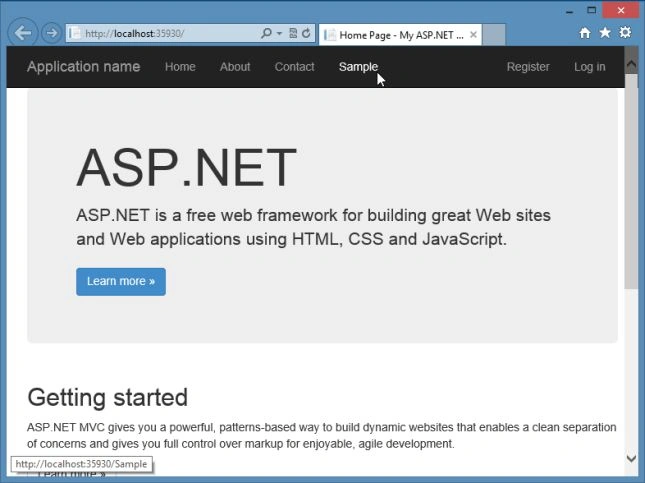
Step 3: You can see the Index page containing the DropDownList
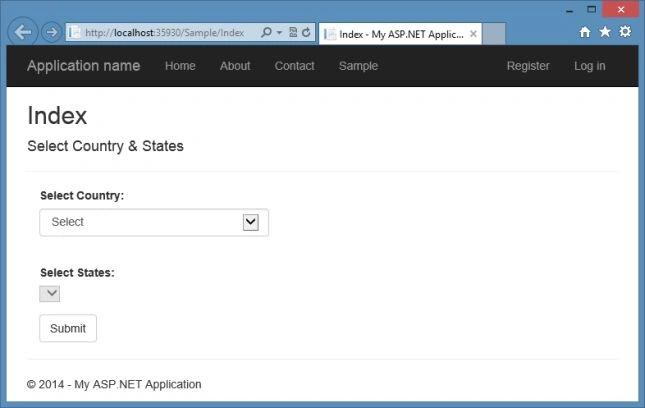
Step 4: Now select the country and then the states from the next DropDownList as shown below:
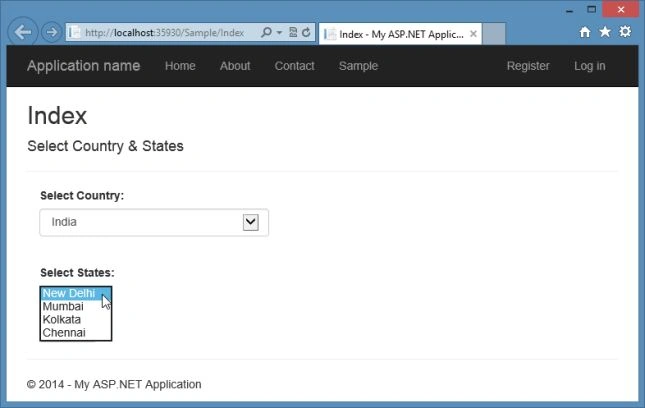
After clicking on "Submit" the default values will display.
Summary
This article described how to work with a Cascading DropDownList in an ASP.NET MVC Application. You can also learn to work with the controller and the corresponding view. Thanks for reading and let me know if you have any problem.
Sarmad YousifPosted Aug 14, 2019, 2:15 PM
Hello thank you this works great my question is when i try to make 3rd box i repeat same thing but i get this error from JS: 'CitiesList' is undefined on this line: for (var i = 0; i < CitiesList.length; i++
Duc NguyenPosted Mar 5, 2019, 9:42 PM
The script always returns error message "Error in Getting States" when i publish the code to my IIS server although it run correctly on local host. How to solve it ?
Thabo HappyPosted Oct 10, 2018, 4:55 PM
Nice post thanks
ananda sanyalPosted May 27, 2017, 1:26 AM
Thank you Nimit for the wonderful nice post..But I've little different scenario. I got already a view. Added a new Controller, added you script.[followed all the steps you mentioned. Except instead of index, I've added into a Create View ] Getting error in the Create View page- {"There is no ViewData item of type 'IEnumerable<SelectListItem>' that has the key 'Country'."} Any clue?
jihane benaichPosted Mar 10, 2017, 8:50 AM
How can i recover the value of the selected state in controller
Hafidz FairizPosted Sep 22, 2016, 2:57 AM
But i have a question. How to create the country and state dynamically? Should i add more case for it? Thats not dynamic i guess.. I have no idea and need some explanation, sorry for it..
Hafidz FairizPosted Sep 22, 2016, 12:10 AM
It works even with database, thank you :)
Rosna ckPosted Sep 12, 2016, 6:57 AM
What should we do if we want to populate data from database? can you give me example please
Rosna ckPosted Sep 12, 2016, 6:47 AM
What should we do if we want to populate data from database?
Sr KarthigaPosted Feb 21, 2016, 11:13 PM
nice one
Sr KarthigaPosted Feb 21, 2016, 11:13 PM
Nice explanation
Sourabh SomaniPosted Jun 16, 2015, 8:44 PM
Very Good Article sir very helpful
Sibeesh VenuPosted Jun 15, 2015, 12:19 AM
Congrats:) Article of the day 15-Jun-2015
Ganesh SarafPosted May 21, 2015, 7:03 AM
Wav.It's too good.
Usman AmjadPosted Dec 29, 2014, 12:55 AM
what should we do if we want to populate data from database?
Ibrahim ErsoyPosted Feb 25, 2014, 9:32 AM
Thank you! This is a great article :)
nga araPosted Feb 14, 2014, 5:01 PM
controller: public JsonResult States(string Country) { List<;string> statesList = new List<string>(); switch (Country) { case "Canada": statesList.Add("Quebec"); statesList.Add("Ontario"); break; case "Australia": statesList.Add("Melbourne"); statesList.Add("Sydney"); break; case "UNITED STATES": statesList.Add("New York"); statesList.Add("Washington"); break; } return Json(statesList); } cshtml : <div class="form-group"> @Html.DropDownListFor(model => model.Country, new SelectList(Model.Countries, "Key", "Value")) </div> <div class="form-group"> <select id="State"></select> </div> <script> $(document).ready(function () { $("#Country").change(function () { if ($("#Country").val() != "Select") { var CountryOptions = {}; CountryOptions.url = "/Test/States"; CountryOptions.type = "POST"; CountryOptions.data = JSON.stringify({ Country: $("#Country").val() }); CountryOptions.datatype = "json"; CountryOptions.contentType = "application/json"; CountryOptions.success = function (statesList) { $("#State").empty(); for (var i = 0; i < statesList.length; i ) { $("#State").append("<option>" statesList[i] "</option>"); } $("#State").prop("disabled", false); }; CountryOptions.error = function () { alert("Error in Getting States!!"); }; $.ajax(CountryOptions); } else { $("#State").empty(); $("#State").prop("disabled", true); } }); }); </script> Model.Countries : I could populate dropdownlist for "Country" from the database. but not populating for States. controller: public JsonResult States(string Country) { List<string> statesList = new List<string>(); switch (Country) { case "Canada": statesList.Add("Quebec"); statesList.Add("Ontario"); break; case "Australia": statesList.Add("Melbourne"); statesList.Add("Sydney"); break; case "UNITED STATES": statesList.Add("New York"); statesList.Add("Washington"); break; } return Json(statesList); } cshtml : <div class="form-group"> @Html.DropDownListFor(model => model.Country, new SelectList(Model.Countries, "Key", "Value")) </div> <div class="form-group"> <select id="State"></select> </div> <script> $(document).ready(function () { $("#Country").change(function () { if ($("#Country").val() != "Select") { var CountryOptions = {}; CountryOptions.url = "/Test/States"; CountryOptions.type = "POST"; CountryOptions.data = JSON.stringify({ Country: $("#Country").val() }); CountryOptions.datatype = "json"; CountryOptions.contentType = "application/json"; CountryOptions.success = function (statesList) { $("#State").empty(); for (var i = 0; i < statesList.length; i ) { $("#State").append("<option>" statesList[i] "</option>"); } $("#State").prop("disabled", false); }; CountryOptions.error = function () { alert("Error in Getting States!!"); }; $.ajax(CountryOptions); } else { $("#State").empty(); $("#State").prop("disabled", true); } }); }); </script> Model.Countries : I could populate dropdownlist for "Country" from the database. but not populating for States.
nga araPosted Feb 14, 2014, 4:57 PM
Very useful article. Thank you so much.