

Introduction
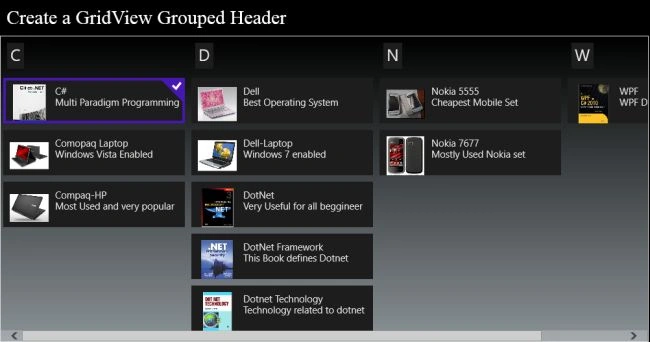
In my previous article I explained how to perform grouping by category. In this article I will explain how to perform grouping of data items in a GridView by their first letter. For example suppose some data items in the list has their names beginning with "A", some others that start with "R" so all the items starting with "A" will be grouped together and the others will corresponingly be grouped according to their first letter only. This application is also very useful when someone wants to search an item according to their first letter. But in this article I only explain how to perform the grouping, not the searching.
So to see how it works let's use the following steps:
Step 1
Open the Visual Studio 2012 and click File -> New -> Project. A window will be shown; select the Window Store inside the Visual C# from the left side pane and select BlankPage from the center pane. Then give the name of your application and click ok.
Step 2
Add some images to your application.
Step 3
Follow the instructions of my previous article, the link of which I have already povided in the introduction.
Step 4
Perform the changes in the ItemSource class's query as. The remainder of the code is the same, also the code for BlankPage1.xaml and .cs file will be the same as my previous application.
internal List<GroupInfoList<object>> GetGroupsByLetters()
{
List<GroupInfoList<object>> groups = new List<GroupInfoList<object>>();
var query = from item in collection
orderby ((ItemSource)item).Title
group item by ((ItemSource)item).Title[0] into g
select new { GroupName = g.Key, Items = g };
foreach (var g in query)
{
GroupInfoList<object> info = new GroupInfoList<object>();
info.Key = g.GroupName;
foreach (var item in g.Items)
{
info.Add(item);
}
groups.Add(info);
}
return groups;
}
Step 5
Write the following code in the MainPage.xaml file:
<Page
x:Class="SemanticZoom_Example.MainPage"
xmlns="http://schemas.microsoft.com/winfx/2006/xaml/presentation"
xmlns:x="http://schemas.microsoft.com/winfx/2006/xaml"
xmlns:local="using:SemanticZoom_Example"
xmlns:d="http://schemas.microsoft.com/expression/blend/2008"
xmlns:mc="http://schemas.openxmlformats.org/markup-compatibility/2006"
mc:Ignorable="d">
<Page.Resources>
<CollectionViewSource x:Name="cvs2" IsSourceGrouped="true" />
</Page.Resources>
<StackPanel>
<TextBlock Text="Create a GridView Grouped Header " FontSize="30" FontFamily="Times New Roman" HorizontalAlignment="Left" Padding="10"/>
<GridView x:Name="LetterWiseGrouping" VerticalAlignment="Bottom"
ItemsSource="{Binding Source={StaticResource cvs2}}" BorderBrush="{StaticResource ApplicationForegroundThemeBrush}" BorderThickness="1" Width="1000" HorizontalAlignment="Left" >
<GridView.Background>
<LinearGradientBrush EndPoint="0.5,1" StartPoint="0.5,0">
<GradientStop Color="Black"/>
<GradientStop Color="#FF8B9397" Offset="1"/>
</LinearGradientBrush>
</GridView.Background>
<GridView.ItemsPanel>
Join the conversation! Your thoughts help the community grow.