

Hibernate
It is a
framework to implement object relational mapping. It provides the facility to
persist the state of an object. Whenever a program creates an object of a class then the
state of the object can be available until the program needs it again. It helps to keep the state of an object after the exit of the creator program. ORM is a mechanism to store the state of an object into relational storage (DBMS). If the program uses
jdbc then the program must know the name of the table and columns to store the values of the variables through SQL commands. The user of hibernate need not know the table and column name. The user of hibernate uses only an object of the classes. Each record
available in the table becomes an object in the program.
Architecture of Hibernate
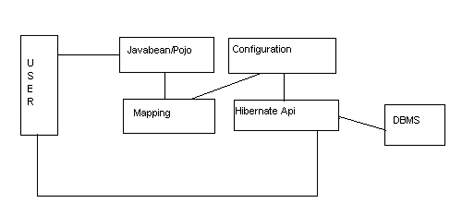
Javabean/Pojo
This is a class whose objects need to be persisted. The user application
creates the objects to store its states into the permanent storage. The user
application can change, fetch or remove the state of the object at any time. This
class contains a set of variables to represent state and their corresponding
setter and getter methods.
Mapping
This is a set of XML files to establish a relation between pojo and a table of the dbms. It maps the class name with a table name and a variable name with a column name.
Configuration
This is an XML file that contains information about DBMS and mapping files. This
files also contains the name of the dialect classes to convert HQL (Hibernate Query
Language) into SQL. Hibernate provides different dialect classes for different
DBMS.
Hibernate API
This is a set of classes and interfaces available from Hibernate to establish a connection with the DBMS. The user program uses this API to configure Hibernate
and to send HQL. The dialect classes present in this API send the corresponding
HQL to the DBMS.
User
This is a program or user interface available to end-users. It uses the Hibernate API to configure the API and uses Pojo or javabean to keep the state
of the objects intact.
Installation of Hibernate
-
Get the binary distribution file of Hibernate (hibernate-distribution-3.3.1.ga-dist.zip) and extract it into any folder.Get it from the below url http://sourceforge.net/projects/hibernate/files/hibernate3/3.3.1.GA/hibernate-distribution-3.3.1.GA-dist.zip/download
-
Search for all .jar files present in extracted folder and make those files available in the lib folder of the context. The lib folder must be created in the WEB-INF folder.
Configuration of Hibernate
Create a file named hibernate.cfg.xml inside the classes folder. Use a property tag
to specify information about the DBMS, dialect class and mapping files.
Tips
Search for hibernate.cfg.xml inside the extracted folder of hibernate. Copy any of
these files and make it available inside the classes folder.
hibernate.cfg.xml file
- <?xml version='1.0' encoding='utf-8'?>
- <!DOCTYPE hibernate-configuration PUBLIC
- "-//Hibernate/Hibernate Configuration DTD//EN"
- "http://hibernate.sourceforge.net/hibernate-configuration-3.0.dtd">
- <hibernate-configuration>
- <session-factory>
- <property name="hibernate.connection.driver_class">com.mysql.jdbc.Driver</property>
- <property name="hibernate.connection.url">jdbc:mysql://localhost/test</property>
- <property name="hibernate.connection.username">root</property>
- <property name="hibernate.connection.password"></property>
- <property name="hibernate.connection.pool_size">10</property>
- <property name="show_sql">true</property>
- <property name="dialect">org.hibernate.dialect.MySQLDialect</property>
- <property name="hibernate.hbm2ddl.auto">update</property>
- <!-- Mapping files -->
- <mapping resource="emp.hbm.xml"/>
- </session-factory>
- </hibernate-configuration>
Here the database is mysql
The database
name in mysql - test
The table
name is emp
Creating hibernate POJO or JavaBean
-
Create a class in the package as the bean class.
-
Provide the required variables as the properties.
-
Provide setter and getter methods for each variable.
-
Store the package folder inside the classes folder.
-
Compile the file as any ordinary java file.
Creating hibernate mapping table
-
Create a file inside the classes folder having the following naming convention classname.hbm.xml
Tips
Search for any. hbm.xml files inside the extracted folder of Hibernate. Copy any of the files to inside the classes folder of the context. Remove all the tags present inside
<hibernate-mapping> and </hibernate-mapping> -
Provide the tags to the map class name with the table name.
-
Provide the tags to specify the name of the primary key present in the table with the name of the variable present in the class.
-
Supply the name of the .hbm file in hibernate.cfg.xml file
emp.hbm
file
- <?xml version="1.0"?>
- <!DOCTYPE hibernate-mapping PUBLIC
- "-//Hibernate/Hibernate Mapping DTD 3.0//EN"
- "http://hibernate.sourceforge.net/hibernate-mapping-3.0.dtd">
- <hibernate-mapping>
- <class name="mypack.Emp" table="emp">
- <id name="empno" type="int" column="empno" >
- <generator class="assigned"/>
- </id>
- <property name="ename">
- <column name="ename" />
- </property>
- <property name="sal">
- <column name="sal"/>
- </property>
- </class>
- </hibernate-mapping>
To Display Records
Creating a client of Hibernate (to select or display)
-
Create an object of org.hibernate.cfg.configuration by using its default constructor.
-
Call configure() of configuration to initialize hibernate.
-
Create an object of org.hibernate.session factory by using buildsessionfactory() of configuration.
-
Create an object of org.hibernate.session by using openSession() of sessionFactory.
-
Create an object of org.hibernate.Query by supplying the required HQL into the createQuery() method of the session.
-
Create a reference to java.util.Iterator by using Iterate() method of the query.
-
Fetch the object of POJO by using hasNext() method and next() method of iterator.
Creation of a context file
Create any
folder in any drive ie (E:\hybernate). Inside that folder store your .jsp files.
Give the Context path name as javahibernate and docBase as E:\hybernate; Here
docBase means the total path where we are storing our .jsp files. Store the java
bean file inside the 'classes' folder of the context for the predefined context (root) of the classes folder required to be created inside the WEB-INF folder. These
changes are done in the server.xml file, which is present in (E:\Program
Files\Apache Software Foundation\Tomcat 6.0\conf) directory.
Table creation in Mysql
database
Test.sql file
- -- phpMyAdmin SQL Dump
- -- version 3.2.4
- -- http://www.phpmyadmin.net
- -- Host: localhost
- -- Generation Time: Sep 28, 2011 at 11:46 AM
- -- Server version: 5.1.41
- -- PHP Version: 5.3.1
- SET SQL_MODE="NO_AUTO_VALUE_ON_ZERO";
- /*!40101 SET @OLD_CHARACTER_SET_CLIENT=@@CHARACTER_SET_CLIENT */;
- /*!40101 SET @OLD_CHARACTER_SET_RESULTS=@@CHARACTER_SET_RESULTS */;
- /*!40101 SET @OLD_COLLATION_CONNECTION=@@COLLATION_CONNECTION */;
- /*!40101 SET NAMES utf8 */;
- --
- -- Database: `test`
- --
- --
- -- Table structure for table `emp`
- --
- CREATE TABLE IF NOT EXISTS `emp` (
- `empno` int(11) NOT NULL,
- `ename` varchar(255) NOT NULL,
- `sal` int(11) NOT NULL,
- PRIMARY KEY (`empno`)
- ) ENGINE=MyISAM DEFAULT CHARSET=latin1;
- -- Dumping data for table `emp`
- INSERT INTO `emp` (`empno`, `ename`, `sal`) VALUES
- (1, 'Raj', 10000),
- (2, 'Ravi', 20000),
- (3, 'Rahul', 30000);
- /*!40101 SET CHARACTER_SET_CLIENT=@OLD_CHARACTER_SET_CLIENT */;
- /*!40101 SET CHARACTER_SET_RESULTS=@OLD_CHARACTER_SET_RESULTS */;
- /*!40101 SET COLLATION_CONNECTION=@OLD_COLLATION_CONNECTION */;
-
Create a class in a package as the bean class.
-
Provide the required variables as the properties.
-
Provide setter and getter methods for each variable.
-
Store the package folder inside the classes folder.
-
Compile the file as any ordinary java file.
Create a package folder named
as mypack inside the classes folder of the context (E:\hybernate\WEB-INF\classes).
Inside the mypack folder place the Emp.java bean file.
Emp.java
- package mypack;
- /*
- a BEAN FOR HIBERNATE MAPPING
- */
- public class Emp {
- private Integer empno;
- private String ename;
- private Double sal;
- public Emp() {}
- public Emp(int no,String nm,double sl)
- {
- this.empno=no;
- this.ename=nm;
- this.sal=sl;
- }
- public Integer getEmpno() {
- return empno;
- }
- public void setEmpno(Integer empno) {
- this.empno = empno;
- }
- public String getEname() {
- return ename;
- }
- public void setEname(String ename) {
- this.ename = ename;
- }
- public Double getSal() {
- return sal;
- }
- public void setSal(Double sal) {
- this.sal = sal;
- }
- }
Javac
Emp.java

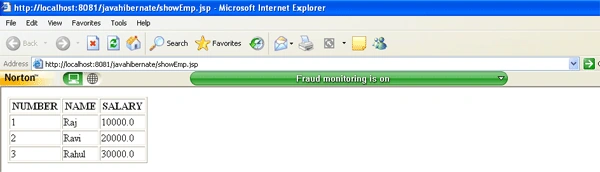
showEmp.jsp
Store all
.jsp files inside the context folder (E:\hybernate)
- <%@ page import="java.util.*,mypack.*,org.hibernate.*,org.hibernate.cfg.*" %>
- <%! int id;double sal; String name; Session session1 = null; %>
- <body>
- <table width="220" border="1">
- <tr><th>NUMBER</th><th>NAME</th><th>SALARY</th></tr>
- <%
- Configuration cf=new Configuration();
- cf.configure();
- SessionFactory sf = cf.buildSessionFactory();
- session1 =sf.openSession();
- //Using from Clause
- String SQL_QUERY ="from Emp";
- Query query = session1.createQuery(SQL_QUERY);
- Iterator it=query.iterate();
- while(it.hasNext())
- {
- Emp e=(Emp)it.next();
- id=e.getEmpno();
- name=e.getEname();
- sal=e.getSal();
- %>
- <tr>
- <td><%=id%></td>
- <td><%=name%></td>
- <td><%=sal%></td>
- </tr>
- <%
- }
- session1.close();
- %>
- </table>
- </body>
- </html>
somisetty subbarayuduPosted Jun 24, 2019, 4:45 AM
Org.hibernate.hql.internal.ast.QuerySyntaxException: SECOND is not mapped [from SECOND] ---->what should i do
Sandeep SharmaPosted May 9, 2013, 12:56 AM
thanks for explaining this advance topic.