

This is the “HttpHandler and HttpModule in real scenerion” article series. As the name suggests, in this series we will understand a few real scenarios where we can use HttpHandler and HttpModule. In our previous two articles we have learned to implement simple HttpHandler in our ASP.NET application. You can read them here.
- HttpHandler and HttpModule in Real Scenario: Getting Started with HttpHandler
- HttpHandler and HttpModule in Real Scenario: Few examples of HttpHandler-1
In this article we will work with images in HttpHandler. Here we can get a few realy helpful information uses of HttpHandler.
Generate Dynamic Image within HttpHandler
In this example we will generate an image dynamically, within HttpHandler. This situation may occur when you want to generate a dynamic image at runtime. For example, when a Captcha image is generated. Have a look at the following code.
- using System;
- using System.Collections.Generic;
- using System.Drawing;
- using System.Drawing.Imaging;
- using System.IO;
- using System.Linq;
- using System.Web;
- namespace WebApp
- {
- public class PictureHandler : IHttpHandler
- {
- public void ProcessRequest(HttpContext context)
- {
- int width = 200;
- int height = 200;
- Bitmap bitmap = new Bitmap(width, height);
- Graphics g = Graphics.FromImage((Image)bitmap);
- g.FillRectangle(Brushes.Red, 0f, 0f, bitmap.Width, bitmap.Height); // fill the entire bitmap with a red rectangle
- MemoryStream mem = new MemoryStream();
- bitmap.Save(mem, ImageFormat.Png);
- byte[] buffer = mem.ToArray();
- context.Response.ContentType = "image/png";
- context.Response.BinaryWrite(buffer);
- context.Response.Flush();
- }
- public bool IsReusable
- {
- get
- {
- return false;
- }
- }
- }
- }
If you have experience with the Drawing class in .NET then you can understand this example very quickly. Within the ProcessRequest() function we are generating an image with a specific height and width. Then we are setting this image within a memory stream and we are flashing it to an output stream.
Now, we need to register our custom PictureHandler in the web.config file. Here is the registration process.
- <system.webServer>
- <handlers>
- <add name="myImageHandler" verb="*" path="*.jpg" type="WebApp.PictureHandler"/>
- </handlers>
- </system.webServer>
Here is the output of above example.

Resize Image using HttpHandler
This is another implementation of HttpHandler. In this example we will resize an image dynamically. The concept is very similar to the previous concept, except that the image is from secondary storage. Have a look at the following example.
- using System;
- using System.Collections.Generic;
- using System.Drawing;
- using System.IO;
- using System.Linq;
- using System.Web;
- namespace WebApp
- {
- public class PictureHandler : IHttpHandler
- {
- public void ProcessRequest(HttpContext context)
- {
- //Get Height and width from Query string
- int Width = Int32.Parse(context.Request.QueryString["width"]);
- int Height = Int32.Parse(context.Request.QueryString["height"]);
- //Get Picture from Server
- string abc = context.Server.MapPath("~/Pic1.jpg");
- Image img = Image.FromFile(context.Server.MapPath("~/Pic1.jpg"));
- Image _img = new Bitmap(Height, Width);
- Graphics graphics = Graphics.FromImage(_img);
- //Resize picture according to size
- graphics.DrawImage(img, 0, 0, Width, Height);
- graphics.CompositingQuality = System.Drawing.Drawing2D.CompositingQuality.HighSpeed;
- graphics.Dispose();
- img.Dispose();
- //Create outpur sream
- MemoryStream str = new MemoryStream();
- _img = _img.GetThumbnailImage(Width, Height, null, IntPtr.Zero);
- _img.Save(str, System.Drawing.Imaging.ImageFormat.Png);
- _img.Dispose();
- str.WriteTo(context.Response.OutputStream);
- str.Dispose();
- str.Close();
- //Set response type
- context.Response.ContentType = ".jpg";
- context.Response.End();
- }
- public bool IsReusable
- {
- get
- {
- return false;
- }
- }
- }
- }
In this example, we are resizing an image depending on height and width values in a query string. So if we want a different image then we need to supply a different value using a query string.
Here is the code to register the HttpHandler. If we request any image then our custom HttpHandler will execute.
- <handlers>
- <add name="myImageHandler" verb="*" path="*.jpg" type="WebApp.PictureHandler"/>
- </handlers>
In this trial, we are passing a height and width value of 200 and we are getting an image of that size.
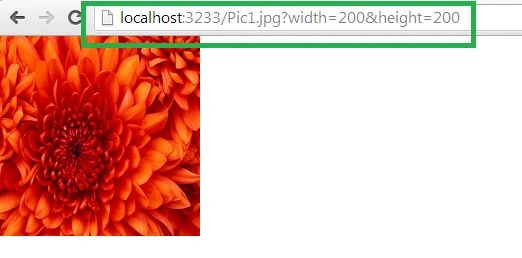
Now, if we change the width value to 300 then the image size will change automatically.

Conclusion
In this article, we have learned how to work with HttpHandler in ASP.NET applications. I hope those examples will help you to understand some realistic scenarios where we can implement HttpHandler.
In a future article, we will focus on a few more concepts of HttpHandler.
Jeevan WijerathnaPosted Oct 13, 2016, 4:54 AM
How can we use this handler in src tag of image attribute in html?