

Reading and writing JSON in C# is common these days. This article will cover the following:
- What is JSON?
- How to create JSON string in C#
- How to read JSON string in C#
What is JSON?
JSON (JavaScript Object Notation) is standard design for human-readable data interchange. I think it is ‘human-readable’ for developers. JSON works with a tree structure and it looks like a XML. It’s shorter and very easy to use. If you already have experience with XML, you will certainly learn easily.
JSON vs. XML
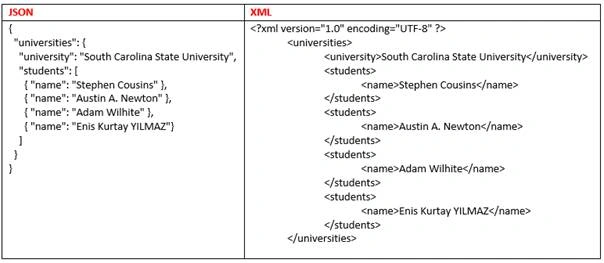
Let’s examine this expression { "name": "Stephen Cousins" },
- If you’re using JSON, you must put your expression in "{ }" tags.
- "name" is the key.
- "Stephen Cousins" is a value of "name" key.
JSON has the logic like { "key": "value" } statement.
And also JSON has the array.
Let’s take another expression and examine that:
"students": [
{ "name": "Stephen Cousins" },
{ "name": "Austin A. Newton" },
{ "name": "Adam Wilhite" },
{ "name": "Enis Kurtay YILMAZ" }
]
”
- "students" is the key.
- "[" and "]" square brackets are array statement. It means there is the array between "[" and "]" in brackets.
- All statements in square brackets are value of "students" key.
- As you see there are four arrays in square brackets and it represents four student names.
How to create JSON string in C#
Please create your new console project from Visual Studio.
Click File, New, Project, then Console Application (.NET Framework 3.5)
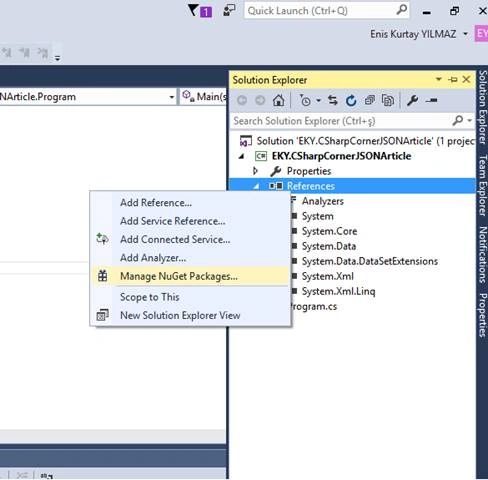
If you want to create or read a JSON string, you need a JSON Serialize or Deserialize. So, please open your Solution Explorer in Visual Studio, right click on References, and then click "Manage NuGet Packages".
Please search "Newtonsoft.JSON" on Nuget Package Manager and install it.
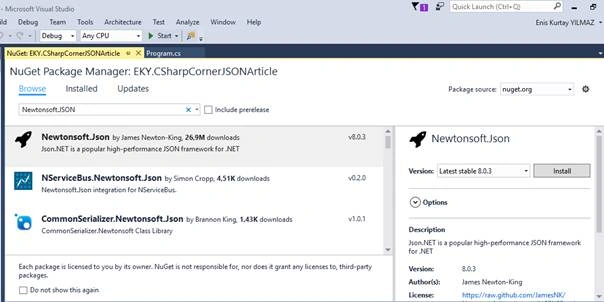
Please add "using Newtonsoft.Json;" statement. If you forget to add this statement, you can’t serialize any JSON strings.
Example JSON
{
    "universities":
    {
        "university": "South Carolina State University",
        "students": [
          {
            "name": "Stephen Cousins"
        }, {
            "name": "Austin A. Newton"
        }, {
            "name": "Adam Wilhite"
        }, {
            "name": "Enis Kurtay YILMAZ"
        }]
    }
}
Now, you need to create class for JSON. If you want to create easily, you can use the website jsonutils.com.
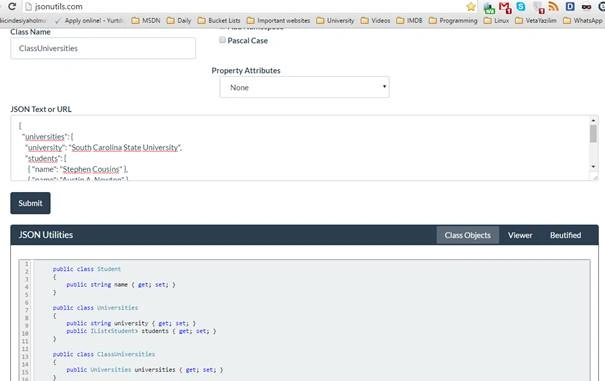
Creating JSON string in C#
C# Codes for Creating JSON string
using System;
using System.Collections.Generic;
using Newtonsoft.Json;

namespaceEKY.CSharpCornerJSONArticle
{
    public class Student
    {
        public string name {
            get;
            set;
        }
    }
    public class Universities {
        public string university {
            get;
            set;
        }
        public IList < Student > students {
            get;
            set;
        }
    }
    public class ClassUniversities {
        public Universities universities {
            get;
            set;
        }
    }
    class Program
    {
        static void Main(string[] args)
        {
            Class Universities university1 = newClassUniversities();

            university1.universities = newUniversities();
            university1.universities.university = "South Carolina StateUniversity";

            List < Student > listStudent = newList < Student > ();
            Student student1 = newStudent {
                name = "StephenCousins"
            };
            Student student2 = newStudent {
                name = "Austin A. Newton"
            };
            Student student3 = newStudent {
                name = "Adam Wilhite"
            };
            Student student4 = newStudent {
                name = "Enis Kurtay YILMAZ"
            };

            listStudent.Add(student1);
            listStudent.Add(student2);
            listStudent.Add(student3);
            listStudent.Add(student4);

            university1.universities.students = listStudent;
            stringjson = JsonConvert.SerializeObject(university1);

            Console.WriteLine(json);
            Console.ReadLine();
        }
    }
}
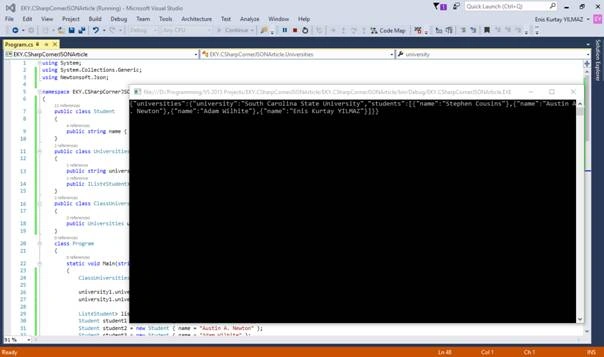
Result
How to read JSON string in C#
I think this part will be very easy for you. You just need an example JSON string and JSON class of your example. You can use jsonutils.com again, if you want to create a class for your example JSON.
Reading JSON string from website in C#
C# Codes for reading JSON string from website
using System;
using System.Collections.Generic;
using Newtonsoft.Json;
using System.Net;
using System.IO;

namespace EKY.CSharpCornerJSONArticle
{
    public class Category
    {
        public int id {
            get;
            set;
        }
        public string slug {
            get;
            set;
        }
        public string title {
            get;
            set;
        }
        public string description {
            get;
            set;
        }
        public int parent {
            get;
            set;
        }
        public int post_count {
            get;
            set;
        }
    }
    public class Tag {
        public int id {
            get;
            set;
        }
        public string slug {
            get;
            set;
        }
        public string title {
            get;
            set;
        }
        public string description {
            get;
            set;
        }
        public int post_count {
            get;
            set;
        }
    }
    public class Author {
        public int id {
            get;
            set;
        }
        public stringslug {
            get;
            set;
        }
        public string name {
            get;
            set;
        }
        public string first_name {
            get;
            set;
        }
        public string last_name {
            get;
            set;
        }
        public string nickname {
            get;
            set;
        }
        public strin gurl {
            get;
            set;
        }
        public string description {
            get;
            set;
        }
    }
    public class CustomFields {}
    public class Post {
        public int id {
            get;
            set;
        }
        public string type {
            get;
            set;
        }
        public string slug {
            get;
            set;
        }
        public string url {
            get;
            set;
        }
        public string status {
            get;
            set;
        }
        public string title {
            get;
            set;
        }
        public string title_plain {
            get;
            set;
        }
        public string content {
            get;
            set;
        }
        public string excerpt {
            get;
            set;
        }
        public string date {
            get;
            set;
        }
        public string modified {
            get;
            set;
        }
        public IList < Category > categories {
            get;
            set;
        }
        public IList < Tag > tags {
            get;
            set;
        }
        public Author author {
            get;
            set;
        }
        public IList < object > comments {
            get;
            set;
        }
        public IList < object > attachments {
            get;
            set;
        }
        public int comment_count {
            get;
            set;
        }
        public stringc omment_status {
            get;
            set;
        }
        public CustomFields custom_fields {
            get;
            set;
        }
    }
    public class Query {
        public bool ignore_sticky_posts {
            get;
            set;
        }
    }
    public class ClassWebsiteposts {
        public string status {
            get;
            set;
        }
        public int count {
            get;
            set;
        }
        public int count_total {
            get;
            set;
        }
        public int pages {
            get;
            set;
        }
        public IList < Post > posts {
            get;
            set;
        }
        public Query query {
            get;
            set;
        }
    }
    class Program
    {
        static void Main(string[] args)
        {
            string url = "http://www.eniskurtayyilmaz.com/api/get_posts/";

            HttpWebRequestrequest = WebRequest.Create(url) asHttpWebRequest;
            string jsonValue = "";
            using(HttpWebResponseresponse = request.GetResponse() asHttpWebResponse)
            {
                StreamReaderreader = newStreamReader(response.GetResponseStream());
                jsonValue = reader.ReadToEnd();
            }

            ClassWebsitepostswebsitePosts = JsonConvert.DeserializeObject < ClassWebsiteposts > (jsonValue);
        }
    }
}
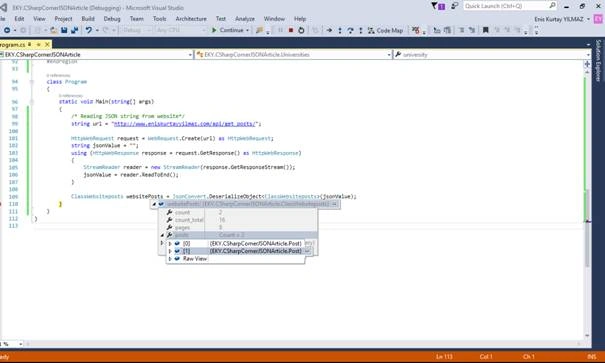
Result
Read more articles on JSON,
Ian KodePosted Aug 25, 2023, 5:21 PM
Would be better if used async await
Salam ELIASPosted Apr 29, 2020, 4:43 PM
Eris, nice post, one question though, what would be the sahpe of the code if I need to serialize 2 or more universties, should I use the same object
shah blouchPosted Nov 24, 2018, 11:41 AM
Great Work dear thanks
Praveen KumarPosted Apr 15, 2016, 3:03 AM
Thanks for good article on json serialization, when we serialize xmlnode to json, generated json contains attribute name appended with @character for all xml attribute. how can we remove this character.
sinraj vPosted Apr 13, 2016, 9:16 AM
Nice
Debasis SahaPosted Apr 9, 2016, 2:05 AM
Good share..
Vignesh ManiPosted Apr 8, 2016, 5:21 PM
good
Mohammed IbrahimPosted Apr 8, 2016, 2:26 PM
nice
Kuppurasu NagarajPosted Apr 8, 2016, 2:21 PM
Nice
Rahul Kumar SaxenaPosted Apr 8, 2016, 7:45 AM
Love to work with JSON always.. good show
Karthikeyan KPosted Apr 8, 2016, 7:01 AM
Good one..Thanks for sharing
sreenivasa kPosted Apr 7, 2016, 4:11 PM
good