Introduction
The List<> type in the C# language resizes dynamically. Lists are generics and constructed types. We need to use < and > in the List declaration. The List class has many methods and properties. The namespace that we use for the list is System.Collection.Generic. The following steps are used for working with a List.
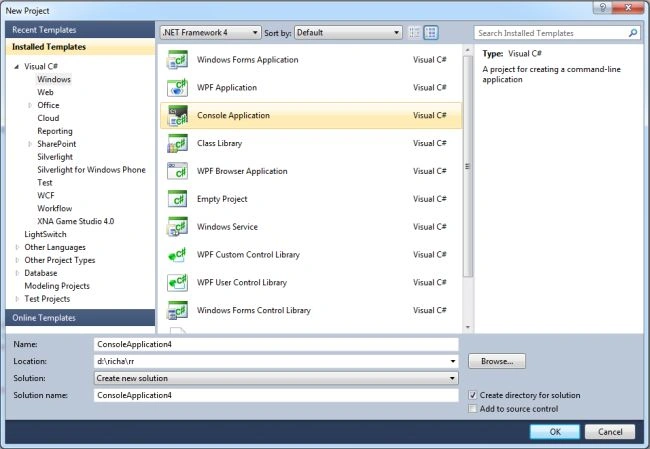
Step 1: First, open Visual Studio and click on file->new->project and click on the console application.
Step 2: Write the following namespace in the program.
using System.Collections.Generic;
Step 3: Add the following code in your program.
namespace ConsoleApplication3
{
class Program
{
static void Main(string[] args)
{
//creation of the list
List<string> courses = new List<string>();
// capacity is used to Gets or sets the total number of elements the internal data structure can hold without resizing.
Console.WriteLine("capacity of courses {0}", courses.Capacity);
//ADD mathod is usd to add the items in the list.
courses.Add("MCA");
courses.Add("BCA");
courses.Add("MBA");
courses.Add("BBA");
courses.Add("MTech");
courses.Add("BTech");
courses.Add("Bcom");
courses.Add("Mcom");
courses.Add("BSc");
courses.Add("MSc");
courses.Add("Diploma");
//display the items
foreach (string i in courses)
{
Console.WriteLine(i);
}
Console.WriteLine("After adding the items the capacity of courses is {0}", courses.Capacity);
//count property of list is used to find the total number of elements in the list
Console.WriteLine("The total number of elements presents in the list is:{0}", courses.Count);
//Remove an item from the list
courses.Remove("MTech");
//After remove an item display the list
Console.WriteLine("Remove the item MTech in the list:");
foreach (string i in courses)
{
Console.WriteLine(i);
}
//Remove an item at the specified index location
courses.RemoveAt(3);
//After remove an item display the list
Console.WriteLine("Remove the item from the index location 3 from the list");
foreach (string i in courses)
{
Console.WriteLine(i);
}
// Find whether the item contain in the list or not
courses.Contains("MCA");
Console.WriteLine("Item contained:"+courses.Contains("MCA"));//It gives the output in true/false format
}
}
}
Step 4 : Now run the program by pressing F5 and the output is as:
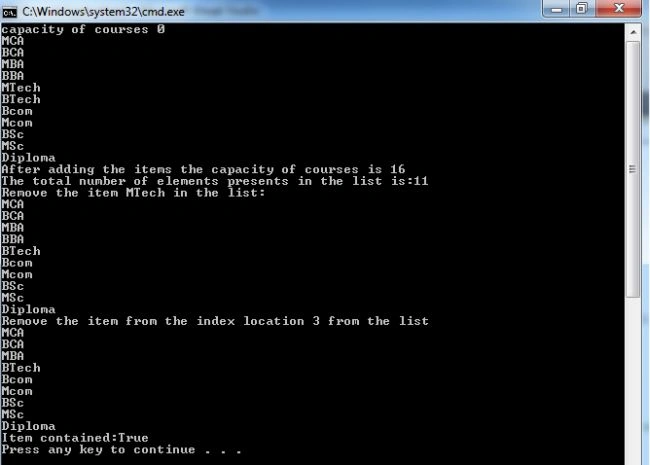
Summary: In this article I create the List named courses, add, remove and find items; also use the capacity and count property of the list.


Join the conversation! Your thoughts help the community grow.