

In most of the registration forms you can find a common thing; there will be 3 drop-down lists asking you to choose your country, state, and city as below.
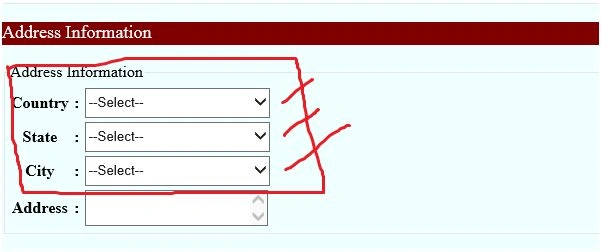
The specialty of these drop-down lists is when you select a country from the first drop down list, it should show all the states of the corresponding country in the second drop-down list, and if you select a state from the second drop-down list, in the thirs drop-down list it should show all the city names of the corresponding state dynamically.
Let us take an example for better understanding.
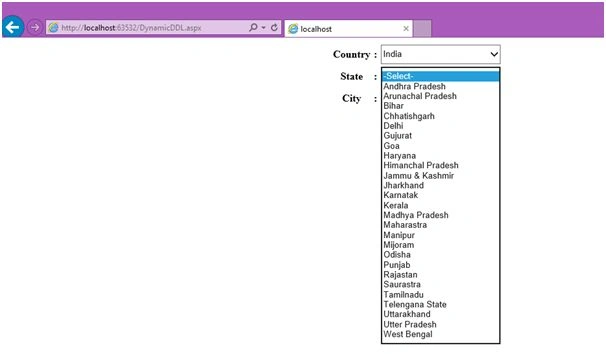
Figure 1
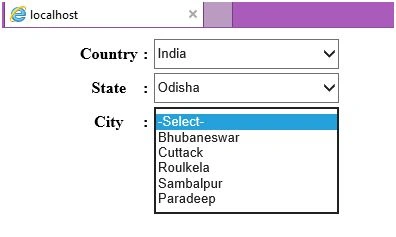
Figure 2
Have a look at the above screen shots. In pic1, when I select the country as India, in the second drop-down list it shows all the states of India. In pic2 when I select the state as Odisha it shows all the cities of Odisha.
Lets learn step by step how to design it.
- First we have to design our database.
- Now create a database with name “CsharpCorner”.
- Database: CsharpCorner
Now create a table to all the country names:
Table: tbl_country
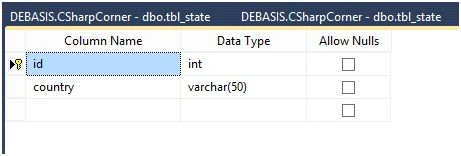
Enter some data with in it like:

Now design the 2nd table “tbl_state” like this:
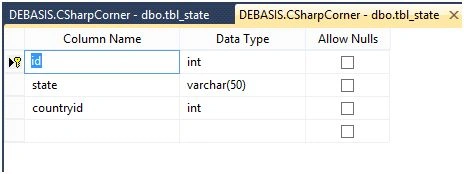
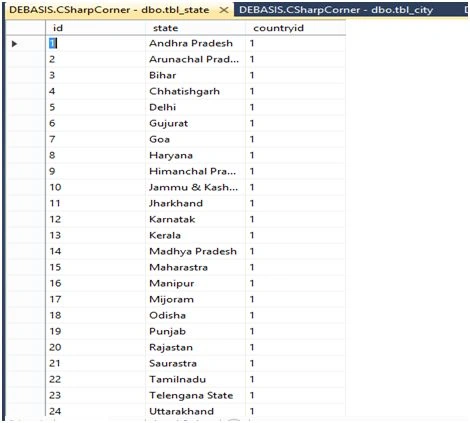
And enter some data.
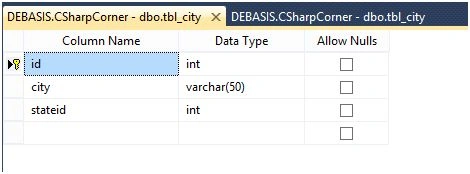
Now design the 3rd Table like this:
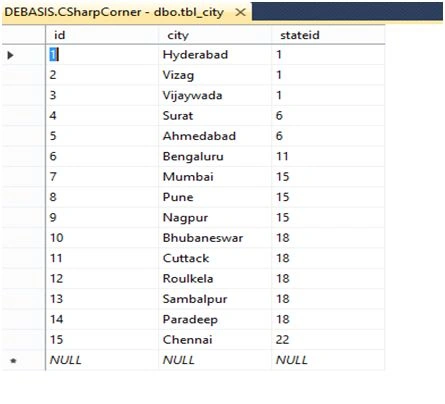
And enter some sample data like this:
Now table creation is completed, establish a primary key and foreign key relationship between the tables.
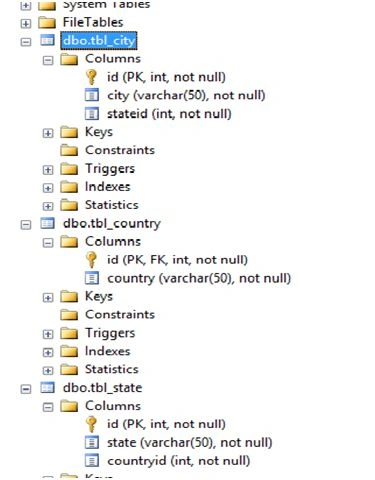
Now the database part is completed. Let us write code for it,
- 1st create a ASP.NET empty project name it as “DynamicDataBindingWithDropDownList”.
- Add a webform in it with name “DinamicDDL” and write the following code inside it.
Design View: (DynamicDDL.aspx)
- <%@ Page Language="C#" AutoEventWireup="true" CodeBehind="DynamicDDL.aspx.cs" Inherits="DynamicDataBindingWithDropDownList.DynamicDDL" %>
- <!DOCTYPE html>
- <html xmlns="http://www.w3.org/1999/xhtml">
- <head runat="server">
- <title></title>
- </head>
- <body>
- <form id="form1" runat="server">
- <div align="center">
- <table>
- <tr>
- <th width="18%">Country</th>
- <th width="3%">:</th>
- <td>
- <asp:DropDownList ID="ddlCountry" runat="server" Width="185px" Height="30px" AutoPostBack="true" OnSelectedIndexChanged="ddlCountry_SelectedIndexChanged" >
- <asp:ListItem>--Select--</asp:ListItem>
- <asp:ListItem>India</asp:ListItem>
- <asp:ListItem>USA</asp:ListItem>
- <asp:ListItem>China</asp:ListItem>
- <asp:ListItem>Japan</asp:ListItem>
- </asp:DropDownList>
- </td>
- </tr>
- <tr>
- <th>State</th>
- <th>:</th>
- <td>
- <asp:DropDownList ID="ddlState" runat="server" Width="185px" Height="30px" AutoPostBack="true" OnSelectedIndexChanged="ddlState_SelectedIndexChanged" />
- </td>
- </tr>
- <tr>
- <th>City</th>
- <th>:</th>
- <td>
- <asp:DropDownList ID="ddlCity" runat="server" Width="185px" Height="30px" ></asp:DropDownList>
- </td>
- </tr>
- </table>
- </div>
- </form>
- </body>
- </html>
- using System;
- using System.Collections.Generic;
- using System.Linq;
- using System.Web;
- using System.Web.UI;
- using System.Web.UI.WebControls;
- using System.Data;
- using System.Data.SqlClient;
- using System.Configuration;
- namespace DynamicDataBindingWithDropDownList
- {
- public partial class DynamicDDL : System.Web.UI.Page
- {
- SqlConnection con = null;
- SqlCommand cmd = null;
- SqlDataReader dr = null;
- string strSqlCmd = string.Empty;
- protected void Page_Load(object sender, EventArgs e)
- {
- con = new SqlConnection(ConfigurationManager.ConnectionStrings["MyConStr"].ConnectionString);
- }
- protected void ddlCountry_SelectedIndexChanged(object sender, EventArgs e)
- {
- strSqlCmd = "select * from tbl_state where countryid=" + ddlCountry.SelectedIndex;
- SqlCommand cmd = new SqlCommand(strSqlCmd,con);
- if(con.State!=ConnectionState.Open)
- {
- con.Open();
- }
- dr = cmd.ExecuteReader();
- ddlState.DataSource = dr;
- ddlState.DataTextField = "state";
- ddlState.DataValueField = "id";
- ddlState.DataBind();
- ddlState.Items.Insert(0, new ListItem("-Select-", "0"));
- if (con.State != ConnectionState.Closed)
- con.Close();
- }
- protected void ddlState_SelectedIndexChanged(object sender, EventArgs e)
- {
- strSqlCmd = "select * from tbl_city where stateid=" + ddlState.SelectedValue;
- SqlCommand cmd = new SqlCommand(strSqlCmd, con);
- if (con.State != ConnectionState.Open)
- {
- con.Open();
- }
- dr = cmd.ExecuteReader();
- ddlCity.DataSource = dr;
- ddlCity.DataTextField = "city";
- ddlCity.DataBind();
- ddlCity.Items.Insert(0, new ListItem("-Select-", "0"));
- if (con.State != ConnectionState.Closed)
- con.Close();
- }
- }
- }
Web.config:
- <configuration>
- <connectionStrings >
- <add name="MyConStr" connectionString="server=DEBASIS;database=CSharpCorner;trusted_connection=true"/>
- </connectionStrings>
- <system.web>
- <compilation debug="true" targetFramework="4.5.1" />
- <httpRuntime targetFramework="4.5.1" />
- </system.web>
- </configuration>
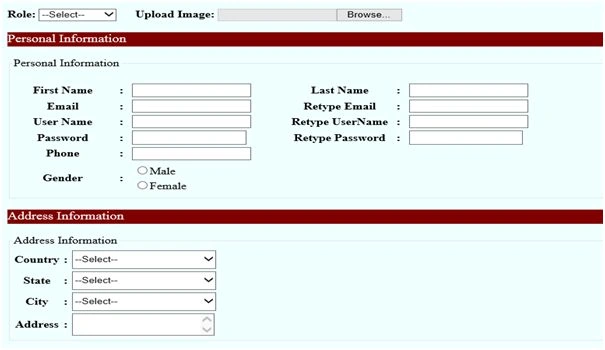
We can use this code when we are creating registration pages like this
Thanks for reading.
George CokerPosted Dec 17, 2019, 2:16 PM
Hello Sthitaprajnya Debasis Nayak. Nice concept. I actually need this concept in an MVC core 2.2 Application using code first migration method. I have 4 dropdowns which should be cascaded whereby one should be connected to the previous one via autopostback. Any ideas as to how to go about this? Regards George.
Narasimharao VunnamPosted Aug 17, 2018, 9:22 AM
It is not working please check it once
Vinoth VenkatachalamPosted Jun 28, 2018, 11:02 AM
How to add values to drop down list not add into database
SubashPosted Jul 4, 2016, 4:45 AM
Very Nice
Sthitaprajnya Debasis NayakPosted Mar 25, 2016, 3:45 PM
Thanks Junaid
Junaid SyedPosted Feb 3, 2016, 1:18 AM
good article Nayak...keep sharing.thank you
Ankur MistryPosted Jan 25, 2016, 10:51 PM
Nicely explained
Shubham KumarPosted Jan 25, 2016, 6:10 AM
nice one keep share
Jaco ZwartsPosted Jan 25, 2016, 2:16 AM
Nice Article! Thank you
Raja TPosted Jan 24, 2016, 11:10 PM
Nice, Thank you for sharing..
Guest UserPosted Jan 24, 2016, 2:06 PM
Thanks very much well thought out article
Santhakumar MunuswamyPosted Jan 24, 2016, 10:22 AM
Thanks for nice article. Keep it up
Gowtham KPosted Jan 24, 2016, 5:38 AM
Good One, Thanks for sharing:)
Muhammad Aqib ShehzadPosted Jan 24, 2016, 5:37 AM
nice one