
One task common to web applications is data collections. For example one may need to collect some information from the end user, as in some sort of registration or some survey process. A rated good practice has been to often split the questions across multiple pages, so that the end user doesn't have jitters scrolling down the pages and by seeing the number of questions he/she would be made to answers. After all who likes to answers questions!!!
ASP.Net1.x offered developers to accomplish this by using panels and then selectively hiding and unhiding a set/group of controls. Or the way around was to create separate pages altogether, which sometimes became too cumbersome. ASP.Net2.0 offers the all new Multiview control to takes out the drudgery of creating multiple pages and thereby making life easier for the developers.
How To Do That?
Drag the Multiview control (located in the Standard Tab) from the toolbox onto the form, and drag two more view controls onto the Multiview. Populate the two view controls as shown below in the figure.
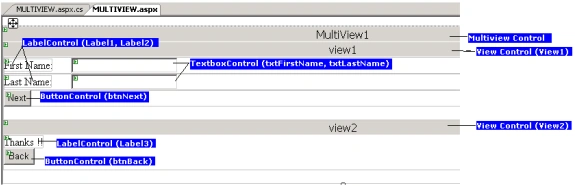
In the properties for the Multiview control set the ActiveViewIndex = 0. This means that view1 will be shown by default when the page gets loaded. All the views appearing in the Multiview control are a part of the view collection which itself is a part of the Multiview control. So by setting the ActiveViewIndex to 0 we make the first view (zeroth in the collection) to be the default view.
To add some functionality to the Next button (btnNext) double click button in the design view, and Visual Studio2005 generates the event for you in the code-file (Multiview.aspx.cs, in my case). Add the following code to the generated event: -
MultiView1.ActiveViewIndex += 1; //Make view2 as the next visible viewIn the above code we are making the ActiveViewIndex of the Multiview to be 1. This is to make view2 visible, and hide view1.
Similarly double click the Back button (btnBack) and add the following line of code to the generated event:-
The above is just some very elementary code written for illustrative purpose. Complex business logic can be written in a similar way. And any number of views can be added to the Multiview control, suiting to ones individual requirements.
Seeing It Work, Finally!!
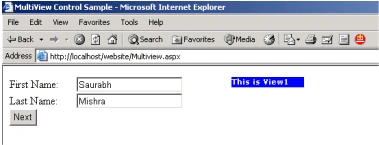
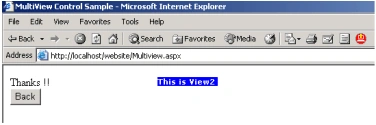
Hit the F5 key on your keyboard to run the sample, and to see it work in completeness.
Jtu PawarPosted Apr 9, 2009, 8:13 AM
how to add more tabs to mulitview.. that is client should be able to scroll across the tab..
Ashwini TripathiPosted Dec 14, 2007, 4:09 AM
Thax for this article. Keep it up..
uma booshanamPosted Dec 4, 2007, 11:02 AM
i hv four views 3 contains datagrid with POSITION - Not Defined 1 contains txtbox with value from database POSITION-ABSOLUTE the views with controls POSITION - Not Defined appear normally in the screen (like in tabs) but the view with control POSITION-ABSOLUTE remains as in design mode Can u help me out with this problem? thanks in advance
uma booshanamPosted Dec 4, 2007, 11:01 AM
i hv four views 3 contains datagrid with POSITION - Not Defined 1 contains txtbox with value from database POSITION-ABSOLUTE the views with controls POSITION - Not Defined appear normally in the screen (like in tabs) but the view with control POSITION-ABSOLUTE remains as in design mode Can u help me out with this problem? thanks in advance
Ron HagermaneditedPosted Aug 24, 2007, 11:53 AMEdited Aug 24, 2007, 11:54 AM
Nice article, just one question though. I have a couple of views in a multiview and I can see the controls, add data to the textboxes, etc. However, when I try to retrieve the data from the textbox, I get nothing. A simple example, string myVar = Textbox1.Text; Response.Write(myVar); Output is nothing even though I've entered text in Textbox1. Is there a trick to pulling the values out with multiviews? Thanks Ron Hagerman
Srikanth GPosted Apr 4, 2007, 4:37 PM
Excellent guidance boss.. cheers
ramesh1628nlPosted Dec 9, 2006, 3:41 AM
hi, that was a nice article.<?xml:namespace prefix = o ns = "urn:schemas-microsoft-com:office:office" /><o:p></o:p>
Srinivas Reddy NallaPosted Dec 27, 2005, 1:21 AM
Hi Saurabh, Nice article. I liked the way you have kept simple yet understandable. Keep up the good work. I am expecting much more like this from you. Thanks, Srinivas
renuPosted Dec 22, 2005, 5:28 AM
We expect more articles of this kind in future.
RituPosted Dec 22, 2005, 4:55 AM
can u plz explain it in a bit more clear way..i will be thankfull
Tripti RaraeditedPosted Dec 20, 2005, 2:54 AMEdited Dec 20, 2005, 2:55 AM
Nice Article helps in understanding of new multiview control whcih can be used in 2.0