

Introduction
In this article we are going to see how Navigation works with Windows Phone 7 Development. Navigating between pages in windows phone 7 is an important task in development of an application with Windows Phone 7 since we cant design an application that fits into a single page. Navigation can be done in two ways, one is to just pass between the pages to show the end user with detailed information and second is to pass value from one page to other based on the user inputs to show the details by passing parameters.
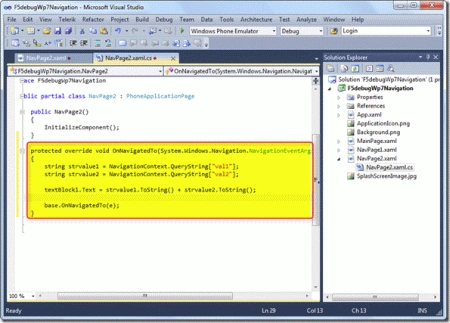
To navigate between the page we can easily do that with the options available which we are going to see in the below section. We have different Navigation events available which can be override to be used in case to track on any navigation that happens on the page flow. Below are the list of navigation events available with Windows Phone 7 development which can be used on need basis as explained below.
- OnNavigatedTo : Triggered when the page is loaded.
- OnNavigatingFrom : Triggered just before the page unload event, we can use this if we need to stop the navigation.
- OnNavigatedFrom : Triggered after the page is navigated.
- OnBackKeyPress : Triggered when the user presses the Back Button
Let us jump start to see the step by step process on how to perform the two navigation's in detail one by one in the below steps.
Steps
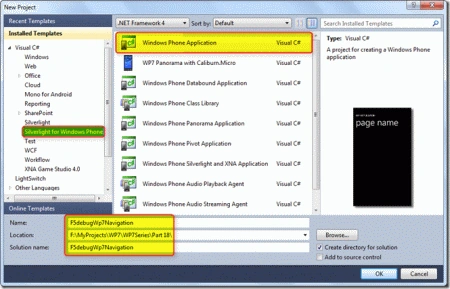
Open Visual Studio 2010 and create a new Silverlight for Windows Phone 7 Application with a valid project name as shown in the screen below.
Now let us add 2 pages to navigate between the pages and also to pass parameters and retrieve it in another page. To add the pages just right click on the project name and click on Add New Items and select Windows Phone Portrait Page as shown in the screen below.
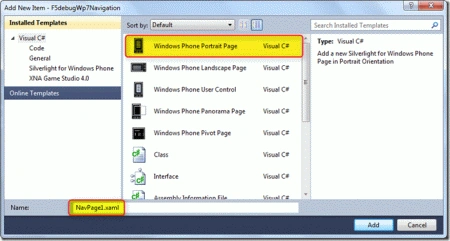
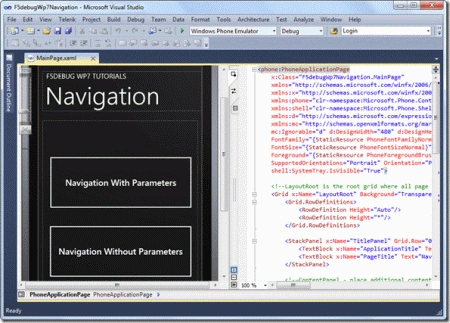
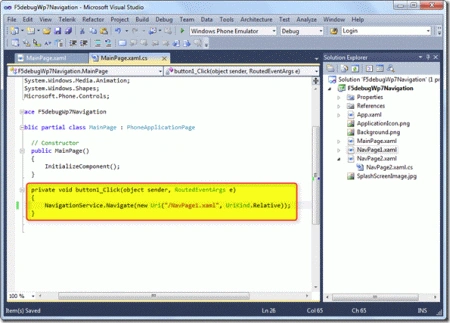
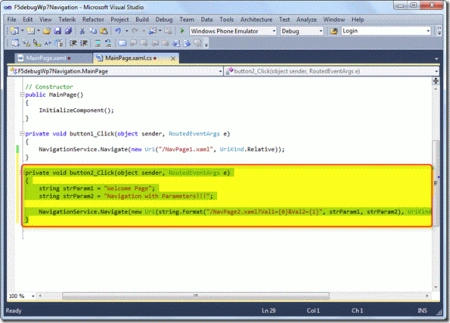
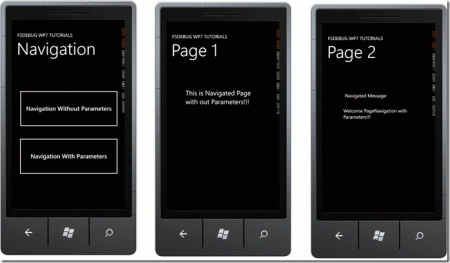
Now we have added 2 pages (NavPage1.xaml and NavPage2.xaml). Let us design the Mainpage.xaml with 2 buttons to navigate on button click as shown in the screen below. Just copy the xaml code provided below to get the same look and feel.
XAML Code
<Grid x:Name="LayoutRoot" Background="Transparent">
<Grid.RowDefinitions>
<RowDefinition Height="Auto"/>
<RowDefinition Height="*"/>
</Grid.RowDefinitions>
<StackPanel x:Name="TitlePanel" Grid.Row="0" Margin="12,17,0,28">
<TextBlock x:Name="ApplicationTitle" Text="F5DEBUG WP7 TUTORIALS" Style="{StaticResource PhoneTextNormalStyle}"/>
<TextBlock x:Name="PageTitle" Text="Navigation" Margin="9,-7,0,0" Style="{StaticResource PhoneTextTitle1Style}"/>
</StackPanel>
<!--<span class="hiddenSpellError" pre="">ContentPanel</span> - place additional content here-->
<Grid x:Name="ContentPanel" Grid.Row="1" Margin="12,0,12,0">
<Button Content="Navigation Without Parameters" Height="172" HorizontalAlignment="Left" Margin="12,96,0,0" Name="button1" VerticalAlignment="Top" Width="437" Click="button1_Click" />
<Button Content="Navigation With Parameters" Height="172" HorizontalAlignment="Left" Margin="11,298,0,0" Name="button2" VerticalAlignment="Top" Width="438" Click="button2_Click" />
Prasan YapaPosted May 15, 2013, 1:37 AM
cool
Abhishek DubeyeditedPosted Apr 16, 2012, 7:07 PMEdited Apr 16, 2012, 7:08 PM
Hi Karthikeyan we want to know how we can achieved paging concept in windows phone 7 ?
Vipendra VermaPosted Apr 3, 2012, 3:42 PM
Thank you for providing good knowledge about Navigation in Windows Phone 7.
Rocson kookPosted Apr 3, 2012, 3:37 PM
Nice article with amazing presentation .