

Introduction
In this article, we are going to understand the working of page flip using HTML5. Page flip is just flipping different pages in continuity as we shuffle the pages of a book.
Here we will make use of a few JavaScript and some styles along with the HTML code.
Just go through the steps to know how to create this application.
Step 1 : Open a HTML editor or Visual studio.
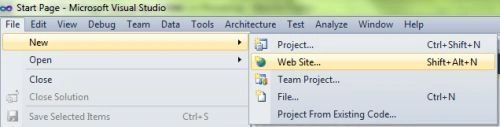
Open File menu ->select new ->Choose Website then.
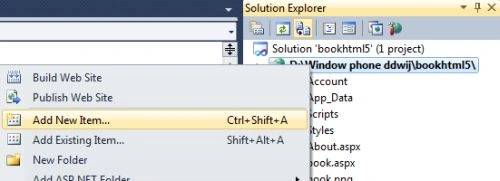
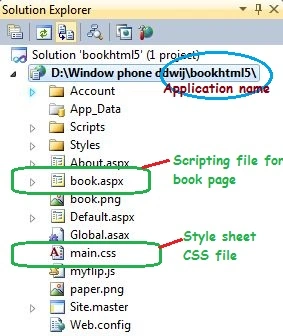
- Go to Solution Explorer
- Right Click on the Application name
- Select Add-->add new item
- Now in this window that opens up select an HTML page or new Web form.
- <section>
- <div>
- <h2>HISTORY OF HTML5</h2>
- <p>The Web Hypertext Application Technology Working Group began work on the new standard in 2004, when the World Wide Web Consortium (W3C) was focusing future developments on XHTML 2.0, and HTML 4.01 had not been updated since 2000.In 2009. </p>
- </div>
- </section>
- <%@ Page Language="C#" AutoEventWireup="true" CodeFile="book.aspx.cs" Inherits="book" %>
- <!DOCTYPE html PUBLIC "-//W3C//DTD XHTML 1.0 Transitional//EN" "http://www.w3.org/TR/xhtml1/DTD/xhtml1-transitional.dtd">
- <html
- xmlns="http://www.w3.org/1999/xhtml">
- <head runat="server">
- <meta http-equiv="Content-Type" content="text/html; charset=utf-8" />
- <link type="text/css" href="main.css" rel="stylesheet" media="screen" />
- </head>
- <body>
- <div id="book">
- <canvas id="pageflip-canvas"></canvas>
- <div id="pages">
- <section>
- <div>
- <h2>HISTORY OF HTML5</h2>
- <p>The Web Hypertext Application Technology Working Group began work on the new standard in 2004, when the World Wide Web Consortium (W3C) was focusing future developments on XHTML 2.0, and HTML 4.01 had not been updated since 2000.In 2009. </p>
- </div>
- </section>
- <section>
- <div>
- <h2>W3C Standardization</h2>
- <p>The Mozilla Foundation and Opera Software presented a position paper at a W3C workshop in June 2004, focusing on developing technologies that are backwards compatible with existing browsers,including an initial draft specification of Web Forms 2.0. </p>
- </div>
- </section>
- <section>
- <div>
- <h2>Markup</h2>
- <p>HTML5 introduces a number of new elements and attributes that reflect typical usage on modern websites. Some of them are semantic replacements forcommon uses of generic block (
- <div>) and inline (
- <span>) elements, for example
- <nav> (website navigation block)
- </p>
- </div>
- </section>
- <section>
- <div>
- <h2>Error handling</h2>
- <p>An HTML5 browser will be flexible in handling incorrect syntax. HTML5 is designed so that old browsers can safely ignore new HTML5 constructs. In contrast to HTML 4.01, the HTML5 specification gives detailed rules for lexing and parsing, with the intent that different compliant browsers will produce the same result in the case of incorrect syntax.</p>
- </div>
- </section>
- </div>
- </div>
- <script type="text/javascript" src="myflip.js"></script>
- </body>
- <html>
Step 4: Now adding a style to the page see the style code below for the main.css file.
Step 5: Some of the snippets of the myflip.js file.
Step 6: Here is your output, when you run the application by pressing F5.
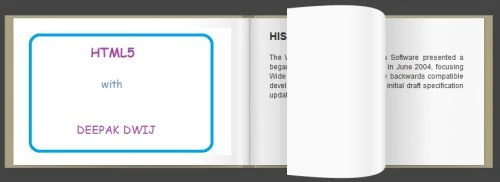
Page 1
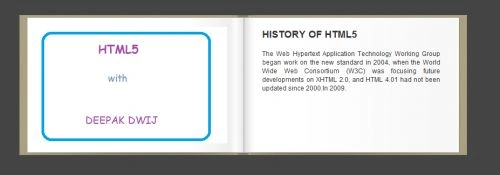
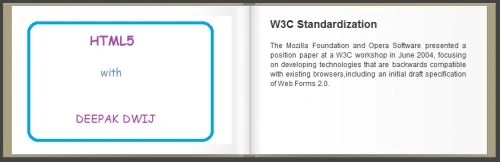
 Page 2
- body, h2, p {
- margin: 0;
- padding: 0;
- }
- body {
- background-color: #444;
- color: #333;
- font-family: Helvetica, sans-serif;
- }
- #book {
- background: url("book.png") no-repeat;
- position: absolute;
- width: 830px;
- height: 260px;
- left: 50%;
- top: 50%;
- margin-left: -400px;
- margin-top: -125px;
- }
- #pages section {
- background: url("paper.png") no-repeat;
- display: block;
- width: 400px;
- height: 250px;
- position: absolute;
- left: 415px;
- top: 5px;
- overflow: hidden;
- }
- #pages section>div {
- display: block;
- width: 400px;
- height: 250px;
- font-size: 12px;
- }
- #pages section p,
- #pages section h2 {
- padding: 3px 35px;
- line-height: 1.4em;
- text-align: justify;
- }
- #pages section h2 {
- margin: 15px 0 10px;
- }
- #pageflip-canvas {
- position: absolute;
- z-index: 100;
- }
- // List of all the page elements in the DOM
- var pages = book.getElementsByTagName("section");
- // Organize the depth of our pages and create the flip definitions
- for (var i = 0, len = pages.length; i < len; i++) {
- pages[i].style.zIndex = len - i;
- flips.push({
- // Current progress of the flip (left -1 to right +1)
- progress: 1,
- // The target value towards which progress is always
- target: 1,
- // The page DOM element related to this flip
- page: pages[i],
- // True while the page is being dragged
- dragging: false
- });
- }

Subhash BalakrishnanPosted Jul 5, 2017, 4:18 AM
Can we do the same for a PDF Document, that is flip the page in asp.net