

To render a SharePoint Online site for an optimized mobile browser view, the Mobile Browser View feature for a site needs to be activated by the site admin. By default, this feature is already turned on when sites are created using certain site templates like Collaboration templates (Team Site, Blank site, Document Workspaces and so on). Meeting templates and Enterprise templates (Document Centre, Records Centre and so on).
On smartphones (supporting HTML5), end users can themselves switch between the mobile view and the PC view using the settings menu on the Mobile UI.
For this demo I have used a Samsung Smart Phone with Android O.S version 4.4.2 and Google Chrome browser.
1. Opening and Browsing The site
- I have created a site named Mobile POC using the team site template using my Office 365 account and made a few changes on the default UI.
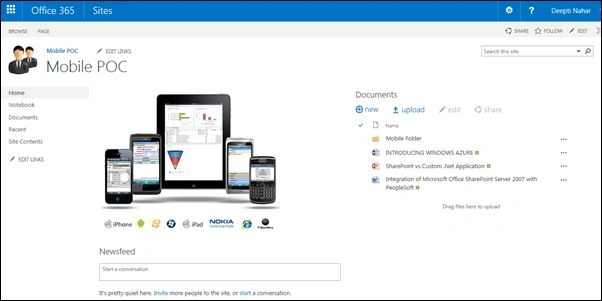
- To open the site in your mobile device, type the URL for your SharePoint Online site in the mobile browser and enter your user credentials.
This is the Home page of my Mobile View. It lists the Apps and the Sub-sites of the Online site. To switch to PC view, click on the ellipsis in the right hand corner and click "Switch to PC view".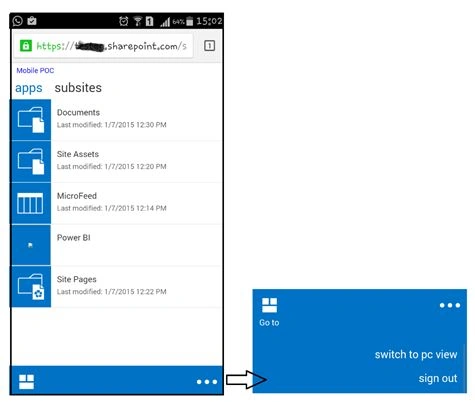
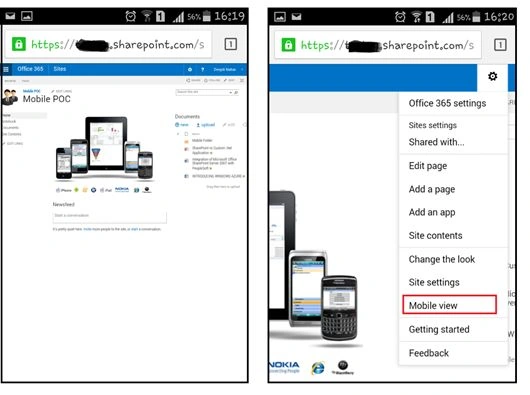
- The figure below shows the PC view of the site on the mobile device. To switch back to Mobile view, click the settings icon and choose "Mobile View".
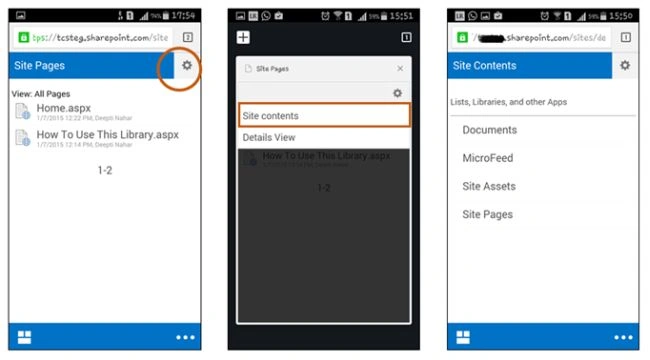
- To view the site contents page, click on Site Pages or Site Assets libraries from the home page and click on the settings icon > Site Contents.
2. Working with Document Libraries
- To open, click on the Document Library name from the list of apps on the Home page. I am opening the default library "Documents" that came as part of the template. I have uploaded some documents already from the web browser.
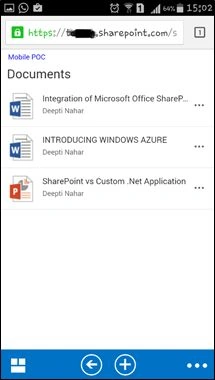
- From the Mobile browser, we can create a new folder or upload new documents from our device into the Document Library. To do so, click on the “+” icon at the bottom of the page.
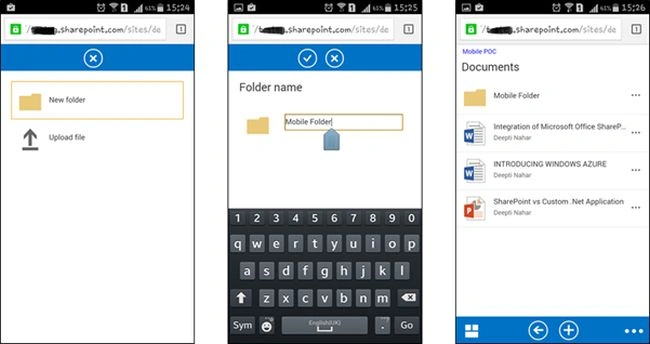
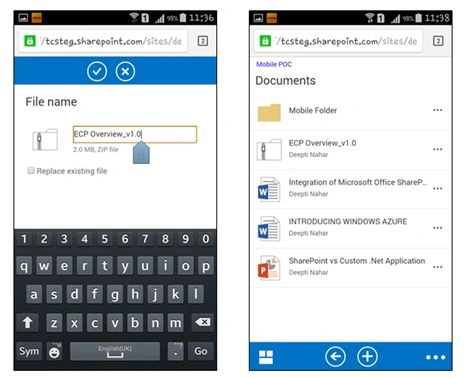
- To upload a file from your mobile device, click on Upload File from the menu and browse to the location of the file and upload.
- To open a Word document, click on the document name. To view the document properties, click on the ellipsis next to the document name.
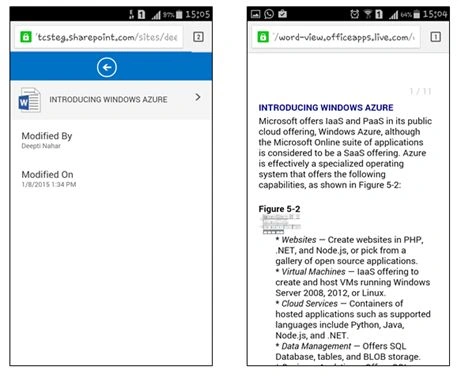
- Mobile View does not support editing the document directly from the browser. But we can do so using the Microsoft Office Mobile app.
- I installed the Microsoft Office Mobile app for Android OS from the Google Play Store. It is a free app.
- I logged into the application using my SharePoint Online credentials. The app is now ready for use.
- To edit a document from the SharePoint Online library, first open the document in the Mobile browser as shown in the previous steps.
- Next, click on the “>” icon on the document view. It will open a small menu as shown in the figure below. Click on the Word Doc icon.
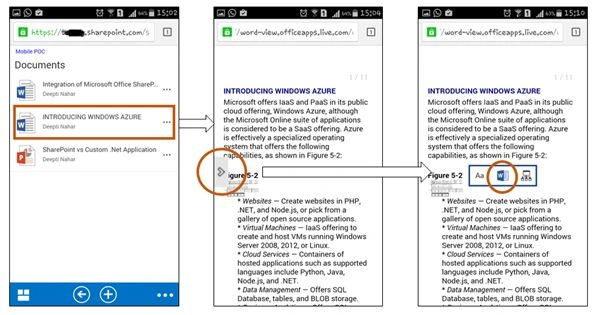
- Clicking on the Word icon will open this document in the Microsoft Office Mobile App (provided it is installed on your mobile device and logged in with same credentials as the SharePoint Online / Office 365 account).
- One more point to note is that we can only edit documents with”.docx” extension using this app. Files with .doc extension are not supported for editing.
- Once the document is open in the app, you can click on the edit icon (marked in the figure below) and edit the document. I have added extra text, “Editing the document…” to the document.
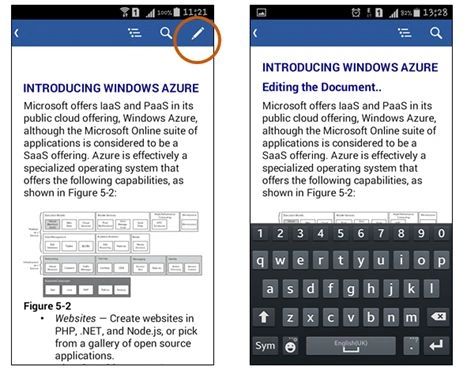
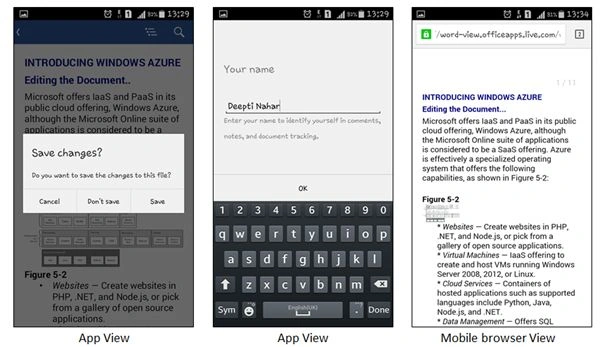
- To save the changes, either navigate away from the document by clicking the “<” icon on top or use the list menu of your device. A pop-up with a save menu appears. After filling in the user details click OK. The document will be again displayed in the mobile browser view with saved changes.
3. Working with SharePoint lists
- I have created a custom list called "Activity tracker" on my SharePoint online site via the web browser and added some list items to it.
Columns added are as follows:
- Activity: Single line of text
- Effort: Number
- Category: Choice
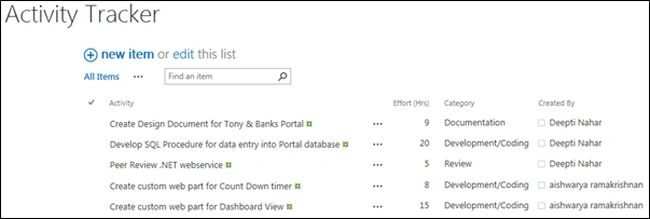
- We can view and edit existing list items or add new items via the Mobile browser view of SharePoint.
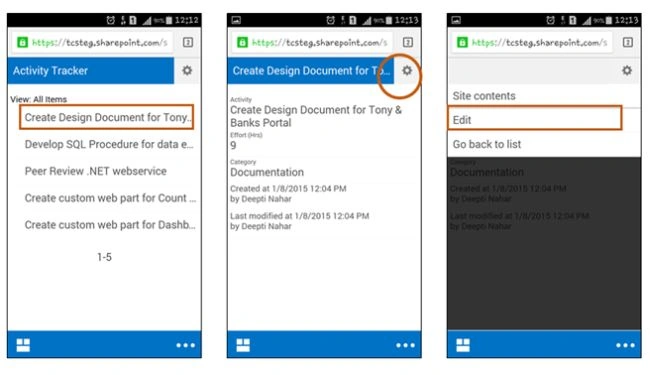
- To view and the edit an item in the list, click on the list name from the home page view of the mobile browser and choose the item to be edited. Click the settings icon and choose the edit option.
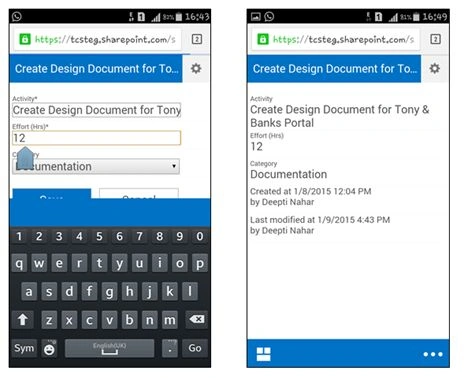
- I have updated the effort column as 12 and saved my changes.
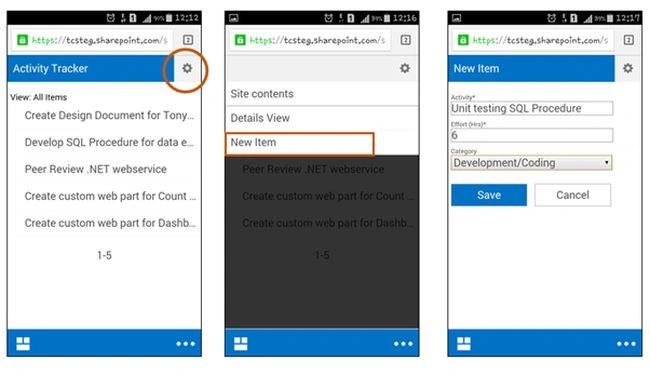
- To add a new item, click on the settings icon from the list view page. Add the entry and save.
Piyush AgarwalPosted Mar 6, 2018, 11:46 AM
Nice article.........
SriramPosted Jul 2, 2015, 5:57 AM
Good.....
Prasham SabadraPosted Feb 26, 2015, 5:26 PM
Nice Article. Thanks for sharing!
Nimit JoshiPosted Jan 12, 2015, 11:41 PM
Nice Article
Dinesh BeniwalPosted Jan 12, 2015, 12:19 AM
great work Deepti
Veena SardaPosted Jan 11, 2015, 2:03 AM
Very informative and useful