

Introduction
In this article, you will learn how we can retrieve, activate or deactivate Web scoped features on SharePoint sites or sub sites, using PnP PowerShell. The Client Side Object Model is used internally for these operations.
Prerequisite
You need to have PowerShell 3.0 available on a Windows machine. You need to install or import PnP PowerShell packages. You can download the installers or view more documentation on the official site. The installers are available here. Online version installer is preferred for On Premise or Office 365 operations. You can also install all the three installers for testing (SharePoint 2013, 2016, online).
The following operations will be compatible with SharePoint 2013 On Premise and Office 365 versions.
Connect To Site
Connect to the site, using the snippet given below. PnP PowerShell code, given below, helps in getting the current context of the site, using the Client Side Object Model (CSOM).
- #Get Current Context Site (Root or subsite)
- $siteurl = "https://abc.sharepoint.com/subsite"
- Connect-SPOnline -Url $siteurl
- $ctx = Get-SPOContext
Since we are working with the features with Web Scope, the site URL can be the site collection or sub sites available. Once connected, you can carry out any of the operations mentioned below, based on the requirement.
Retrieve Web Scope Features
The Web scoped features active on the site or sub sites are retrieved in the operation given below. Get-SPOFeature command is used to get all the features from the site. Since we are retrieving the Web scoped features, the scope parameter is not required in this operation.
Each and every feature's information is retrieved using for each loop. The display name and definition Id are retrieved from the features. The code snippet given below helps in retrieving all the Web scoped features from the site or sub site specified in the context.
- function RetrieveFeatures(){
- # Get Web Scoped features
- $features = Get-SPOFeature -Scope Web
- Write-Host "Total active features count " $features.Count
- foreach($feature in $features){
- Write-Host "Feature Name : " $feature.DisplayName
- Write-Host "Feature ID : " $feature.DefinitionId
- }
- }
- RetrieveFeatures #Get all web scoped features from site
The feature can be retrieved using the identity. The identity can be the feature name or Id. The scope parameter is optional, though Web is passed as a scope. The following code snippet retrieves the feature, using the feature Id.
- function RetrieveFeature(){
- $features = Get-SPOFeature -Scope Web
- # Check whether FollowingContent feature is active
- $feature = Get-SPOFeature -Identity a7a2793e-67cd-4dc1-9fd0-43f61581207a -Scope Web
- if($feature.DisplayName -ne $null){
- Write-Host $feature.DisplayName " feature is active"
- }
- else{
- Write-Host "Couldn't find info about feature id. Feature is not active"
- }
- }
- RetrieveFeature #Get web scoped feature from site using feature id
Enable Web Scope Feature
The feature can be activated using PnP PowerShell script. Enable-SPOFeature command is used to activate the features. Along with the command, the necessary parameter is the identity. The identity is the feature Id. The scope is an optional parameter.
The code snippet, given below, helps in activating the feature at the Web scope.
- function EnableFeature(){
- # Active Mobile View web feature
- Enable-SPOFeature -Identity d95c97f3-e528-4da2-ae9f-32b3535fbb59 -Scope Web
- $feature = Get-SPOFeature -Identity d95c97f3-e528-4da2-ae9f-32b3535fbb59 -Scope Web
- if($feature.DisplayName -ne $null){
- Write-Host $feature.DisplayName " feature is activated"
- }
- else{
- Write-Host "Feature is not activated"
- }
- }
- EnableFeature # Activates Mobile View web feature using feature id
The image, given below, shows the operation.
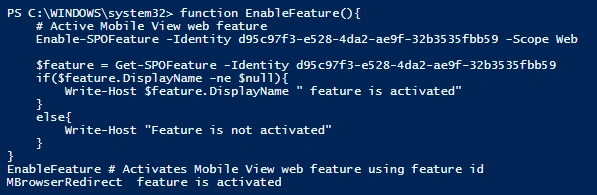
The image, given below, shows the activated feature. The URL is required to access the Web scope feature.

Disable Web Scope Feature
The feature can be deactivated, using PnP PowerShell script. Disable-SPOFeature command is used to deactivate the features. Along with the command, the necessary parameter is the identity. The identity is the feature Id. The scope is an optional parameter.
The code snippet, given below, helps in deactivating the feature at the Web scope.
- function DisableWebFeature(){
- Disable-SPOFeature -Identity d95c97f3-e528-4da2-ae9f-32b3535fbb59 -Scope Web
- $feature = Get-SPOFeature -Identity d95c97f3-e528-4da2-ae9f-32b3535fbb59 -Scope Web
- if($feature.DisplayName -eq $null){
- Write-Host $feature.DisplayName " feature is deactivated"
- }
- else{
- Write-Host "Feature is still active"
- }
- }
- DisableWebFeature # Deactivates Mobile View web feature using feature id
Summary
Thus, you have learned how to retrieve the Web scoped features from the site or sub sites, enable or disable the Web scoped features, using PnP PowerShell. The operations will be compatible for SharePoint 2013 On Premise / SharePoint online sites.
Saineshwar BageriPosted Jul 4, 2016, 1:10 PM
Nice one
Vignesh ManiPosted Jul 4, 2016, 11:09 AM
Nice
kalu singh raoPosted Jul 4, 2016, 1:37 AM
Nice...
RajaPosted Jul 4, 2016, 12:35 AM
Nice Share...