
Introduction
SqlConnection and SqlCommand are classes of a
connected architecture and found in the System.Data.SqlClient namespace. The SqlConnection
class makes a connection with the database. Further, this connection (database
connection) is used by the SqlCommand to work with that database. The SqlCommand class
is used to execute the SQL statements. Let's work with the SqlConnection and SqlCommand
classes with simple examples.
SqlConnection Class
Here, we will use two important methods of SqlConnection.
Open() : The open() method is used to open the Database
connection.
Close() : The close() method is used to close the Database
connection.
Look at the following code
- using System;
- using System.Data;
- using System.Data.SqlClient;
- namespace sqlconnectionANDsqlcommand
- {
- public partial class Form1 : Form
- {
- public Form1()
- {
- InitializeComponent();
- }
- private void btnclick_Click(object sender, EventArgs e)
- {
- SqlConnection conn = new SqlConnection("Database=student;Server=.;user=sa;password=aaaaaaa");
- conn.Open(); // Open the connection
- // body
- // body
- conn.Close(); // Close the connection
- }
- }
- }
Add the following code to the application.
- private void btnclick_Click(object sender, EventArgs e)
- {
- // connection is opened. so if you click button then messagebox will be shown with the message "Open"
- SqlConnection conn = new SqlConnection("Database=student;Server=.;user=sa;password=aaaaaaa");
- conn.Open();
- MessageBox.Show(conn.State.ToString());
- conn.Close();
- }
- private void btnok_Click(object sender, EventArgs e)
- {
- // connection is not opened. so if you click button then messagebox will be shown with the message "Closed"
- SqlConnection conn = new SqlConnection("Database=student;Server=.;user=sa;password=aaaaaaa");
- MessageBox.Show(conn.State.ToString());
- }
SqlCommand Class
The main role of SqlCommand is to execute SQL statements.
SqlCommand Properties
CommandText: The commandText property is used to set the SQL statement.
Connection: This property is used to get connection to the database
source which is specified in SqlConnection.
SqlCommand Method
ExecuteNonQuery() : The
ExecuteNonQuery() method does not return any record. Which means we use
ExecuteNonQuery() in all operations with databases except retrieving records from a
database. It only returns the number of affected rows.
Now we use this method in our application. There is a database "student" and a
database "student_detail" which has no record. I am giving a simple example to
insert a record into database.
Take 3 labels, 3 textboxes and 1 button and arrange them as in the following figure.
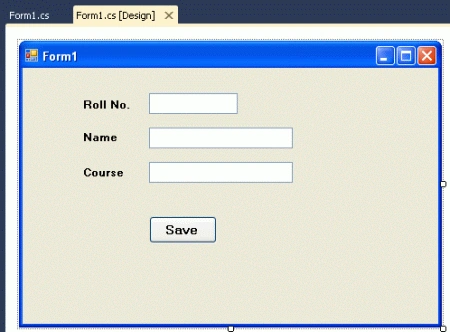
Write the following code
- using System;
- using System.Collections.Generic;
- using System.ComponentModel;
- using System.Data;
- using System.Drawing;
- using System.Linq;
- using System.Text;
- using System.Windows.Forms;
- using System.Data.SqlClient;
- namespace sqlconnectionANDsqlcommand
- {
- public partial class Form1 : Form
- {
- public Form1()
- {
- InitializeComponent();
- }
- private void Form1_Load(object sender, EventArgs e)
- {
- }
- private void btnclick_Click(object sender, EventArgs e)
- {
- // Creating instance of SqlConnection
- SqlConnection conn = new SqlConnection("Database=student;Server=.;user=sa;password=aaaaaaa");
- conn.Open();// open the database connection
- SqlCommand cmd = new SqlCommand();// Creating instance of SqlCommand
- cmd.Connection = conn; // set the connection to instance of SqlCommand
- cmd.CommandText = "insert into student_detail values (" + txtrollno.Text + ",'" + txtname.Text + "','" + txtcourse.Text + "')"; // set
- //the sql command ( Statement )
- cmd.ExecuteNonQuery();
- MessageBox.Show("Record Saved"); // showing messagebox for confirmation message for user
- conn.Close();// Close the connection
- }
- }
- }
Enter the RollNo., Name and Course and click the "save" button. It will save
the record into database.
ExecuteScalar() : The
ExecuteScalar() returns a single value from the database. Generally, it is used with an
aggregate function (a function which returns a single value).
Suppose there is a need to check how many records are in the database table. Then we use
this function. Add another button to your application and set its text property
to "Count" and write the following code on button click.
- private void btncount_Click(object sender, EventArgs e)
- {
- SqlConnection conn = new SqlConnection("Database=student;Server=.;user=sa;password=aaaaaaa");
- conn.Open();// open the database connection
- SqlCommand cmd = new SqlCommand();// Creating instance of SqlCommand
- cmd.Connection = conn; // set the connection to instance of SqlCommand
- cmd.CommandText = "select count (*) from student_detail" ; // set the sql command ( Statement )
- string record= cmd.ExecuteScalar().ToString();
- MessageBox.Show("Total records : "+ record );
- conn.Close();// Close the connection
- }
When you click the "count" button, a MessageBox will be displayed to show the
total number of records in the database table.
ExecuteReader() : The
ExecuteReader() method can return a set of records from a database.
I will explain more about the ExecuteReader() method in my next article....
Here are some related resources.
mikepowertech mikepowertechPosted Jan 4, 2021, 6:47 AM
That is great post! Would be super to see the db and the source code project , if it is possible?