

In my previous articles, I explained the following things in MVC:
- Creating And Calling A Web API From A .NET Client In ASP.NET Web API 2
- Creating Cascading DropDownList In MVC Using Entity Framework And ADO.NET
- Displaying Image In WebGrid And Changing Background Color Of Webgrid Row On Mouse Hover
- Using DHTMLX Scheduler in MVC
- ASP.NET MVC Drag and Drop Multiple Image Upload Using DropZone
- Working With Telerik Grid In MVC
- How to Upload Image and Save Image in Project Folder in MVC
For this, I have created an MVC project. Now, I will add the Telerik Extension for MVC from NuGet Package.

Now, it will add the following CSS and DLL to the Project.

Here is the DLL.

Now, create the following Controller in the Project.
- public ActionResult chat()
- {
- List<Sales> li = new List<Sales>();
- li.Add(new Sales { Year = 2004, production = 8000 });
- li.Add(new Sales { Year = 2005, production = 6000 });
- li.Add(new Sales { Year = 2006, production = 10000 });
- li.Add(new Sales { Year = 2008, production = 8000 });
- li.Add(new Sales { Year = 2010, production = 12000 });
- return View(li);
- }
- using System.Collections.Generic;
- using System.Linq;
- using System.Web;
- namespace Tellerik_grid.Models
- {
- public class Sales
- {
- public int Year { get; set; }
- public int production { get; set; }
- }
- }
- @model IEnumerable<Tellerik_grid.Models.Sales>
- @using Telerik.Web.Mvc.UI;
- @using System.Collections;
- @{
- ViewBag.Title = "chat";
- }
- <link href="~/fonts/ss1.css" rel="stylesheet" />
- <h2>chart</h2>
- @{
- ArrayList alyear1 = new ArrayList();
- ArrayList alprod1 = new ArrayList();
- foreach (var x in Model)
- {
- alyear1.Add(Convert.ToInt32(x.Year));
- alprod1.Add(Convert.ToInt32(x.production));
- }
- Html.Telerik().Chart()
- .Name("mychart")
- .Title("Production Chart")
- .Legend(legend => legend
- .Position(ChartLegendPosition.Bottom))
- .Series(series =>
- {
- series.Line(alyear1).Name("Years");
- series.Line(alprod1).Name("Total production");
- })
- .ChartArea(area => area
- .Background("#00FFFF")
- )
- .CategoryAxis(axis => axis
- .Categories(alyear1)
- )
- .Render();
- @(Html.Telerik().StyleSheetRegistrar().DefaultGroup(group => group.Add("telerik.common.css").Add("telerik.windows7.css").Add("telerik.hay.min.css").Combined(true).Compress(true)))
- @(Html.Telerik().ScriptRegistrar())
- }
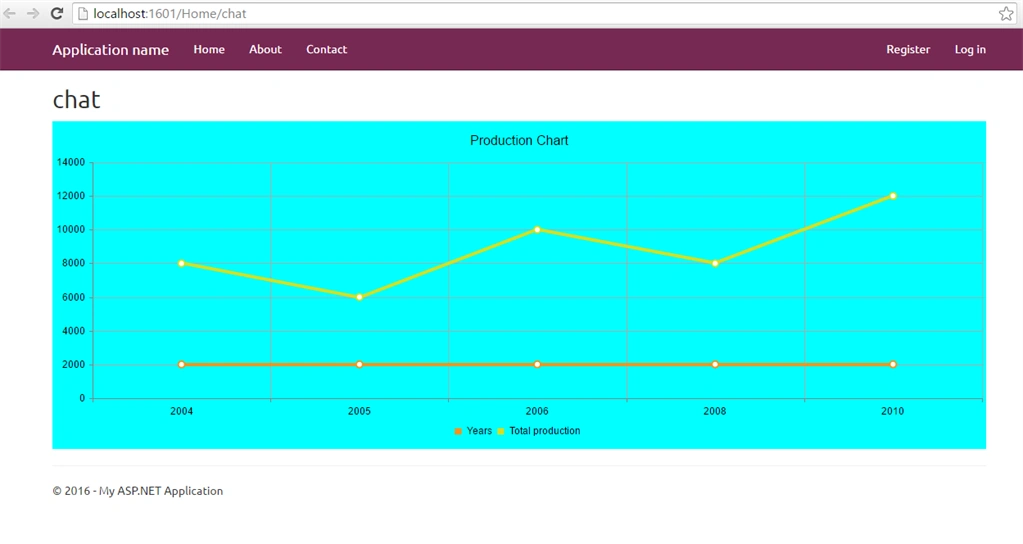
Now, the code is given below to generate Bar Graph:
- @model IEnumerable<Tellerik_grid.Models.Sales>
- @using Telerik.Web.Mvc.UI;
- @using System.Collections;
- @{
- ViewBag.Title = "chat";
- }
- <link href="~/fonts/ss1.css" rel="stylesheet" />
- <h2>chart</h2>
- @{
- ArrayList alyear = new ArrayList();
- ArrayList alprod = new ArrayList();
- foreach(var x in Model)
- {
- alyear.Add(Convert.ToInt32(x.Year));
- alprod.Add(Convert.ToInt32(x.production));
- }
- Html.Telerik().Chart()
- .Name("mychart")
- .Title("Production Chart")
- .Tooltip(true)
- .Legend(legend => legend
- .Position(ChartLegendPosition.Bottom))
- .Series(series =>
- {
- series.Bar(alyear).Name("Years");
- series.Bar(alprod).Name("Total production");
- })
- .CategoryAxis(axis => axis
- .Categories(alyear)
- )
- .Render();
- @(Html.Telerik().StyleSheetRegistrar().DefaultGroup(group => group.Add("telerik.common.css").Add("telerik.windows7.css").Add("telerik.hay.min.css").Combined(true).Compress(true)))
- @(Html.Telerik().ScriptRegistrar())
- }

Similarly, if you want to do an Area Chart, change the series to area for the following graph.
- @{
- ArrayList alyear1 = new ArrayList();
- ArrayList alprod1 = new ArrayList();
- foreach (var x in Model)
- {
- alyear1.Add(Convert.ToInt32(x.Year));
- alprod1.Add(Convert.ToInt32(x.production));
- }
- Html.Telerik().Chart()
- .Name("mychart")
- .Title("Production Chart")
- .Legend(legend => legend
- .Position(ChartLegendPosition.Bottom))
- .Series(series =>
- {
- series.Area(alyear1).Name("Years");
- series.Area(alprod1).Name("Total production");
- })
- .Tooltip(true)
- .CategoryAxis(axis => axis
- .Categories(alyear1)
- )
- .Render();
- @(Html.Telerik().StyleSheetRegistrar().DefaultGroup(group => group.Add("telerik.common.css").Add("telerik.windows7.css").Add("telerik.hay.min.css").Combined(true).Compress(true)))
- @(Html.Telerik().ScriptRegistrar())
- }

Thus, in this way, we can work with various Types of Telerik chat controls. I hope you liked this tutorial.
Jhon HernándezPosted Jan 10, 2019, 2:00 AM
And what if the data comes from a sql data base? for example adding an ADO, what changes must be done?
degachi souhailPosted Aug 14, 2016, 8:59 AM
Another question please, is TelerickMvcExtention free version or just trial version??
degachi souhailPosted Jul 31, 2016, 1:58 PM
Sorry, but it didn't work for me! :( is there any other configuration??
farooq smdPosted Jul 28, 2016, 9:29 AM
Nice one
Muhammad Aqib ShehzadPosted Jul 28, 2016, 8:11 AM
Good share
Shobana JPosted Jul 28, 2016, 7:10 AM
Niceone
Vignesh ManiPosted Jul 28, 2016, 6:39 AM
Nice
Prasanna MuraliPosted Jul 27, 2016, 9:36 PM
Nice share