

Introduction
Entity Framework internally maintains transactions when the SaveChanges() method is called. It means the Entity Framework maintains a transaction for the multiple entity insert, update and delete in a single SaveChanges() method. When we execute another operation, the Entity Framework creates a new transaction.
For example I have two entities, employee and department, and I have added the employee and department entities to the context object and finally call the SaveChanges() method. The Entity Framework creates a single transaction for these multiple inserts.
- using (EntitiesContext context = new EntitiesContext())
- {
- EmployeeMaster employee = new EmployeeMaster();
- employee.Code = "A0001";
- employee.Name = "Jignesh Trivedi";
- employee.DepartmentId = 1;
- context.Employees.Add(employee);
- DepartmentMaster dept = new DepartmentMaster();
- dept.Code = "DEP0001";
- dept.Name = "Department 1";
- context.Departments.Add(dept);
- context.SaveChanges();
- Console.ReadLine();
- }
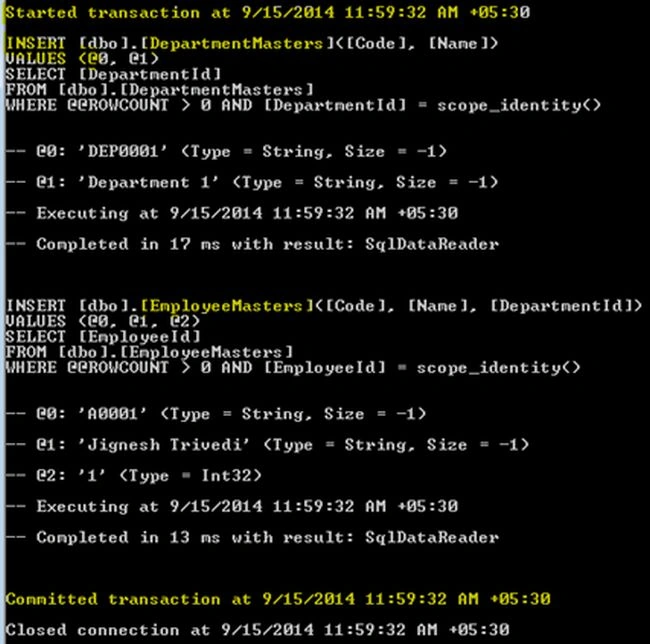

Earlier the System.Transactions namespace was used to handle transactions in the Entity Framework using TransactionScope and the Entity Framework uses this transaction to save the changes in the database.
- using (TransactionScope scope = new TransactionScope())
- {
- //Code Here
- }
Entity Framework 6.0 introduced two new APIs to maintain the transaction.
- DbContext.Database.BeginTransaction: It allows us to begin a transaction. It allows us to combine several operations to be combined within the same transaction and hence all the transactions are either committed or rolled back. This method allows us to specify the isolation level for the transaction.
- DbContext.Database.UseTransaction: It allows DbContext to use a transaction that was stated outside of the Entity Framework. It means using this API we can use any existing transaction with Entity Framework.
DbContext.Database.BeginTransaction
This method returns a DbContextTransaction object. The BeginTransaction method has two overloads, one has no argument and the other accepts an explicit Isolation Level.
A DbContextTransaction object provides Commit() and Rollback() methods to do commit and rollback on the underlying store transaction.
Test Code
- using (EntitiesContext context = new EntitiesContext())
- {
- using (var transaction = context.Database.BeginTransaction())
- {
- try
- {
- EmployeeMaster employee = new EmployeeMaster();
- employee.Code = "A0001";
- employee.Name = "Jignesh Trivedi";
- employee.DepartmentId = 1;
- context.Employees.Add(employee);
- context.SaveChanges();
- DepartmentMaster dept = new DepartmentMaster();
- dept.Code = "DEP0001";
- dept.Name = "Department 1";
- context.Departments.Add(dept);
- context.SaveChanges();
- transaction.Commit();
- }
- catch (Exception ex)
- {
- transaction.Rollback();
- }
- }
- }
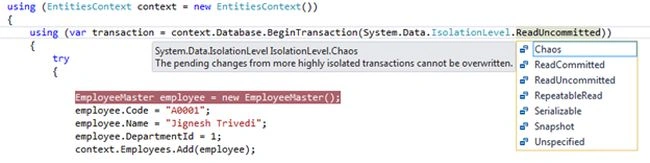
The overloaded version of the DbContext.Database.BeginTransaction method:
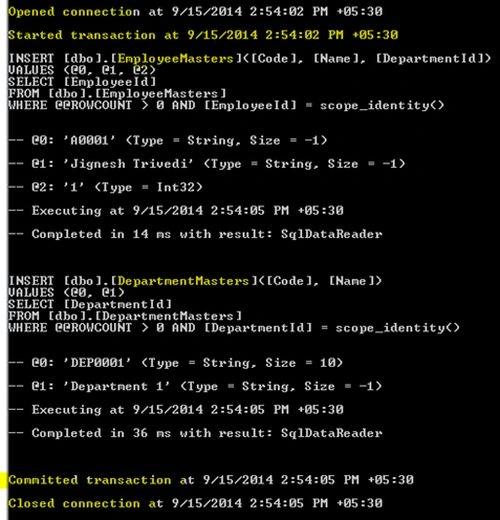
SQL logging output
DbContext.Database.UseTransaction
Sometimes we must use an existing transaction that is started outside of the Entity Framework. In this case the DbContext.Database.UseTransaction API is very useful. In this method, we can pass an existing transaction object.
To maintain the transaction, the connection object must be the same, so we are required to create a DbContext contractor that takes a connection as an argument.
- public class EntitiesContext : DbContext
- {
- public EntitiesContext()
- : base("name=Entities")
- {
- Database.Log = Console.WriteLine;
- }
- public EntitiesContext(DbConnection existingConnection, bool contextOwnsConnection)
- : base(existingConnection, contextOwnsConnection)
- {
- }
- }
- using(SqlConnection con = new SqlConnection("connectionString"))
- {
- con.Open();
- using(var transaction = con.BeginTransaction())
- {
- // Do something....
- //Pass this transaction to EF....
- using (EntitiesContext context = new EntitiesContext(con, false))
- {
- context.Database.UseTransaction(transaction);
- EmployeeMaster employee = new EmployeeMaster();
- employee.Code = "A0001";
- employee.Name = "Jignesh Trivedi";
- employee.DepartmentId = 1;
- context.Employees.Add(employee);
- context.SaveChanges();
- }
- }
- }
Summary
Entity Framework 6.0 introduced two new APIs to maintain transactions. The DbContext.Database.BeginTransaction API method creates a new transaction whereas the DbContext.Database.UseTransaction API method allows use of an existing transaction.
Vinod PasiPosted Aug 23, 2019, 11:59 PM
Can u share the code for EntitiesContext class.
Naresh SinghalPosted Dec 15, 2017, 8:30 AM
Hi Sir, Nice explanation, reading comments below i found , yes its just one time we need SaveChanges(), but in some scenario where its is must to save data in master table and based on that we insert record in transaction table , so my question here is, what if we already done savechage() in master table and somehow error occur while saving record in transaction table , so what will happen ? the savechage() made in master table will also be rolled back ? or only transaction table will be rolled back ?
Bikesh SrivastavaPosted Sep 7, 2016, 10:23 AM
Very nice post,
Minh AnhPosted Jun 7, 2016, 10:49 PM
Very good example. Thanks
jo poPosted Apr 4, 2015, 5:15 PM
In the above example you call savechanges() twice using one context for two operations wrapped in a transactionscope. This is not necessary, as stated on MSDN: In all versions of Entity Framework, whenever you execute SaveChanges() to insert, update or delete on the database the framework will wrap that operation in a transaction. This transaction lasts only long enough to execute the operation and then completes. When you execute another such operation a new transaction is started.
Manish Kumar ChoudharyPosted Jan 31, 2015, 2:42 AM
Nice one..
Sandeep Singh ShekhawatPosted Sep 16, 2014, 12:18 AM
Good !!
Vithal WadjePosted Sep 15, 2014, 2:30 PM
great keep it up