

Introduction
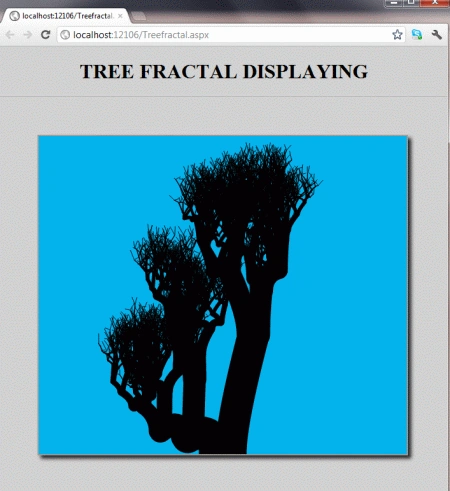
In this article, we are going to understand working with tree fractals using HTML5. In this, we will see various randomized trees when the page is refreshed again and again in the browser.
Here we will use some JavaScript and some styles along with HTML code. Just go through the steps to see how to create this application.
Let's see how the TreeFractal application can be created. To do so use the following steps.
Step 1 : Open a HTML editor or Visual Studio.
 Open File menu ->select new ->Choose Website then.

- Go to Solution Explorer
- Right-click on the Application name
- Select Add-->add new item
- Now in the window that opens, select an HTML page or a new Webform
- Rename it to Treefractal.aspx

- <style>
- body {
- margin: 0px;
- padding: 0px;
- font-family: Comic Sans MS;
- outline-color: Yellow;
- }
- #Bubble {
- border: 2px solid #9C9898;
- margin-top: 50px;
- margin-left: 60px;
- background-color: #00B2EE;
- box-shadow: 5px 5px 8px #222;
- }
- .title {
- text-align: center;
- font-family: Segoe UI Light, Arial, Helvetica;
- font-size: 2.2em;
- margin: 1em;
- }
- .info {
- text-align: center;
- font-family: Segoe UI Light, Arial, Helvetica;
- font-size: 1.2em;
- margin: 0.25em;
- }</style>
Step 3 : In this part we need to work on some JavaScript. To fully understanding how the JavaScript works, download the attached .rar file and run the TreeFractal application.
The whole JavaScript looks as in the following.
- <script>
- function drawBranches(startX, startY, trunkWidth, level)
- {
- canvas = document.getElementById("myCanvas");
- context = canvas.getContext("2d");
- if (level < 12) {
- var changeX = 100 / (level + 1);
- var changeY = 200 / (level + 1);
- var topRightX = startX + Math.random() * changeX;
- var topRightY = startY - Math.random() * changeY;
- var topLeftX = startX - Math.random() * changeX;
- var topLeftY = startY - Math.random() * changeY;
- // draw right branch
- context.beginPath();
- context.moveTo(startX + trunkWidth / 4, startY);
- context.quadraticCurveTo(startX + trunkWidth / 4, startY - trunkWidth, topRightX, topRightY);
- context.lineWidth = trunkWidth;
- context.lineCap = "round";
- context.stroke();
- // draw left branch
- context.beginPath();
- context.moveTo(startX - trunkWidth / 4, startY);
- context.quadraticCurveTo(startX - trunkWidth / 4, startY -
- trunkWidth, topLeftX, topLeftY);
- context.lineWidth = trunkWidth;
- context.lineCap = "round";
- context.stroke();
- drawBranches(topRightX, topRightY, trunkWidth * 0.7, level + 1);
- drawBranches(topLeftX, topLeftY, trunkWidth * 0.7, level + 1);
- }
- }
- window.onload = function ()
- {
- canvas = document.getElementById("myCanvas");
- context = canvas.getContext("2d");
- drawBranches(canvas.width / 2, canvas.height, 50, 0);
- };
- </script>
Step 4: In this section, we are going to become familiar with the body part of HTML scripting. Replace this script from the body section of the Treefractal.aspx page. Here we pass a #myCanvas in the canvas tag.
- <body style="background-color: #D1D1D1">
- <center>
- <h1>
- TREE FRACTAL DISPLAYING
- </h1>
- </center>
- <hr />
- <canvas id="myCanvas" width="578" height="500">
- </canvas>
- </body>
Step 5: The complete code for the TreeFractal application.
- <%@ Page Language="C#" AutoEventWireup="true" CodeBehind="Treefractal.aspx.cs" Inherits="TreeFractal._Default" %>
- <!DOCTYPE html PUBLIC "-//W3C//DTD XHTML 1.0 Transitional//EN" "http://www.w3.org/TR/xhtml1/DTD/xhtml1-transitional.dtd">
- <html xmlns="http://www.w3.org/1999/xhtml">
- <head runat="server">
- <style>
- Copy and paste step 2 here
- </style>
- <script>
- Copy and paste step 3 here
- </script>
- </head>
- <body style="background-color: #D1D1D1">
- <center>
- <h1>
- TREE FRACTAL DISPLAYING
- </h1>
- </center>
- <hr />
- <canvas id="myCanvas" width="578" height="500">
- </canvas>
- </body>
- </html>
Step 6: Output Press F5
Note: For the accurate output of HTML5 applications, you must have the Google Chrome browser on your PC. You will see the different randomized trees when the page is refreshed again and again on the browser.

Join the conversation! Your thoughts help the community grow.