

SharePoint Views are yet another implementation by which, we can organize the data within a list/library. A list can contain millions of items and we might be really concerned about only a minor subset of that data. In order to work with the subset of the main data, we create a view, which satisfies out the requirement by conditionally retrieving the data, based on certain columns within the list.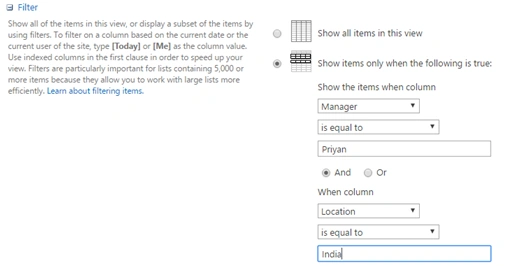
We can create the views and delete them out of the box. Let’s see, how we can do the same programmatically, using JavaScript Object Model.
Internal Implementation
Scope of the article is,
- Create a new list view.
- Delete an existing view.
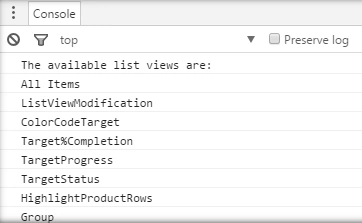
- List all the views.
All of these operations will be done, using JavaScript object model.
Create a List View
- Add the reference to jQuery file.
- <script language="javascript" type="text/javascript" src="//ajax.googleapis.com/ajax/libs/jquery/1.8.1/jquery.min.js"></script>
- <script language="javascript" type="text/javascript">
- Within Document ready function, call SP.SOD.executeFunc, so as to load the on demand script SP.js . Call the main starting point function say: ‘createListView’,
- SP.SOD.executeFunc('sp.js', 'SP.ClientContext', createListView);
- Instantiate the client context, Web and list instance.
- //Get client context,web and list object
- var clientContext = new SP.ClientContext();
- var oWebsite = clientContext.get_web();
- var oList = oWebsite.get_lists().getByTitle('Products');
- Create the view by instantiating ‘ViewCreationInformation’ object.
- //Create view using ViewCreationInformation object
- var creationInfo = new SP.ViewCreationInformation();
- creationInfo.set_title("CustomProductView");
- creationInfo.set_setAsDefaultView("true");
- creationInfo.set_rowLimit("10");
- creationInfo.set_personalView("false");
- creationInfo.set_viewFields(viewFields);
- Set CAML query, so that the view shows only the required subset of the items in the list.
- var camlQuery = new SP.CamlQuery();
- var query = "<Where><IsNotNull><FieldRef Name='Product_x0020_Name' /></IsNotNull></Where>";
- camlQuery.set_viewXml(query);
- creationInfo.set_query(camlQuery);
- oListViews=oList.get_views().add(creationInfo);
- Load the client context and execute the batch.
- clientContext.load(oListViews);
- clientContext.executeQueryAsync(QuerySuccess, QueryFailure);
Output
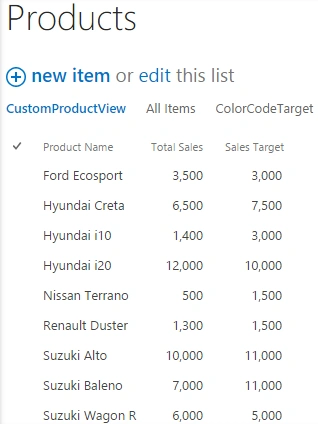
Full Code: The full code of the view creation is shown below:
- <script language="javascript" type="text/javascript" src="//ajax.googleapis.com/ajax/libs/jquery/1.8.1/jquery.min.js"></script>
- <script language="javascript" type="text/javascript">
- $(document).ready(function() {
- SP.SOD.executeFunc('sp.js', 'SP.ClientContext', createListView);
- });
- var oListViews;
- function createListView() {
- //Get client context,web and list object
- var clientContext = new SP.ClientContext();
- var oWebsite = clientContext.get_web();
- var oList = oWebsite.get_lists().getByTitle('Products');
- //Set the view fields
- var viewFields = new Array('Total_x0020_Sales', 'Sales_x0020_Target', 'Product_x0020_Name');
- var viewType = new SP.ViewType();
- //Create view using ViewCreationInformation object
- var creationInfo = new SP.ViewCreationInformation();
- creationInfo.set_title("CustomProductView");
- creationInfo.set_setAsDefaultView("true");
- creationInfo.set_rowLimit("10");
- creationInfo.set_personalView("false");
- creationInfo.set_viewFields(viewFields);
- //Set CAML query so that the view shows only a subset of items
- var camlQuery = new SP.CamlQuery();
- var query = "<Where><IsNotNull><FieldRef Name='Product_x0020_Name' /></IsNotNull></Where>";
- camlQuery.set_viewXml(query);
- creationInfo.set_query(camlQuery);
- oListViews = oList.get_views().add(creationInfo);
- //Load the client context and execute the batch
- clientContext.load(oListViews);
- clientContext.executeQueryAsync(QuerySuccess, QueryFailure);
- }
- function QuerySuccess() {
- console.log("Views created successfully!");
- }
- function QueryFailure(sender, args) {
- console.log('Request failed' + args.get_message());
- }
- </script>
Tarun DPosted Aug 26, 2016, 12:59 AM
Thanks for sharing..
Prasham SabadraPosted Aug 25, 2016, 11:28 PM
Thanks for Sharing ! Nice article!