

In the previous article, Working with WPF Table using XAML - Part I, we discovered how to perform this task using XAML. Now, we will see how to do the same using C#. Let's take the previous example; witch is North African countries representation table.
Remarque: The images used in the project could be reached in those links:
| Image reachable in | Rename it as |
| http://en.wikipedia.org/wiki/Tunisia | TunisianFlag.png |
| http://en.wikipedia.org/wiki/Algeria | AlgerianFlag.png |
| http://en.wikipedia.org/wiki/Morroco | MorrocoFlag.png |
| http://en.wikipedia.org/wiki/Lybia | LybianFlag.png |
| http://en.wikipedia.org/wiki/Mauritania | MauritanianFlag.png |
After renaming images, add them to the project by copying and pasting them in the Debug project folder.
Now add this code to the code behind zone:
private void InitializeTable()
{
//Configure the window width
this.Width = 700;
/* The table object must be contained in a parent
ontainer at the contrast of the grid one*/
FlowDocument oDoc = new FlowDocument();
// Create the Table object instance
Table oTable = new Table();
// Append the table to the document
oDoc.Blocks.Add(oTable);
// Create 5 columns and add them to the table's Columns collection.
int numberOfColumns = 5;
for (int x = 0; x < numberOfColumns; x++)
{
oTable.Columns.Add(new TableColumn());
oTable.Columns[x].Width = new GridLength(130);
}
// Create and add an empty TableRowGroup Rows.
oTable.RowGroups.Add(new TableRowGroup());
// Add the table head row.
oTable.RowGroups[0].Rows.Add(new TableRow());
//Configure the table head row
TableRow currentRow = oTable.RowGroups[0].Rows[0];
currentRow.Background = System.Windows.Media.Brushes.Navy;
currentRow.Foreground = System.Windows.Media.Brushes.White;
// Add the header row with content,
currentRow.Cells.Add(new TableCell(new Paragraph(new Run("Country"))));
currentRow.Cells.Add(new TableCell(new Paragraph(new Run("Flag"))));
currentRow.Cells.Add(new TableCell(new Paragraph(new Run("Calling code"))));
currentRow.Cells.Add(new TableCell(new Paragraph(new Run("Internet TLD"))));
currentRow.Cells.Add(new TableCell(new Paragraph(new Run("Time zone"))));
//Add Libya data row
oTable.RowGroups[0].Rows.Add(new TableRow());
currentRow = oTable.RowGroups[0].Rows[1];
//Configure the row layout
currentRow.Background = System.Windows.Media.Brushes.White;
currentRow.Foreground = System.Windows.Media.Brushes.Navy;
//Add the country name in the first cell
currentRow.Cells.Add(new TableCell(new Paragraph(new Run("Libya"))));
//Add the country flag in the second cell
BitmapImage bmp0 = new BitmapImage();
System.Windows.Controls.Image img0 = new System.Windows.Controls.Image();
bmp0.BeginInit();
bmp0.UriSource = new Uri("LybianFlag.png", UriKind.Relative);
bmp0.EndInit();
Paragraph oParagraph0 = new Paragraph();
oParagraph0.Background = new ImageBrush(bmp0);
currentRow.Cells.Add(new TableCell(oParagraph0));
//Add the calling code
currentRow.Cells.Add(new TableCell(new Paragraph(new Run("218"))));
//Add the internet TLD
currentRow.Cells.Add(new TableCell(new Paragraph(new Run(".ly"))));
//Add the Time Zone
currentRow.Cells.Add(new TableCell(new Paragraph(new Run("GMT + 2 "))));
//Add Tunisia data row
oTable.RowGroups[0].Rows.Add(new TableRow());
currentRow = oTable.RowGroups[0].Rows[2];
//Configure the row layout
currentRow.Background = System.Windows.Media.Brushes.Azure;
currentRow.Foreground = System.Windows.Media.Brushes.Navy;
//Add the country name in the first cell
currentRow.Cells.Add(new TableCell(new Paragraph(new Run("Tunisia"))));
//Add the country flag in the second cell
BitmapImage bmp1 = new BitmapImage();
bmp1.BeginInit();
bmp1.UriSource = new Uri("TunisianFlag.png", UriKind.Relative);
bmp1.EndInit();
Paragraph oParagraph1 = new Paragraph();
oParagraph1.Background = new ImageBrush(bmp1);
currentRow.Cells.Add(new TableCell(oParagraph1));
//Add the calling code
currentRow.Cells.Add(new TableCell(new Paragraph(new Run("216"))));
//Add the internet TLD
currentRow.Cells.Add(new TableCell(new Paragraph(new Run(".tn"))));
//Add the Time Zone
currentRow.Cells.Add(new TableCell(new Paragraph(new Run("GMT + 1 "))));
//Add Algeria data row
oTable.RowGroups[0].Rows.Add(new TableRow());
currentRow = oTable.RowGroups[0].Rows[3];
//Configure the row layout
currentRow.Background = System.Windows.Media.Brushes.White;
currentRow.Foreground = System.Windows.Media.Brushes.Navy;
//Add the country name in the first cell
currentRow.Cells.Add(new TableCell(new Paragraph(new Run("Algeria"))));
//Add the country flag in the second cell
BitmapImage bmp2 = new BitmapImage();
bmp2.BeginInit();
bmp2.UriSource = new Uri("AlgerianFlag.png", UriKind.Relative);
bmp2.EndInit();
Paragraph oParagraph2 = new Paragraph();
oParagraph2.Background = new ImageBrush(bmp2);
currentRow.Cells.Add(new TableCell(oParagraph2));
//Add the calling code
currentRow.Cells.Add(new TableCell(new Paragraph(new Run("213"))));
//Add the internet TLD
currentRow.Cells.Add(new TableCell(new Paragraph(new Run(".dz"))));
//Add the Time Zone
currentRow.Cells.Add(new TableCell(new Paragraph(new Run("GMT + 1 "))));
//Add Morroco data row
oTable.RowGroups[0].Rows.Add(new TableRow());
currentRow = oTable.RowGroups[0].Rows[4];
//Configure the row layout
currentRow.Background = System.Windows.Media.Brushes.White;
currentRow.Foreground = System.Windows.Media.Brushes.Navy;
//Add the country name in the first cell
currentRow.Cells.Add(new TableCell(new Paragraph(new Run("Morroco"))));
//Add the country flag in the second cell
BitmapImage bmp3 = new BitmapImage();
bmp3.BeginInit();
bmp3.UriSource = new Uri("MorrocoFlag.png", UriKind.Relative);
bmp3.EndInit();
Paragraph oParagraph3 = new Paragraph();
oParagraph3.Background = new ImageBrush(bmp3);
currentRow.Cells.Add(new TableCell(oParagraph3));
//Add the calling code
currentRow.Cells.Add(new TableCell(new Paragraph(new Run("212"))));
//Add the internet TLD
currentRow.Cells.Add(new TableCell(new Paragraph(new Run(".ma"))));
//Add the Time Zone
currentRow.Cells.Add(new TableCell(new Paragraph(new Run("GMT"))));
//Add Morroco data row
oTable.RowGroups[0].Rows.Add(new TableRow());
currentRow = oTable.RowGroups[0].Rows[5];
//Configure the row layout
currentRow.Background = System.Windows.Media.Brushes.White;
currentRow.Foreground = System.Windows.Media.Brushes.Navy;
//Add the country name in the first cell
currentRow.Cells.Add(new TableCell(new Paragraph(new Run("Morroco"))));
//Add the country flag in the second cell
BitmapImage bmp4 = new BitmapImage();
bmp4.BeginInit();
bmp4.UriSource = new Uri("MauritanianFlag.png", UriKind.Relative);
bmp4.EndInit();
Paragraph oParagraph4 = new Paragraph();
oParagraph4.Background = new ImageBrush(bmp4);
currentRow.Cells.Add(new TableCell(oParagraph4));
//Add the calling code
currentRow.Cells.Add(new TableCell(new Paragraph(new Run("222"))));
//Add the internet TLD
currentRow.Cells.Add(new TableCell(new Paragraph(new Run(".mr"))));
//Add the Time Zone
currentRow.Cells.Add(new TableCell(new Paragraph(new Run("GMT"))));
//Add the given flow document to the window
this.Content = oDoc;
}
Then, add call the above method from the window constructor
public Window1()
{
InitializeComponent();
InitializeTable();
}
Finally, run the project and the result will be:
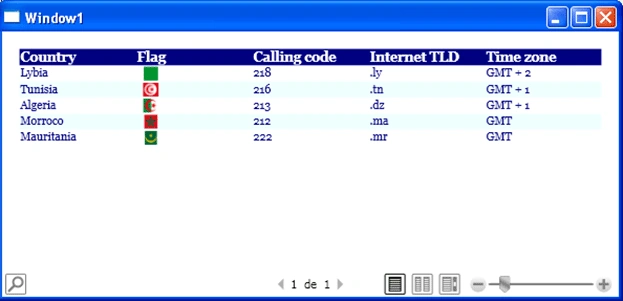
Figure1
Conclusion:
In part I we discovered how to define and configure a Table object using XAML and in this part we discovered how to perform the same task using C#. That's it.
Good Dotneting!!!
Join the conversation! Your thoughts help the community grow.