
Suppose a Webshop wants to create a Web application that can store the details of the books available for sale in XML format and we want to store the details of the books and display them in tabular format. To show the data in tabular format we will use the XSLT file and a XML server control.
Let's have a look at the following steps:
Step 1
Go to the Visual Studio 2010.
Step 2
Click on File -> New -> WebSite.
Step 3
Now select the ASP.NET Website template from the available templates.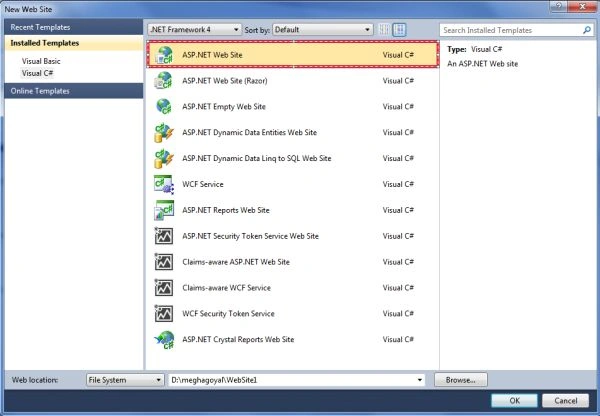
Step 4
Now give the name to your application and click on the ok button.
Step 5
Now right-click on the project name in the Solution Explorer and select Add New Item from it.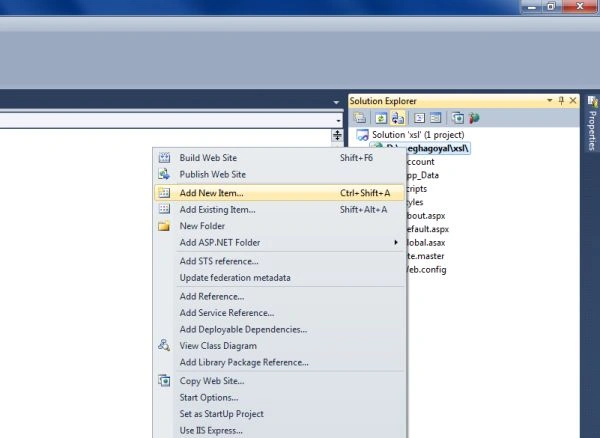
Step 6
Now select the XML File template from the available templates.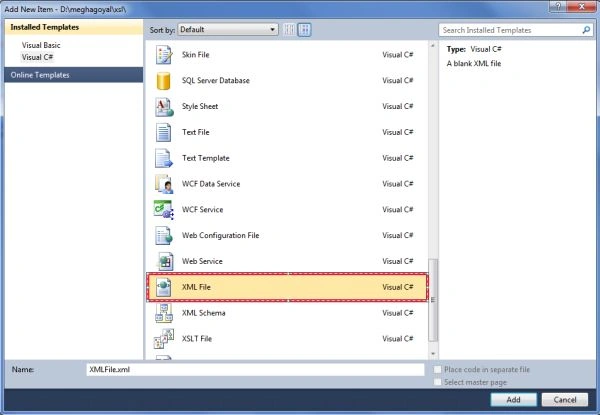
Step 7
Now give the name to your file .i.e. book.xml and click the Add button.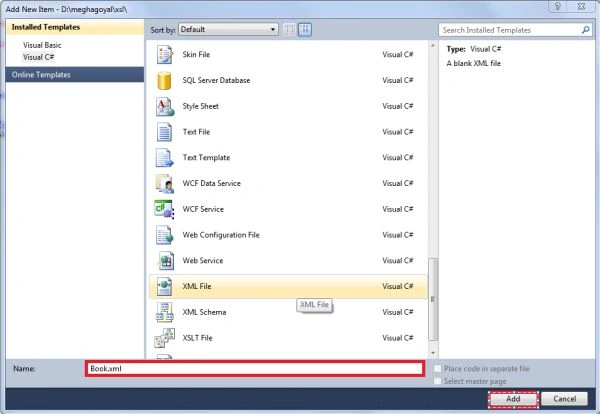
Step 8
Now add the following code in this file and press ctrl+s to save this file.
<?xml version="1.0" encoding="utf-8" ?>
<Books>
<Book>
<BookId>B001</BookId>
<Title>Getting Started with XML</Title>
<Price>$2.5</Price>
<Author>
<FirstName>Micheal</FirstName>
<LastName>Hicks</LastName>
</Author>
<Author>
<FirstName>John</FirstName>
<LastName>Williams</LastName>
</Author>
</Book>
<Book>
<BookId>B002</BookId>
<Title>Understanding XML</Title>
<Price>$22.15</Price>
<Author>
<FirstName>David</FirstName>
<LastName>Simpson</LastName>
</Author>
</Book>
</Books>
Step 9
Now again right-click on the project name in Solution Explorer and select Add New Item.
Step 10
Now select XSLT file from the available templates.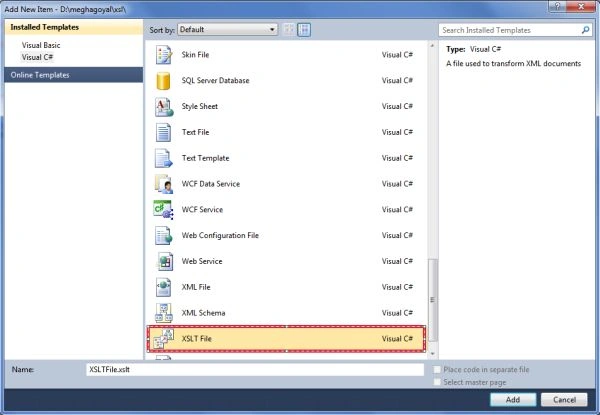
Step 11
Now give a name to your file and click on the Add button.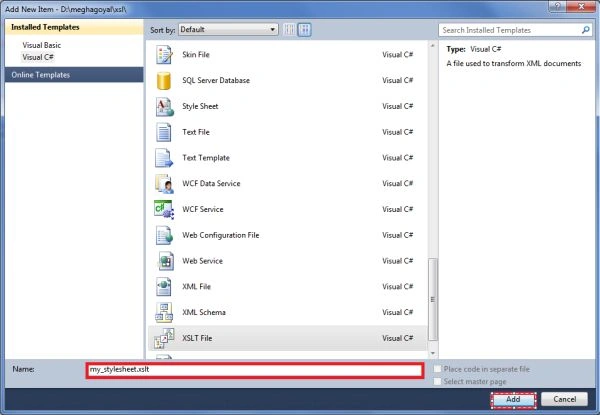
Step 12
Now add the following code in this file named my_stylesheet.xsl.
<?xml version="1.0" encoding="utf-8"?>
<xsl:stylesheet version="1.0" xmlns:xsl="http://www.w3.org/1999/XSL/Transform">
<xsl:template match="Author">
<xsl:value-of select="FirstName"/>
<xsl:value-of select="LastName"/>
<xsl:if test="position()!=last()">, </xsl:if>
</xsl:template>
<xsl:template match="/">
<html>
<head>
<title>Books at webshop</title>
</head>
<body>
<h1>Books at webshop</h1>
<table border="3" cellspacing="2" cellpadding="6">
<thead align="center" bgcolor="silver">
<th>Book Id</th>
<th>Title</th>
<th>price</th>
<th>Author(s)</th>
</thead>
<tbody>
<xsl:for-each select="Books/Book">
<tr>
<td>
<font color="green">
<xsl:value-of select="BookId"/>
</font>
</td>
<td>
<xsl:value-of select="Title"/>
</td>
<td>
<xsl:value-of select="Price"/>
</td>
<td>
<xsl:apply-templates select="Author"/>
</td>
</tr>
</xsl:for-each>
</tbody>
</table>
</body>
</html>
</xsl:template>
</xsl:stylesheet>
Step 13
Now drag and drop the XML server control on the web form named myform.aspx like this: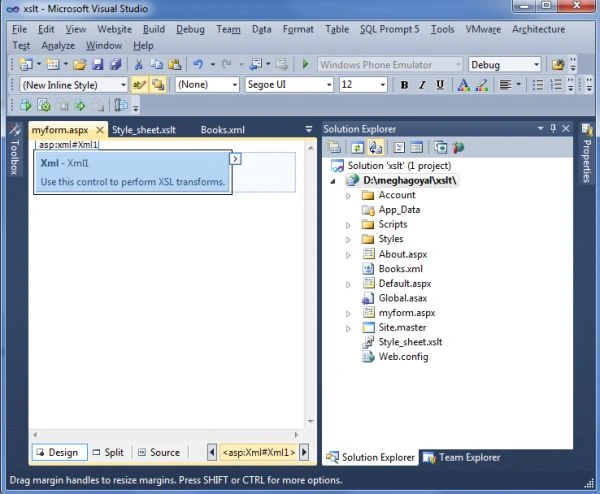
Step 14
Now right-click on this control and select the property option from it.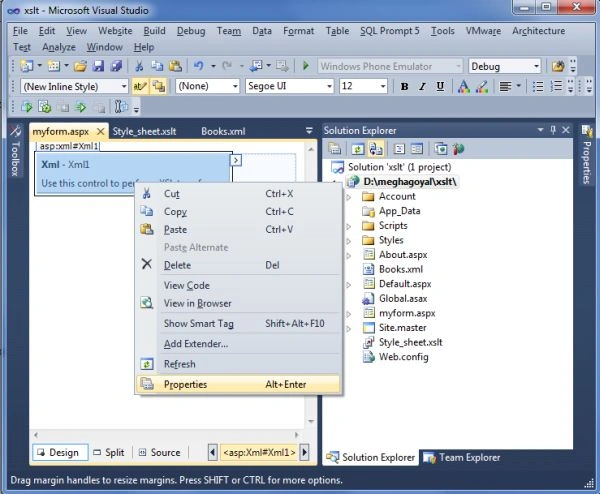
Step 15
In the property window of it just select the DocumentSource property of it.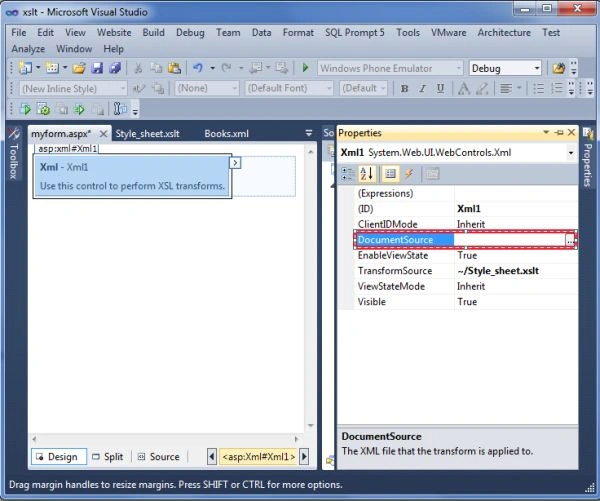
Step 16
Now click on the browse button and select the XML file whose data needs to be displayed and click on the ok button.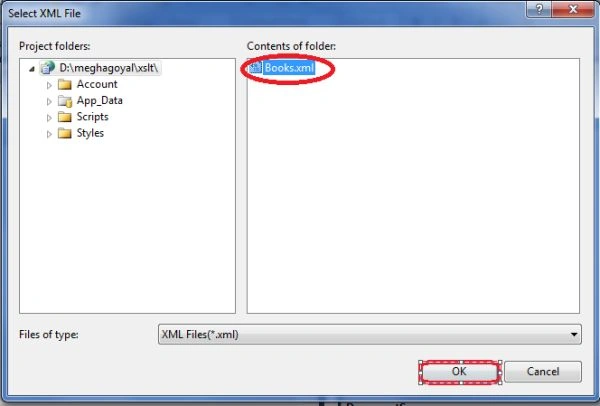
Step 17
Now select the TransformSource property of the XML server Control.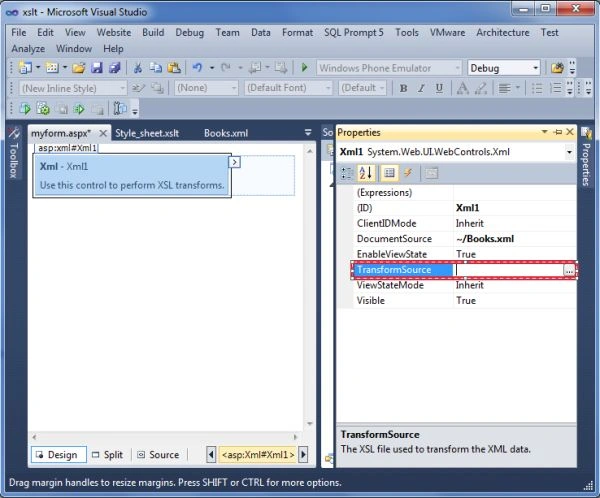
Step 18
Now select the xslt file .i.e. my_stylesheet.xsl by which we want to display the data in tabular format.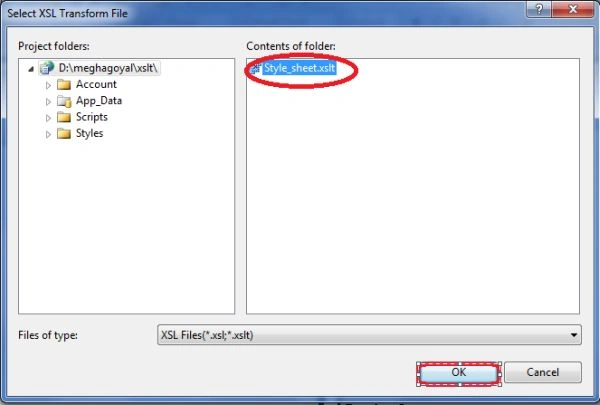
Step 19
Now press F5 key to run the application.
Step 20
The output will be like this: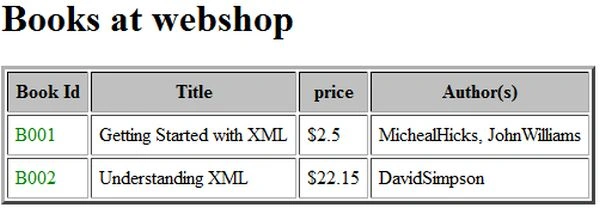
Raj KumareditedPosted Aug 22, 2012, 9:20 AMEdited Aug 22, 2012, 9:21 AM
Well done megha good article good use of XSLT.Advantage and Disadvantage of Using XML and XSLT Advantages:1. XSLT applies user defined transformations to an XML document and the output can be HTML, XML, or any other structured document. So it is easy to merge XML data into presentation.2. XPath used by XSLT to locate elements/attribute within an XML document. So it is more convenient way to traverse an XML document rather than a traditional way, by using scripting language.3. Being template based, XSLT is more resilient to changes in documents than low level DOM and SAX.4. By separating data (XML document) from the presentation (XSLT), it is very easy to change the output format in any time easily without touching the code-behind.5. Using XML and XSLT, the application UI script will look clean and will be easier to maintain6. XSLT templates are based on XPath pattern which is very powerful in terms of performance to process the XML document7. XSLT can be used as a validation language as it uses tree-pattern-matching approach.8. XML is platform independent.9. XML has column flexibility, so it can be update easily rather than a traditional table-row-column approach10. XML Supports Unicode11. XML has self-documenting capabilityDisadvantages:1. It is difficult to implement complicate business rules in XSLT2. Changing variable value in looping, is difficult in XSLT3. Using XSLT have performance penalty in some cases as its engine don’t optimize code by using caching technique like traditional compiler.4. XML encourage non-relational data structure(de-normalized)