

Live Shaping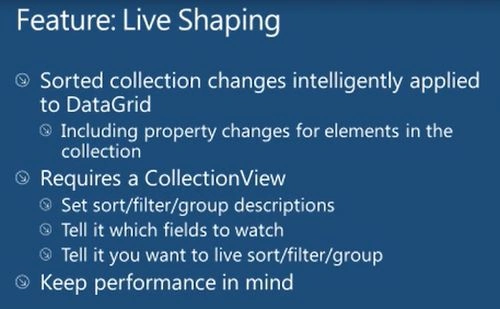
Properties required for Live Shaping
- IsLiveFiltering = true;
- LiveFilteringProperties.Add("Value");
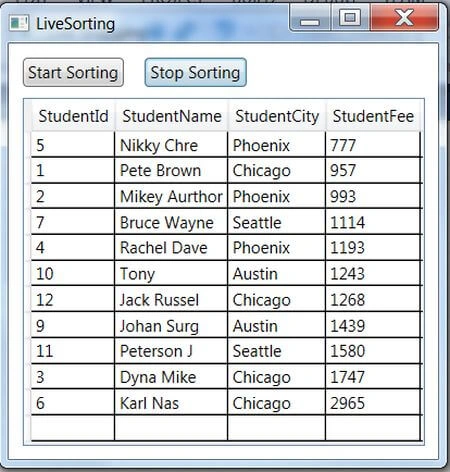
In the following example, we have created a class named student. The class implements an INotifyPropertyChanged interface and is used for the Property’s value changes. Also a StudentCollection was created that populates the student information at runtime. On a Window_Loaded event we created an object of StudentCollection that is already populated with the student information and binds it with a dataGrid.
Also created a:
- DispatcherTimer dispTimer = new DispatcherTimer();
- ICollectionView: Enable collections to apply Custom Sorting, Filtering and Grouping.
- ICollectionViewLiveShaping: Defining Sorting, Grouping, Filtering on ColectionView in Real Time.
- public class Student : INotifyPropertyChanged
- {
- int _StudentId;
- public int StudentId
- {
- get { return _StudentId; }
- set
- {
- _StudentId = value;
- OnPropertychanged("StudentId");
- }
- }
- string _StudentName;
- public string StudentName
- {
- get { return _StudentName; }
- set
- {
- _StudentName = value;
- OnPropertychanged("StudentName");
- }
- }
- string _StudentCity;
- public string StudentCity
- {
- get { return _StudentCity; }
- set
- {
- _StudentCity = value;
- OnPropertychanged("StudentCity");
- }
- }
- decimal _StudentFee;
- public decimal StudentFee
- {
- get { return _StudentFee; }
- set
- {
- _StudentFee = value;
- OnPropertychanged("StudentFee");
- }
- }
- public event PropertyChangedEventHandler PropertyChanged;
- private void OnPropertychanged(string pName)
- {
- if (PropertyChanged != null)
- {
- PropertyChanged(this, new PropertyChangedEventArgs(pName));
- }
- }
- }
- public class StudentCollection : ObservableCollection<Student>
- {
- public StudentCollection()
- {
- Add(new Student() { StudentId = 1,StudentName = "Pete Brown", StudentCity = "Chicago", StudentFee = 100 });
- Add(new Student() { StudentId = 2, StudentName = "Mikey Aurthor", StudentCity = "Phoenix", StudentFee = 150 });
- Add(new Student() { StudentId = 3, StudentName = "Dyna Mike", StudentCity = "Chicago", StudentFee = 800 });
- Add(new Student() { StudentId = 4, StudentName = "Rachel Dave", StudentCity = "Phoenix", StudentFee = 200 });
- Add(new Student() { StudentId = 5, StudentName = "Nikky Chre", StudentCity = "Phoenix", StudentFee = 180 });
- Add(new Student() { StudentId = 6, StudentName = "Karl Nas", StudentCity = "Chicago", StudentFee = 2200 });
- Add(new Student() { StudentId = 7, StudentName = "Bruce Wayne", StudentCity = "Seattle", StudentFee = 100 });
- Add(new Student() { StudentId = 9, StudentName = "Johan Surg", StudentCity = "Austin", StudentFee = 300 });
- Add(new Student() { StudentId = 10, StudentName = "Tony ", StudentCity = "Austin", StudentFee = 300 });
- Add(new Student() { StudentId = 11, StudentName = "Peterson J", StudentCity = "Seattle", StudentFee = 300 });
- Add(new Student() { StudentId = 12, StudentName = "Jack Russel", StudentCity = "Chicago", StudentFee = 300 });
- }
- }
- <Window x:Class="Wpf_Live_Shaping.LiveSorting"
- xmlns="http://schemas.microsoft.com/winfx/2006/xaml/presentation"
- xmlns:x="http://schemas.microsoft.com/winfx/2006/xaml"
- Title="LiveSorting" Height="400" Width="500" Loaded="Window_Loaded">
- <Grid>
- <DataGrid Name="DGData" Margin="10,40,10,10"></DataGrid>
- <Button Content="Start Sorting" HorizontalAlignment="Left" Margin="10,10,0,0" VerticalAlignment="Top" Width="75" Click="ButtonStartSirting_Click"/>
- <Button Content="Stop Sorting" HorizontalAlignment="Left" Margin="100,10,0,0" VerticalAlignment="Top" Width="75" Click="ButtonStopSorting_Click"/>
- </Grid>
- </Window>
- public partial class LiveSorting : Window
- {
- DispatcherTimer dispTimer = new DispatcherTimer();
- ObservableCollection<Student> ListStudent = new ObservableCollection<Student>();
- public LiveSorting()
- {
- InitializeComponent();
- }
- private void Window_Loaded(object sender, RoutedEventArgs e)
- {
- var studentCollection = new StudentCollection();
- DGData.ItemsSource = studentCollection;
- Random random = new Random();
- var Students = new StudentCollection();
- foreach (var item in Students)
- {
- ListStudent.Add(new Student()
- {
- StudentId = item.StudentId,
- StudentName = item.StudentName,
- StudentCity = item.StudentCity,
- StudentFee = item.StudentFee
- });
- }
- DGData.ItemsSource = ListStudent;
- }
- void dispTimer_Tick(object sender, EventArgs e)
- {
- Random random = new Random();
- foreach (var pc in ListStudent)
- {
- pc.StudentFee += random.Next(100) - 5;
- }
- }
- private void ButtonStartSirting_Click(object sender, RoutedEventArgs e)
- {
- ICollectionView pView = CollectionViewSource.GetDefaultView(ListStudent);
- pView.SortDescriptions.Add(new SortDescription("StudentFee", ListSortDirection.Ascending));
- var productview = (ICollectionViewLiveShaping)CollectionViewSource.GetDefaultView(ListStudent);
- productview.IsLiveSorting = true;
- dispTimer.Interval = TimeSpan.FromMilliseconds(600);
- dispTimer.Tick += dispTimer_Tick;
- dispTimer.Start();
- }
- private void ButtonStopSorting_Click(object sender, RoutedEventArgs e)
- {
- dispTimer.Stop();
- }
- }


Example Live Filtering
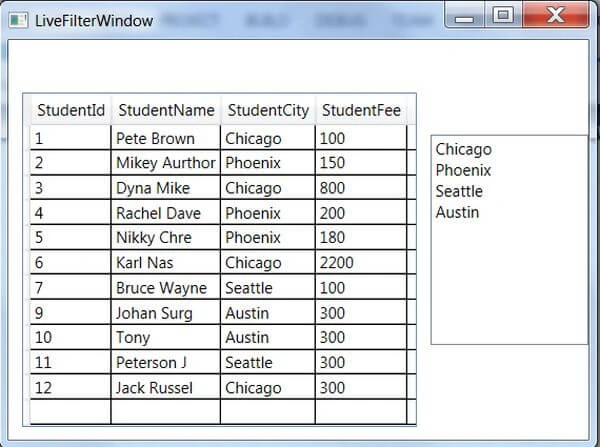
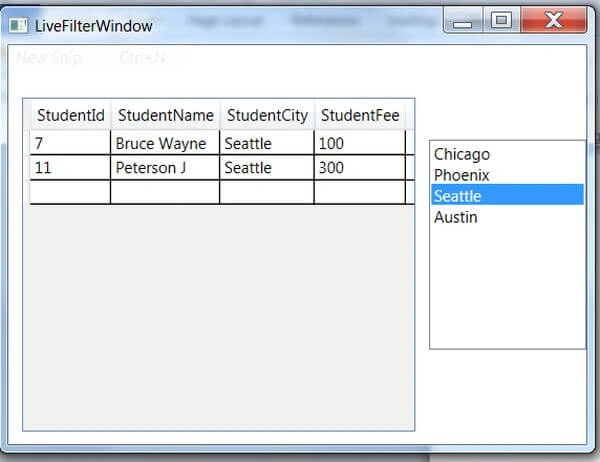
In this example we will filter information that exists in a datagrid on the basis of StudentCity.
XAML Design
- <Grid>
- <Grid.RowDefinitions>
- <RowDefinition Height="100*"></RowDefinition>
- </Grid.RowDefinitions>
- <Grid.ColumnDefinitions>
- <ColumnDefinition Width="80*"></ColumnDefinition>
- <ColumnDefinition Width="30*"></ColumnDefinition>
- </Grid.ColumnDefinitions>
- <DataGrid Name="DGData" Margin="10,40,10,10" Grid.Row="0" Grid.Column="0"></DataGrid>
- <ListBox x:Name="lstCity"
- Height="160" Grid.Row="0" Grid.Column="1"
- SelectionChanged="lstCity_SelectionChanged"/>
- </Grid>
- public partial class LiveFilterWindow : Window
- {
- StudentCollection Students;
- List<string> Cities;
- public string CityName { get; set; }
- public LiveFilterWindow()
- {
- InitializeComponent();
- }
- private void Window_Loaded(object sender, RoutedEventArgs e)
- {
- Students = new StudentCollection();
- DGData.ItemsSource = Students;
- Cities = Students.Select(d => d.StudentCity).Distinct().ToList();
- lstCity.ItemsSource = Cities;
- }
- private void lstCity_SelectionChanged(object sender, SelectionChangedEventArgs e)
- {
- ListCollectionView studentView = CollectionViewSource.GetDefaultView(DGData.ItemsSource) as ListCollectionView;
- studentView.IsLiveFiltering = true;
- studentView.LiveFilteringProperties.Add("StudentCity");
- CityName = lstCity.SelectedItem.ToString();
- studentView.Filter = new Predicate<object>(IsCityFound);
- studentView.Refresh();
- }
- bool IsCityFound(object d)
- {
- bool result = false;
- Student std = d as Student;
- if (std.StudentCity == CityName)
- {
- result = true;
- }
- return result;
- }
- }
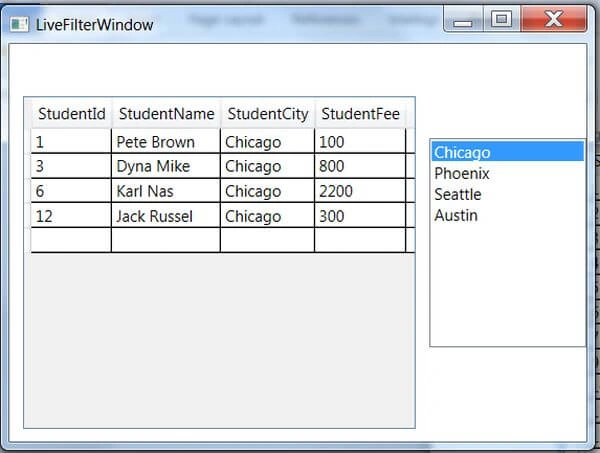
Mahesh ChandPosted Nov 20, 2014, 10:23 PM
Nice Nitin.