

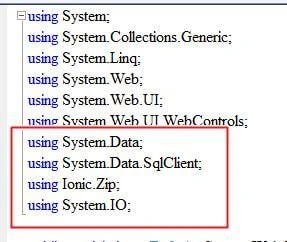
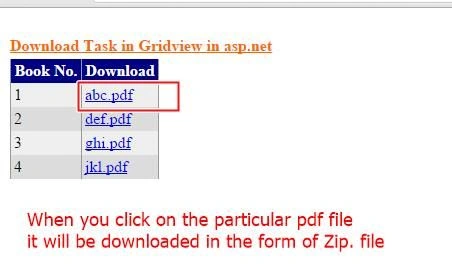
We bind a PDF in a GridView and then write download code using the Ionic.Zip library.
Initial Chamber
Step 1
Open your Visual Studio 2010 and create an Empty Website, provide a suitable name (gridview_demo).
Step 2
In Solution Explorer you get your empty website, then add a web form and a SQL Server database as in the following.
For Web Form:
gridview_demo (your empty website) then right-click then select Add New Item -> Web Form. Name it gridview_demo.aspx.
For SQL Server Database
gridview_demo (your empty website) then right-click then select Add New Item -> SQL Server Database. (Add a database inside the App_Data_folder).
DATABASE CHAMBER
Step 3
In Server Explorer, click on your database (Database.mdf) then select Tables -> Add New Table. Make the table like this.
Table tbl_data (Don't Forget to make ID as IS Identity -- True)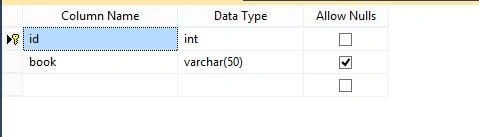
Design Chamber
Step 4
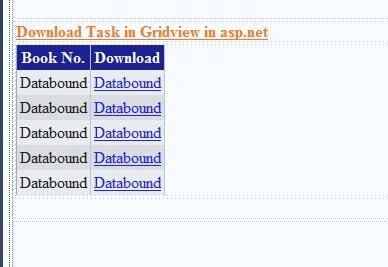
Now open your gridview_demo.aspx file, where we create our design so that our application works.
Gridview_demo.aspx.cs:
- <%@ Page Language="C#" AutoEventWireup="true" CodeFile="Default.aspx.cs" Inherits="_Default" %>
- <!DOCTYPE html PUBLIC "-//W3C//DTD XHTML 1.0 Transitional//EN" "http://www.w3.org/TR/xhtml1/DTD/xhtml1-transitional.dtd">
- <html xmlns="http://www.w3.org/1999/xhtml">
- <head runat="server">
- <title></title>
- <style type="text/css">
- .style1
- {
- font-size: medium;
- text-decoration: underline;
- color: #FF6600;
- }
- .style2
- {
- color: #FF6600;
- }
- </style>
- </head>
- <body>
- <form id="form1" runat="server">
- <div>
- <br />
- <table style="width:100%;">
- <tr>
- <td class="style1">
- <strong>Download Task in Gridview in asp.net</strong></td>
- <td class="style2">
- </td>
- <td class="style2">
- </td>
- </tr>
- <tr>
- <td>
- <asp:GridView ID="GridView1" runat="server" AutoGenerateColumns="False"
- DataKeyNames="id" onrowcommand="GridView1_RowCommand" BackColor="White"
- BorderColor="#999999" BorderStyle="None" BorderWidth="1px" CellPadding="3"
- GridLines="Vertical">
- <AlternatingRowStyle BackColor="#DCDCDC" />
- <Columns>
- <asp:TemplateField HeaderText="Book No.">
- <EditItemTemplate>
- <asp:TextBox ID="TextBox1" runat="server" Text='<%# Bind("id") %>'></asp:TextBox>
- </EditItemTemplate>
- <ItemTemplate>
- <asp:Label ID="Label1" runat="server" Text='<%# Bind("id") %>'></asp:Label>
- </ItemTemplate>
- </asp:TemplateField>
- <asp:TemplateField HeaderText="Download">
- <EditItemTemplate>
- <asp:TextBox ID="TextBox3" runat="server"></asp:TextBox>
- </EditItemTemplate>
- <ItemTemplate>
- <asp:LinkButton ID="lnkbtn" runat="server" CommandName="Download" Text='<%#Bind("book")%>'></asp:LinkButton>
- </ItemTemplate>
- </asp:TemplateField>
- </Columns>
- <FooterStyle BackColor="#CCCCCC" ForeColor="Black" />
- <HeaderStyle BackColor="#000084" Font-Bold="True" ForeColor="White" />
- <PagerStyle BackColor="#999999" ForeColor="Black" HorizontalAlign="Center" />
- <RowStyle BackColor="#EEEEEE" ForeColor="Black" />
- <SelectedRowStyle BackColor="#008A8C" Font-Bold="True" ForeColor="White" />
- <SortedAscendingCellStyle BackColor="#F1F1F1" />
- <SortedAscendingHeaderStyle BackColor="#0000A9" />
- <SortedDescendingCellStyle BackColor="#CAC9C9" />
- <SortedDescendingHeaderStyle BackColor="#000065" />
- </asp:GridView>
- </td>
- <td>
- </td>
- <td>
- </td>
- </tr>
- <tr>
- <td>
- </td>
- <td>
- </td>
- <td>
- </td>
- </tr>
- </table>
- <br />
- <br />
- <br />
- <br />
- <br />
- </div>
- </form>
- </body>
- </html>
Arul RPosted Oct 28, 2015, 5:36 AM
Good one !!!
Chervine BhiwooPosted Aug 8, 2015, 2:20 AM
Good work
Vinodh NarayananPosted Aug 7, 2015, 7:55 AM
good one
Rahul PrajapatPosted Aug 7, 2015, 7:12 AM
Good article sir
Rajeesh MenothPosted Aug 7, 2015, 4:17 AM
Good One Nilesh Jadav
Upendra Pratap ShahiPosted Aug 7, 2015, 2:10 AM
good one Nilesh Jadav Sir
RakeshPosted Jul 31, 2015, 11:09 AM
Good work
Manas MohapatraPosted Jul 31, 2015, 3:03 AM
Nice one..
Sibeesh VenuPosted Jul 31, 2015, 1:57 AM
Nice Share!.
Debasis SahaPosted Jul 31, 2015, 12:43 AM
Good One..
Gopi ChandPosted Jul 31, 2015, 12:30 AM
Good work
Neeraj KumarPosted Jul 30, 2015, 5:41 PM
Nice Article