

Writing your own jQuery plugin isn't as hard as it might seem at first. This article shows the process of writing a simple plugin, adding some options and even performing a callback.
Plugin declaration
Here is the simple syntax to get started declaring a jQuery plugin:
(function ($) {
$.fn.hello = function () { /* code goes here */ }
} (jQuery));
In this I have used "$.fn"; this is the shortcut of "jQuery.prototype".
The problem we have here is that the $ syntax could conflict with other JavaScript libraries. An easy way to overcome this problem is by wrapping your jQuery plugin inside a self-invoking anonymous function. An anonymous function is a function without a name that is executed immediately. You can call the function with jQuery as the argument and $ as a parameter allowing you to use the $ syntax in a safe manner.
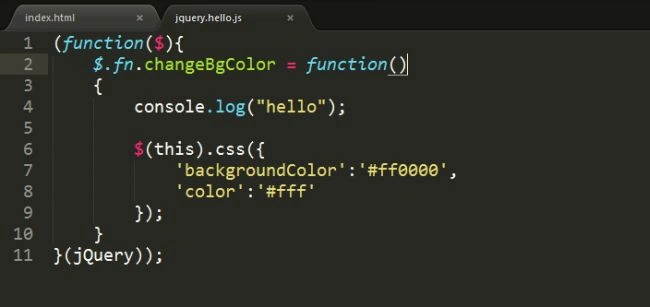
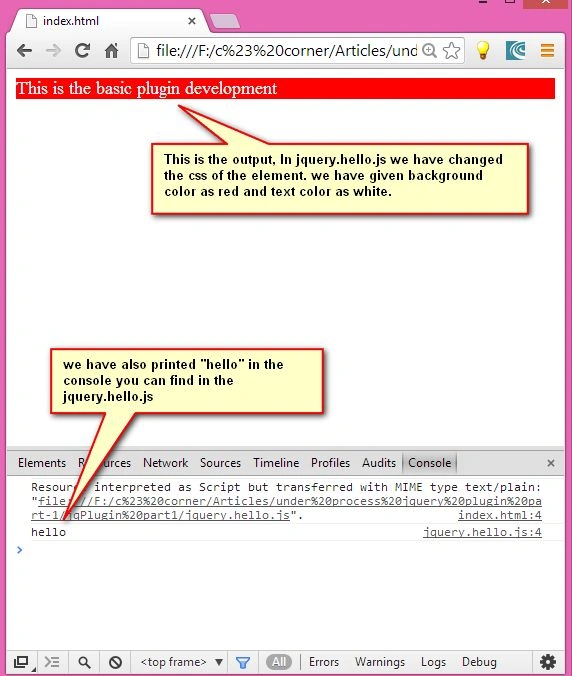
An example will clarify that.
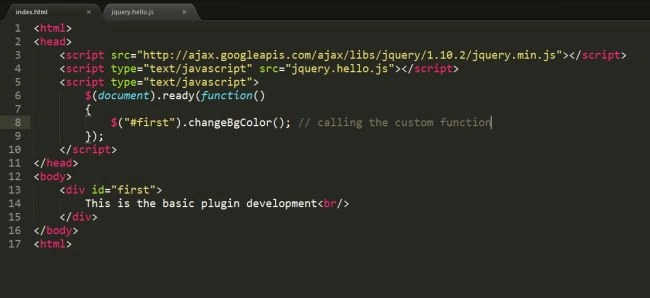
index.html file
<head>
<script src="http://ajax.googleapis.com/ajax/libs/jquery/1.10.2/jquery.min.js">
</script>
<script type="text/javascript" src="jquery.hello.js"></script>
<script type="text/javascript">
$(document).ready(function () {
$("#first").changeBgColor(); // calling the custom function
});
</script>
Parminder Pal SinghPosted Mar 28, 2014, 2:59 PM
good work sir
Yusuf KaratoprakPosted Oct 8, 2013, 4:12 AM
Great article for beginner of own jquery plugin.