

In our earlier articles, we provided sample code to write retrieve and retrievemultiple request, today we are going to provide sample code to create entity record using Web API. Let's say we want to create account record and want to set different fields of different types. There are mainly two things which is different in Web API while creating entity record, the first is referring lookup field and the other is capturing response.
In Web API relationship is represented using Navigation properties, there are two types of navigation properties Single-valued and Collection-valued. Single-valued navigation is used to represent many to one (N:1) navigation whereas Collection-valued is used to represent one to many and many to many navigation property. You can find more details here.
To set the lookup (single-valued) navigation property we can use two options, like the following
- account["[email protected]"]="/contacts(757B1E74-FBA3-E511-80DE-3863BB341BF0)";
In above code, we are setting primary contact id using existing contact record, but if required we can also create contact record on the fly and set lookup using the following option:
- account["primarycontactid"]={"firstname":"Mahender","lastname":"Pal"};
After create request is executed successfully, http response status code is returned as 204, which does not include any contents so if you will try to debug code, you will see response as blank like the following:
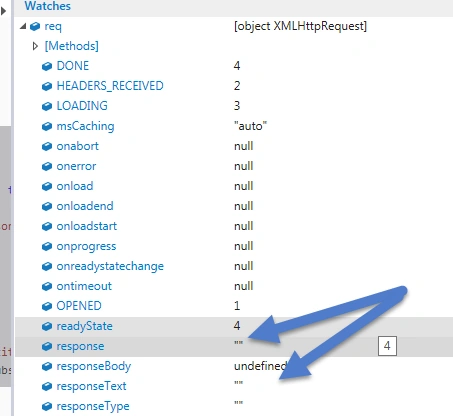
But we can get GUID of the new record using the following code :
- var accountUri = this.getResponseHeader("OData-EntityId");
- function createAccount() {
- var serverURL = Xrm.Page.context.getClientUrl();
- var account = {};
- account["name"] = "Web API Example";
- account["address1_city"] = "Delhi";
- //account["[email protected]"]="/contacts(757B1E74-FBA3-E511-80DE-3863BB341BF0)"; //setting existing lookup
- account["primarycontactid"] = {
- "firstname": "Mahender",
- "lastname": "Pal"
- };
- //optionset
- account["industrycode"] = 1;
- //two options
- account["donotphone"] = true;
- //number
- account["numberofemployees"] = 20;
- var req = new XMLHttpRequest();
- req.open("POST", serverURL + "/api/data/v8.0/accounts", true);
- req.setRequestHeader("Accept", "application/json");
- req.setRequestHeader("Content-Type", "application/json; charset=utf-8");
- req.setRequestHeader("OData-MaxVersion", "4.0");
- req.setRequestHeader("OData-Version", "4.0");
- req.onreadystatechange = function() {
- if (this.readyState == 4 /* complete */ ) {
- req.onreadystatechange = null;
- if (this.status == 204) {
- var accountUri = this.getResponseHeader("OData-EntityId");
- var ID = accountUri.substr(accountUri.length - 38).substring(1, 37); //get only GUID
- Xrm.Utility.openEntityForm("account", ID); //Open newly created account record
- } else {
- var error = JSON.parse(this.response).error;
- alert(error.message);
- }
- }
- };
- req.send(JSON.stringify(account));
- }
After that we can call this method on some event or through command button to create account record.
Stay tuned for more Web API Samples.
Sibeesh VenuPosted Dec 31, 2015, 3:20 AM
Nice Share
Santhakumar MunuswamyPosted Dec 31, 2015, 1:44 AM
Thanks for nice share