

Introduction
Xamarin.Forms code runs on multiple platforms - each of which has its own filesystem. This means that reading and writing files are most easily done using the native file APIs on each platform. Alternatively, embedded resources are a simpler solution to distribute data files with an app.
App Actions
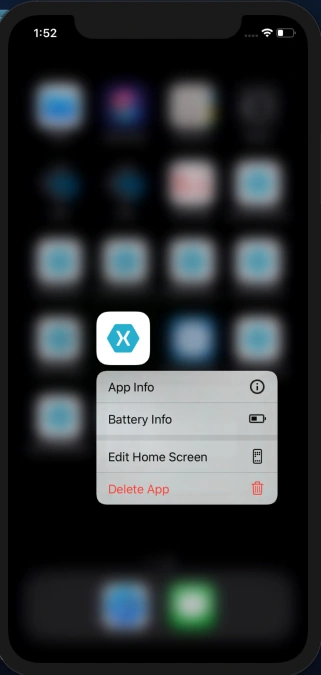
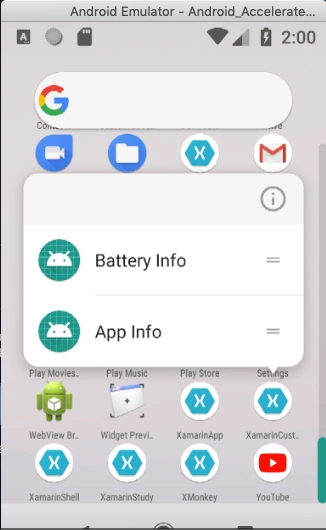
Xamarin.Essentails provided one of the best API for App Actions, by clicking the App icon will display the menu option if choose the option app will be navigating the appropriate page or link.
Prerequisites
- Visual Studio 2017 or later (Windows or Mac)
- Xamarin.Essentials 1.6 or later
Setting up a Xamarin.Forms Project
Start by creating a new Xamarin.Forms project. You will learn more by going through the steps yourself.
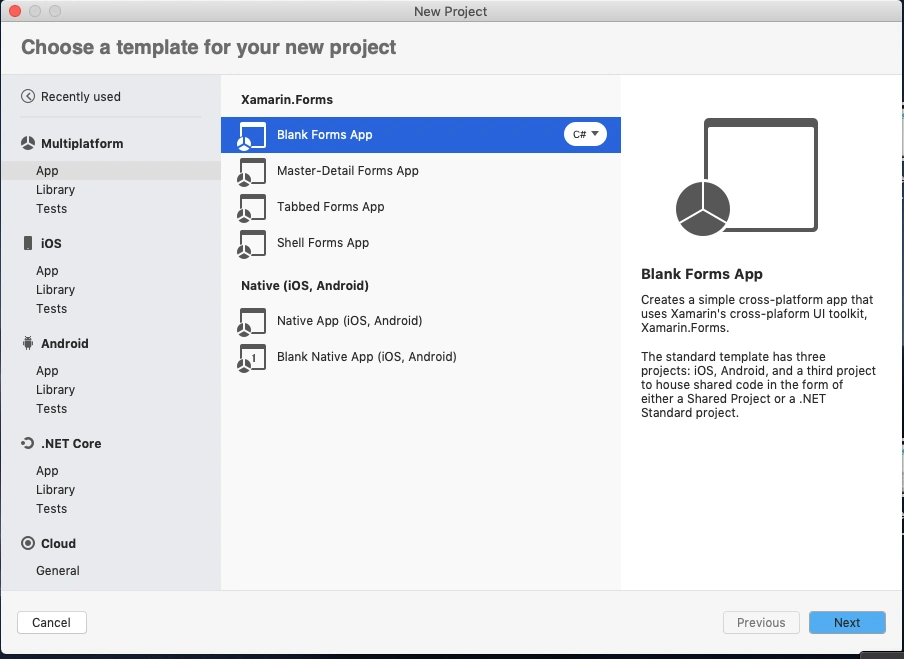
Create a new or existing Xamarin forms(.Net standard) Project with Android and iOS Platform.
Install Xamarin.Essentials Nuget
Note
Make sure you must install Xamarin.Essentials 1.6 or later.
In this step, add Xamarin.Essentials to your project. You can install Xamarin.Essentials via NuGet, or you can browse the source code on GitHub.
Go to the Solution Explorer and select your solution. Right-click and select "Manage NuGet Packages for Solution". Search "Xamarin.Essentials" and add Package. Remember to install it for each project (PCL, Android, iO, and UWP). Refer to the below image,

Android Setup
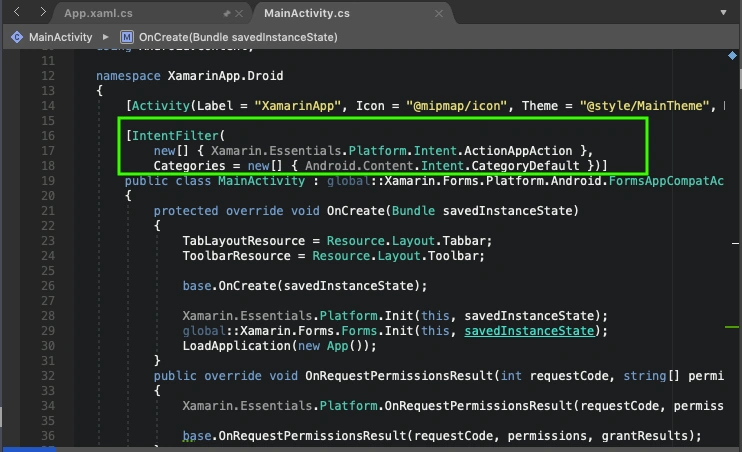
Now, add Intentfilter for App Action in your MainActivity.cs class. Refer to the below image,
MainActivity.cs
namespace XamarinApp.Droid
{
    [Activity(Label = "XamarinApp", Icon = "@mipmap/icon", Theme = "@style/MainTheme", MainLauncher = true, ConfigurationChanges = ConfigChanges.ScreenSize | ConfigChanges.Orientation)]

    [IntentFilter(
        new[] { Xamarin.Essentials.Platform.Intent.ActionAppAction },
        Categories = new[] { Android.Content.Intent.CategoryDefault })]
    public class MainActivity : global::Xamarin.Forms.Platform.Android.FormsAppCompatActivity
    {
        protected override void OnCreate(Bundle savedInstanceState)
        {
            TabLayoutResource = Resource.Layout.Tabbar;
            ToolbarResource = Resource.Layout.Toolbar;

            base.OnCreate(savedInstanceState);

            Xamarin.Essentials.Platform.Init(this, savedInstanceState);
            global::Xamarin.Forms.Forms.Init(this, savedInstanceState);
            LoadApplication(new App());
        }
        public override void OnRequestPermissionsResult(int requestCode, string[] permissions, [GeneratedEnum] Android.Content.PM.Permission[] grantResults)
        {
            Xamarin.Essentials.Platform.OnRequestPermissionsResult(requestCode, permissions, grantResults);

            base.OnRequestPermissionsResult(requestCode, permissions, grantResults);
        }
        protected override void OnResume()
        {
            base.OnResume();

            Xamarin.Essentials.Platform.OnResume(this);
        }

        protected override void OnNewIntent(Intent intent)
        {
            base.OnNewIntent(intent);

            Xamarin.Essentials.Platform.OnNewIntent(intent);
        }

    }
}
iOS Setup
Add below code in AppDelegate.cs to handle App Action in your iOS app.
AppDelegate.cs
[Register("AppDelegate")]
    public partial class AppDelegate : global::Xamarin.Forms.Platform.iOS.FormsApplicationDelegate
    {
        public override bool FinishedLaunching(UIApplication app, NSDictionary options)
        {
            Xamarin.Calabash.Start();
            global::Xamarin.Forms.Forms.Init();
            LoadApplication(new App());

            return base.FinishedLaunching(app, options);
        }

        public override void PerformActionForShortcutItem(UIApplication application, UIApplicationShortcutItem shortcutItem, UIOperationHandler completionHandler)
        {
            Platform.PerformActionForShortcutItem(application, shortcutItem, completionHandler);
        }
    }
Add Shortcuts
Now add App shortcuts in your App.Xaml.cs class OnStart Method.
The following properties can be set on an AppAction,
- Id: A unique identifier used to respond to the action tap.
- Title: the visible title to display.
- Subtitle: If supported a sub-title to display under the title.
- Icon: Must match icons in the corresponding resources directory on each platform.
App.xaml.cs
protected async override void OnStart()
        {
            try
            {
                await AppActions.SetAsync(
                    new AppAction("app_info", "App Info", icon: "info.png"),
                    new AppAction("battery_info", "Battery Info",icon:"battery.png"));
            }
            catch (FeatureNotSupportedException ex)
            {
                Debug.WriteLine("App Actions not supported");
            }
        }
Responding To Actions
Now, Register actions for shortcuts in App.xaml.cs constructor.
When an app action is selected the OnAppAction event will be sent with information as to which action was selected.
App.xaml.cs
public App()
        {
            InitializeComponent();

            MainPage = new NavigationPage(new MainPage());

            AppActions.OnAppAction += AppActions_OnAppAction;
        }

        void AppActions_OnAppAction(object sender, AppActionEventArgs e)
        {
            if (Application.Current != this && Application.Current is App app)
            {
                AppActions.OnAppAction -= app.AppActions_OnAppAction;
                return;
            }
            Device.BeginInvokeOnMainThread(async () =>
            {
                Page pageName=new Page();
                if(e.AppAction.Id == "battery_info")
                {
                    pageName=new BatteryInfoPage();
                }
                else if(e.AppAction.Id == "app_info")
                {
                    pageName = new AppInfoPage();
                }

                if (pageName != null)
                {
                    await Application.Current.MainPage.Navigation.PopToRootAsync();
                    await Application.Current.MainPage.Navigation.PushAsync(pageName);
                }
            });
        }
FeatureNotSupportedException
If App Actions are not supported on the specific version of the operating system a FeatureNotSupportedException will be thrown.
Full code
You will get the full source code here.
App.xaml.cs
using System;
using Xamarin.Forms;
using Xamarin.Forms.Xaml;
using Xamarin.Essentials;
using System.Diagnostics;

namespace XamarinApp
{
    public partial class App : Application
    {
        public App()
        {
            InitializeComponent();

            MainPage = new NavigationPage(new MainPage());

            AppActions.OnAppAction += AppActions_OnAppAction;
        }

        void AppActions_OnAppAction(object sender, AppActionEventArgs e)
        {
            if (Application.Current != this && Application.Current is App app)
            {
                AppActions.OnAppAction -= app.AppActions_OnAppAction;
                return;
            }
            Device.BeginInvokeOnMainThread(async () =>
            {
                Page pageName=new Page();
                if(e.AppAction.Id == "battery_info")
                {
                    pageName=new BatteryInfoPage();
                }
                else if(e.AppAction.Id == "app_info")
                {
                    pageName = new AppInfoPage();
                }

                if (pageName != null)
                {
                    await Application.Current.MainPage.Navigation.PopToRootAsync();
                    await Application.Current.MainPage.Navigation.PushAsync(pageName);
                }
            });
        }

        protected async override void OnStart()
        {
            try
            {
                await AppActions.SetAsync(
                    new AppAction("app_info", "App Info", icon: "info.png"),
                    new AppAction("battery_info", "Battery Info",icon:"battery.png"));
            }
            catch (FeatureNotSupportedException ex)
            {
                Debug.WriteLine("App Actions not supported");
            }
        }

        protected override void OnSleep()
        {
        }

        protected override void OnResume()
        {
        }
    }
}
Result
iOS Simulator
Android
Conclusion
I hope you have understood how to add shortcuts using Xamarin.Essentials in Xamarin.Forms App
References
https://docs.microsoft.com/en-us/xamarin/essentials/app-actions
Thanks for reading. Please share your comments and feedback. Happy Coding :)
Join the conversation! Your thoughts help the community grow.