

Introduction
Today, we will learn how to create an Image Button in Xamarin Forms. Most of you will think, why? Isn't there an Image property of Buttons? Yes, there is an Image property in Button but that doesn't meet the needs completely since it adds the image as an icon to the text in the button. So to solve this problem, I came up with this tweak.
Ingredients
- Visual Studio 2012 or higher/Xamarin Studio 5
- Xamarin Forms 1 or higher
Procedure
1. To create a new application in Visual Studio we will select New Project from the Welcome screen.
2. Select Mobile Apps from the installed templates of Visual Studio under C#. Now as you can see we have two options for a Blank App, one is Xamarin.Forms Portable and Xamarin.Forms Shared. We will be working on Xamarin.Forms Portable.

3. Now you can see that the solution file contains the 4 projects XamarinSample (Portable), XamarinSample.Android, XamarinSample.iOS and XamarinSample.WinPhone. We will now right-click on the first project, XamarinSample (Portable), and click on Add -> New Item from the context menu.

4. Now we will select Forms XAML Page from the dialog and name it.

5. Once the Forms XAML Page is added to the project, open the App.Cs and write the following code in the constructor:
- MainPage = new NavigationPage(new MainPage());
The App.cs will look like this:

6. Now go back to the Forms XAML Page we created in Step 4, in other words the MainPage that we called in the constructor. And replace the Label tags with:
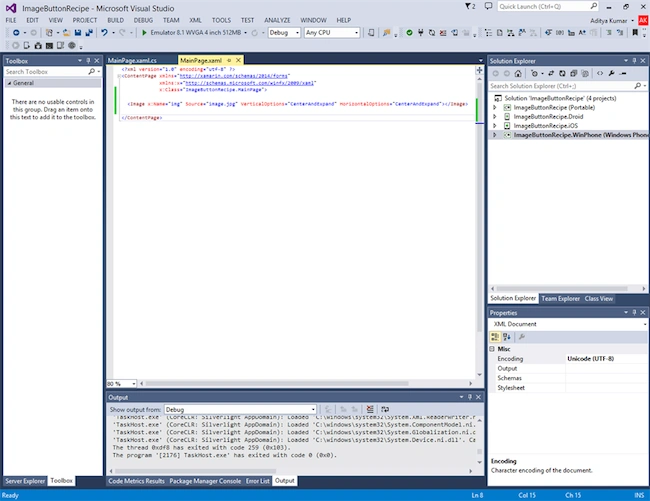
- <Image x:Name="img" Source="image.jpg" VerticalOptions="CenterAndExpand" HorizontalOptions="CenterAndExpand"></Image>
The MainPage.xaml will now look like this:
7. Now we will write the Tap Gesture Recognizers code in MainPage.xaml.cs as in the following:
- //Creating TapGestureRecognizers
- var tapImage = new TapGestureRecognizer();
- //Binding events
- tapImage.Tapped += tapImage_Tapped;
- //Associating tap events to the image buttons
- img.GestureRecognizers.Add(tapImage);
- void tapImage_Tapped(object sender, EventArgs e)
- {
- // handle the tap
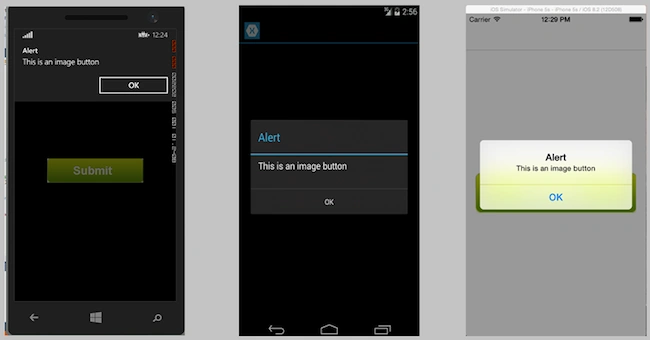
- DisplayAlert("Alert", "This is an image button", "OK");
- }
The MainPage.xaml.cs will now look like this:

8. Now add the "image.jpg" in all the three projects of the various OSs in the following way:
- Android: Add the file in ImageButtonRecipe.Droid -> Resources -> drawable folder.
- iOS: Add the file in ImageButtonRecipe.iOS -> Resources.
- WinPhone: Add the file in ImageButtonRecipe.WinPhone.
9. Now the Image Button will look like this across all the devices:
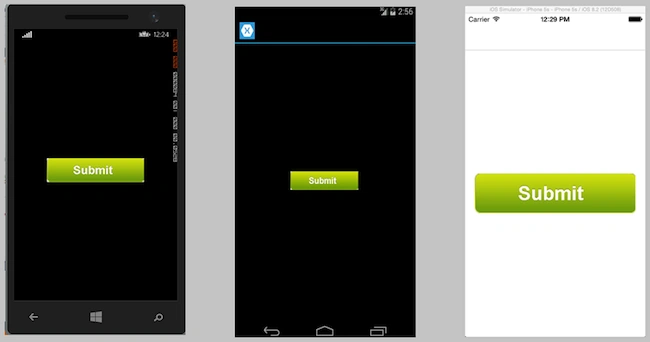
10. On clicking these buttons it will display a pop-up message.
This is the simplest way to have an image button in your Xamarin.Forms app across all your devices.
Make some beautiful apps using Xamarin.Forms.
PEDRO RENE GONZALEZPosted Nov 20, 2017, 12:29 AM
Greate job man and thx
Nuri YilmazPosted Jul 20, 2017, 6:56 AM
It's look like ok but... how you can avoid double (or more) taps as Click. You know button behavior, it accept only "click".
Vaikesh K PPosted Aug 14, 2015, 1:39 AM
Nice Work :)
Sibeesh VenuPosted Apr 29, 2015, 2:23 AM
Good One
Karthik Muthu KaruppanPosted Apr 23, 2015, 11:36 AM
nice
NitinPosted Apr 18, 2015, 12:52 AM
good one
Santhakumar MunuswamyPosted Apr 17, 2015, 11:07 PM
Thanks for nice one