

Introduction
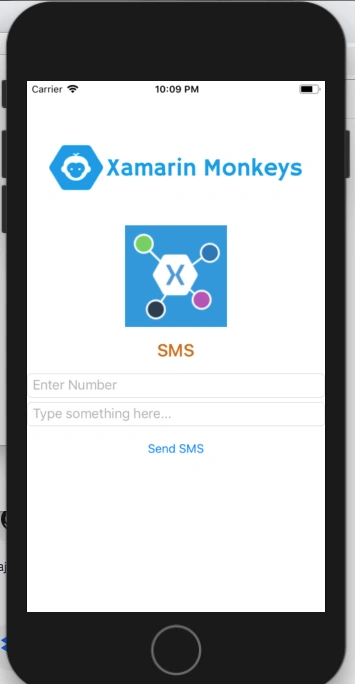
The Xamarin.Forms code runs on multiple platforms - each of which has its own filesystem. This means that reading and writing files is most easily done using the native file APIs on each platform. Alternatively, embedded resources are a simpler solution to distribute the data files with an app.
Xamarin.Essentials

Xamarin.Essentials plugin provides 20+ cross-platform APIs for mobile application development. Xamarin.Essentials API works with all Xamarin.Forms, Xamarin.Android, Xamarin.iOS, or UWP applications that can be accessed from shared code. When we are developing Xamarin with Android, we have both iOS and UWP apps, but now Xamarin.Essentials overcomes the problem, and developers can access every native platform API using C#. This plugin provides many APIs so initially, there is no need for more plugins in Xamarin. Xamarin.Essentials plugin impacts your app's minimum size.
Platform Support
Xamarin.Essentials supports the following platforms and operating systems,
| Platform | Version |
| Android | 4.4 (API 19) or earlier |
| iOS | 10.0 or higher |
| UWP | 10.0.16299.0 or earlier |
Prerequisites
- Visual Studio 2017 (Windows or Mac)
Setting up a Xamarin.Forms Project
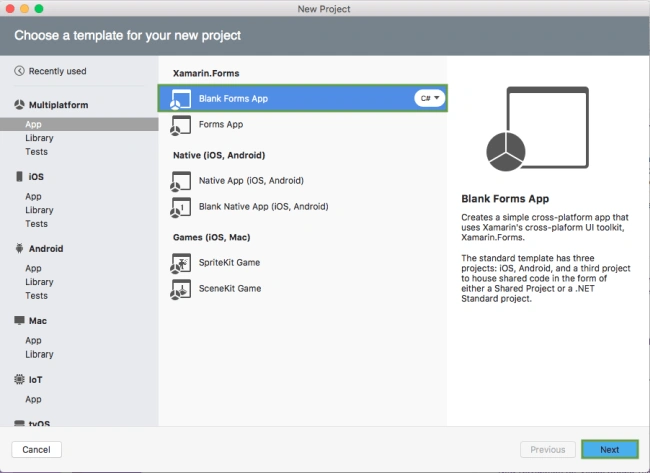
Start by creating a new Xamarin.Forms project. You’ll learn more by going through the steps yourself. Choose the Xamarin.Forms App Project under Cross-platform/App in the "New Project" dialog.
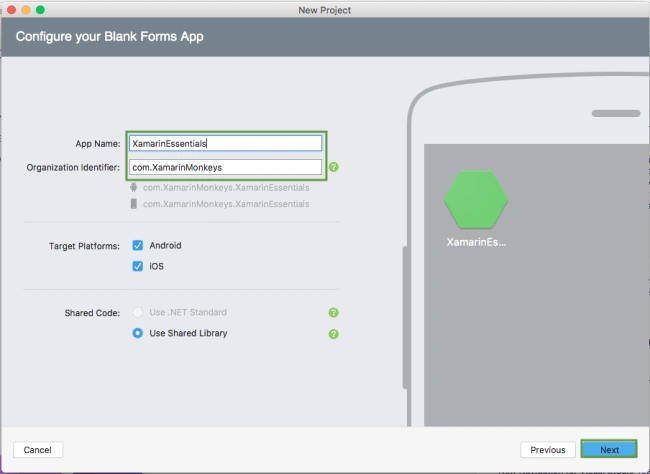
Name your app, select “Use Portable Class Library” for shared code, and target both - Android and iOS.
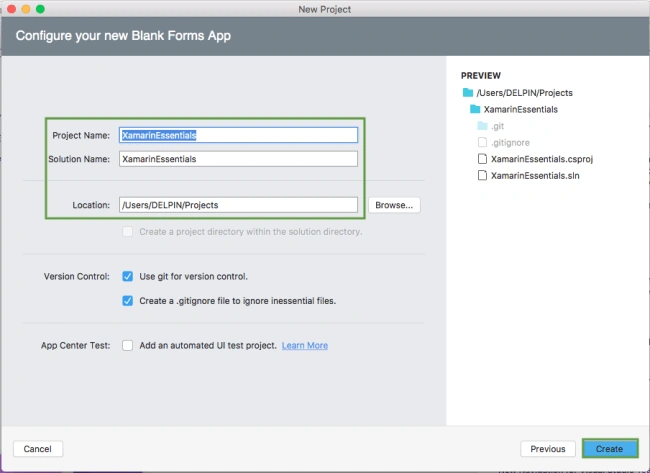
You probably want your project and solution to use the same name as your app. Put it in your preferred folder for projects and click "Create".
You now have a basic Xamarin.Forms app. Click the "Play" button to try it out.
Setting up the User Interface
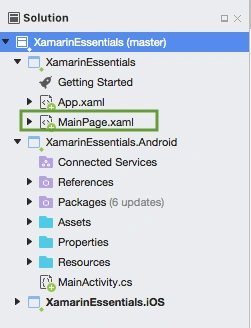
Go to MainPage.Xaml and write the following code.
MainPage.xaml
- <?xml version="1.0" encoding="utf-8" ?>
- <ContentPage xmlns="http://xamarin.com/schemas/2014/forms"
- xmlns:x="http://schemas.microsoft.com/winfx/2009/xaml"
- xmlns:local="clr-namespace:XamarinEssentials"
- x:Class="XamarinEssentials.MainPage">
- <StackLayout>
- <StackLayout HorizontalOptions="Center" VerticalOptions="Start">
- <Image Margin="0,50,0,0" x:Name="imgBanner" Source="banner.png" ></Image>
- <Image Margin="0,0,0,10" x:Name="imgXamarinEssential" Source="xamarinessential.png" ></Image>
- <Label Margin="0,0,0,10" FontAttributes="Bold" FontSize="Large" TextColor="#CA6F1E" HorizontalTextAlignment="Center" Text="SMS"></Label>
- <Entry x:Name="txtNumber" Placeholder="Enter Number"> </Entry>
- <Entry x:Name="txtMessage" Placeholder="Type something here..."> </Entry>
- <Button x:Name="btnSms" Text="Send SMS" Clicked="btnSendSms_Clicked"/>
- </StackLayout>
- </StackLayout>
- </ContentPage>
Add Xamarin Essentials
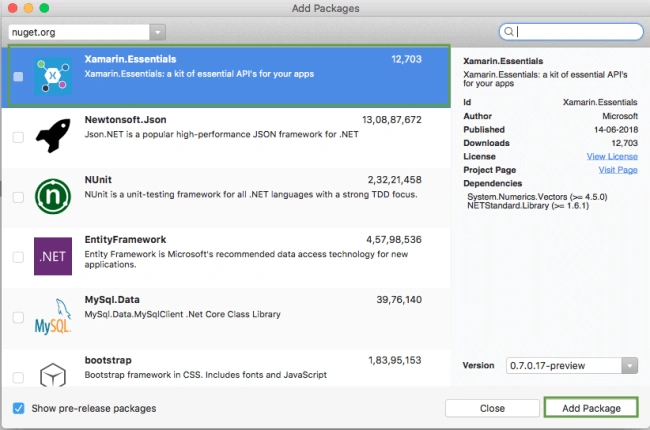
In this step, add Xamarin.Essentials to your project. You can install Xamarin.Essentials via NuGet, or you can browse the source code on GitHub.
Go to Solution Explorer and select your solution. Right-click and select "Manage NuGet Packages for Solution". Search for "Xamarin.Essentials" and add Package. Remember to install it for each project (PCL, Android, iO, and UWP).
Xamarin.Essentials requires platform-specific setup
Android
The following steps are necessary for Android.
- Xamarin.Essentials supports a minimum Android version of 4.4.
- Target Android version for compiling must be 8.1, API level 27.
In the Android project's MainActivity that is launched, the Xamarin.Essentials must be initialized in the OnCreate method.
MainActivity.cs
- Xamarin.Essentials.Platform.Init(this, bundle);
Xamarin.Essentials must receive any OnRequestPermissionsResult. Write the following code for runtime permission.
MainActivity.cs
- public override void OnRequestPermissionsResult(int requestCode, string[] permissions, [GeneratedEnum] Android.Content.PM.Permission[] grantResults)
- {
- Xamarin.Essentials.Platform.OnRequestPermissionsResult(requestCode, permissions, grantResults);
- base.OnRequestPermissionsResult(requestCode, permissions, grantResults);
- }
iOS
No additional set up required.
UWP
No additional set up required.
Limitation
- It supports the devices only, not Simulator/Emulator.
In this step, write the following code for sending the SMS.
MainPage.xaml.cs
- using Xamarin.Forms;
- using Xamarin.Essentials;
- namespace XamarinEssentials
- {
- public partial class MainPage : ContentPage
- {
- public MainPage()
- {
- InitializeComponent();
- }
- protected override void OnAppearing()
- {
- base.OnAppearing();
- }
- async void btnSendSms_Clicked(object sender, System.EventArgs e)
- {
- if(!string.IsNullOrEmpty(txtNumber.Text))
- {
- await SendSms(txtMessage.Text,txtNumber.Text);
- }
- }
- public async Task SendSms(string messageText, string recipient)
- {
- try
- {
- var message = new SmsMessage(messageText, recipient);
- await Sms.ComposeAsync(message);
- }
- catch (FeatureNotSupportedException ex)
- {
- await DisplayAlert("Failed", "Sms is not supported on this device.", "OK");
- }
- catch (Exception ex)
- {
- await DisplayAlert("Failed", ex.Message, "OK");
- }
- }
- }
- }
Click the "Play" button to try it out.
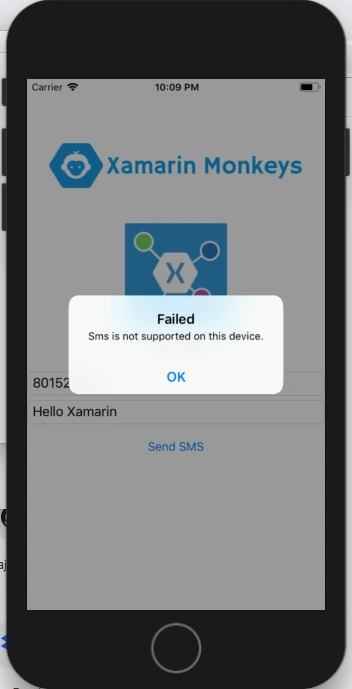
I hope you have understood how to send an SMS using Xamarin.Essentials in Xamarin.Forms.
Thanks for reading. Please share your comments and feedback.
Amy NguyenPosted Apr 2, 2021, 7:35 AM
How to test send SMS on device ?
Hassnain IqbalPosted Oct 18, 2018, 9:22 PM
Hi! can u explain var message = new SmsMessage(messageText, recipient); await Sms.ComposeAsync(message); line 29 bc recipient is giving me error here