

In this walk through we will discuss the detailed structure and concepts of code sharing in Xamarin.Forms. Before going into this article it will be good and helpful if you go through the following article to get into the flow of Xamarin.
Only by having a deep knowledge in Xamarin will help you to maximize your ability to share code.
When we start to create a cross-platform project we will get a N+1 projects under a solution, where N represents the number of platforms you are targeting and the extra project will carry the code which will be shared across all your platforms.
Before going further you must be aware of the .NET frameworks used in Xamarin. The versions of the .NET Framework that are used in Xamarin.iOS, Xamarin.Android, and Windows Phone are not full versions of the .NET Framework. They are smaller subsets designed to work more efficiently on mobile platforms.
When we start to share code using Xamarin.Forms, we have universally accepted two methodologies of sharing:
- Portable Class Libraries
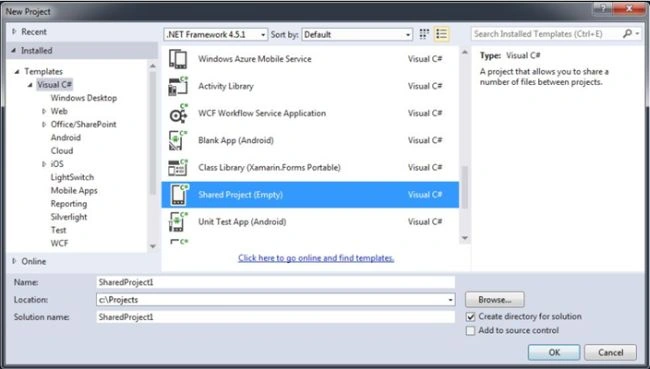
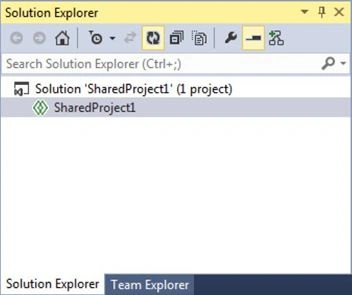
- Shared Projects
We can discuss more about those methods in the following sessions. According to your needs you can choose one of those methods in your project.
Portable Class Libraries
Portable Class Libraries or PCLs are nearly same as normal class libraries with limited functionalities. PCLs are designed with an idea of sharing code across multiple projects that target different versions of the .NET Framework. When you are working with a PCL, you have the ability to configure it to target the frameworks that are appropriate for your application. To get a full list of supported versions of the .NET Framework as well as functionality, just go through the documentation on MSDN about Cross-Platform Development with the PCL.
Let's start by creating a new project in Visual Studio or Xamarin Studio and select the Blank App (Xamarin.Forms Portable) template under Visual C# family. Give your new project a name, e.g. PortableDemo and click OK.
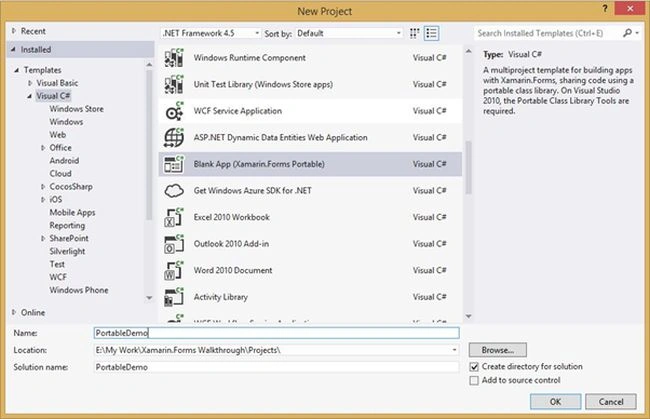
We will get our solutions created similar to the following screenshot:
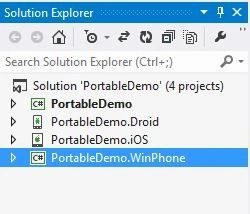
Here the project name PortableDemo will carry all the shared code, and all the other projects, PortableDemo.Droid, PortableDemo.iOS and PortableDemo.WinPhone will carry the Android, iOS and Windows Phone platform codes respectively.
Advantages
- Non-platform specific code can be isolated in a separate project.
- The PCL project can be referenced easily by other projects in the solution.
- Shared codes in PCLs can be shared with other applications via a compiled.dll.
Disadvantages
- PCLs may not include any platform specific codes or classes available in MonoTouch of Mono for Android.
- PCLs can't be referenced due to the sharing of same class libraries between multiple platforms.
- PCLs only contain access to a subset of the .NET Framework.
Vaikesh K PPosted Dec 13, 2015, 10:47 PM
Thanks Ankur Mistry
Vaikesh K PPosted Dec 13, 2015, 10:47 PM
Thanks Kadi Maz
Ankur MistryPosted Dec 12, 2015, 7:41 AM
nice share
Kadi MazPosted Nov 5, 2015, 5:04 AM
Good One, waiting for next
Vaikesh K PPosted Sep 12, 2015, 6:16 AM
Thanks Santhakumar Munuswamy :)
Vaikesh K PPosted Sep 12, 2015, 6:07 AM
Thanks Sumit Joshi
Vaikesh K PPosted Sep 12, 2015, 6:07 AM
Thanks Mohammed Ibrahim :)
Vaikesh K PPosted Sep 12, 2015, 5:53 AM
Thanks Pankaj Kumar Choudhary :)
Vaikesh K PPosted Sep 12, 2015, 5:52 AM
Thanks Karthikeyan K :)
Vaikesh K PPosted Sep 12, 2015, 5:44 AM
Thanks Karthikeyan K :)
Santhakumar MunuswamyPosted Sep 5, 2015, 4:08 AM
Thanks for nice share
Sumit JoshiPosted Sep 4, 2015, 12:19 PM
Good one.
Mohammed IbrahimPosted Sep 3, 2015, 11:38 AM
nice
Pankaj Kumar ChoudharyPosted Sep 3, 2015, 8:00 AM
Nice One Sir..............
Karthikeyan KPosted Sep 3, 2015, 5:53 AM
Good one sir...Thanks for sharing