

Introduction
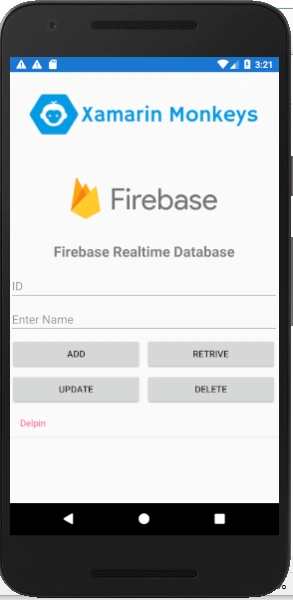
Xamarin.Forms code runs on multiple platforms - each of which has its own filesystem. This means that reading and writing files is most easily done using the native file APIs on each platform. Alternatively, embedded resources are a simpler solution to distribute data files with an app.
Firebase
Firebase gives you functionality like analytics, databases, messaging and crash reporting so you can move quickly and focus on your users.

Firebase is a back-end platform for building Web, Android, and iOS applications. It offers real-time database, different APIs, multiple authentication types and hosting platform. This is an introductory tutorial, which covers the basics of the Firebase platform and explains how to deal with its various components and sub-components.
Build apps with Firebase
- Real-time Database
- Storage
- Notifications
- Authentication
- Hosting
Prerequisites
- Visual Studio 2017 or Later(Windows or Mac)
Setting up a Xamarin.Forms Project
Start by creating a new Xamarin.Forms project. You’ll learn more by going through the steps yourself or download the source from the following GitHub link -
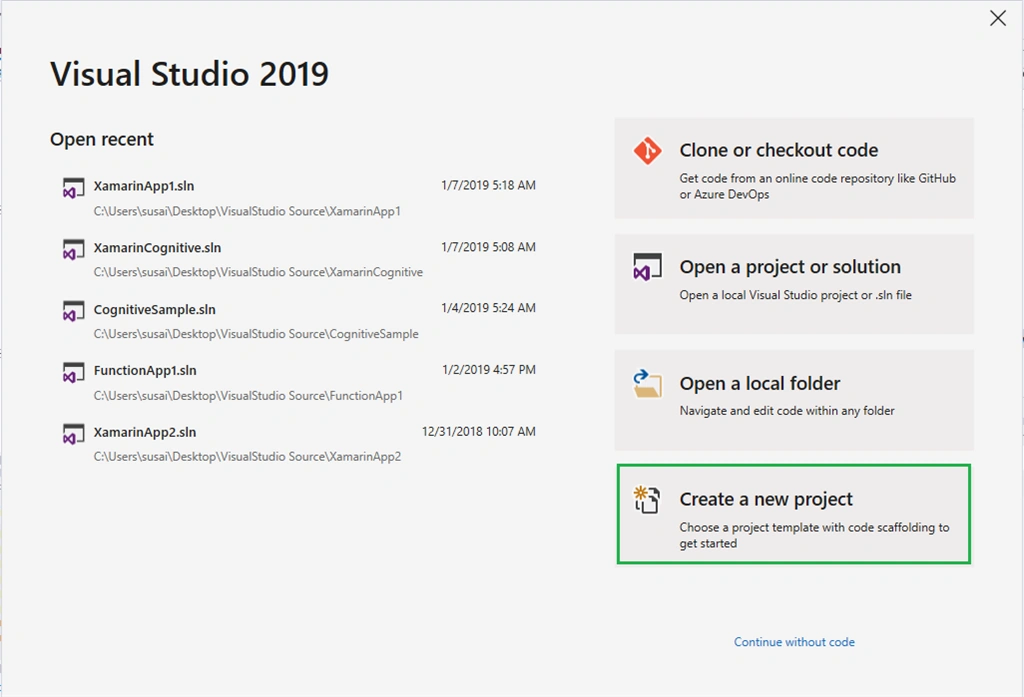
Visual Studio 2019 has more options in the opening window. Clone or check out the code from any repository or, open a project or solution for your computer.
Now, you need to click "Create a new project".
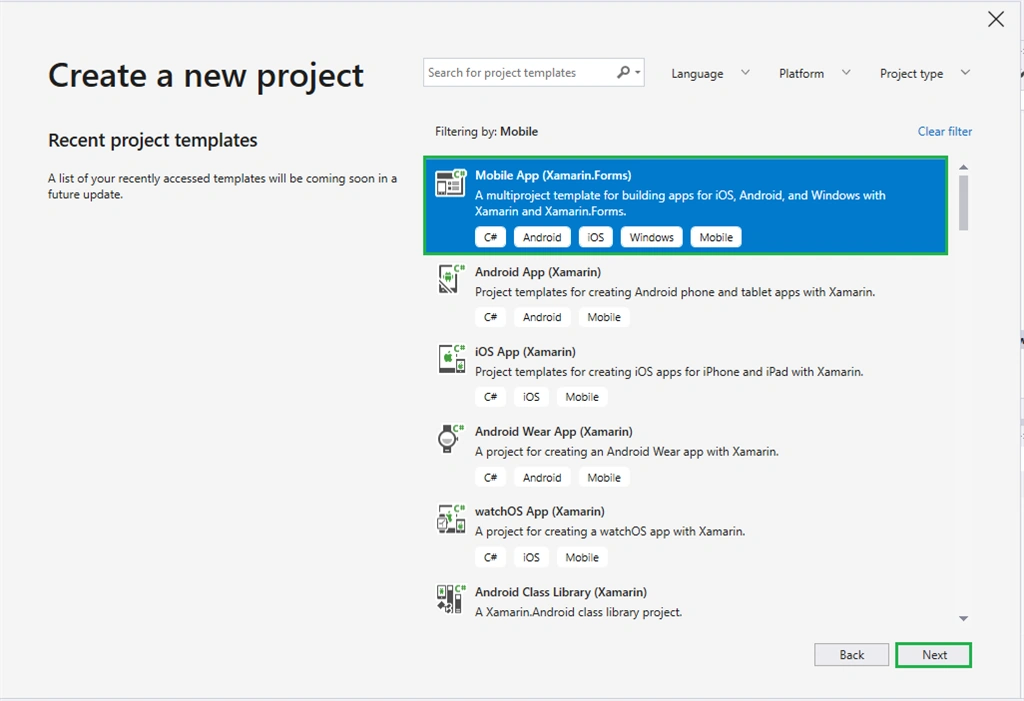
Now, filter by Project Type: Mobile.
Choose the Mobile App (Xamarin. forms) project under C# and Mobile.
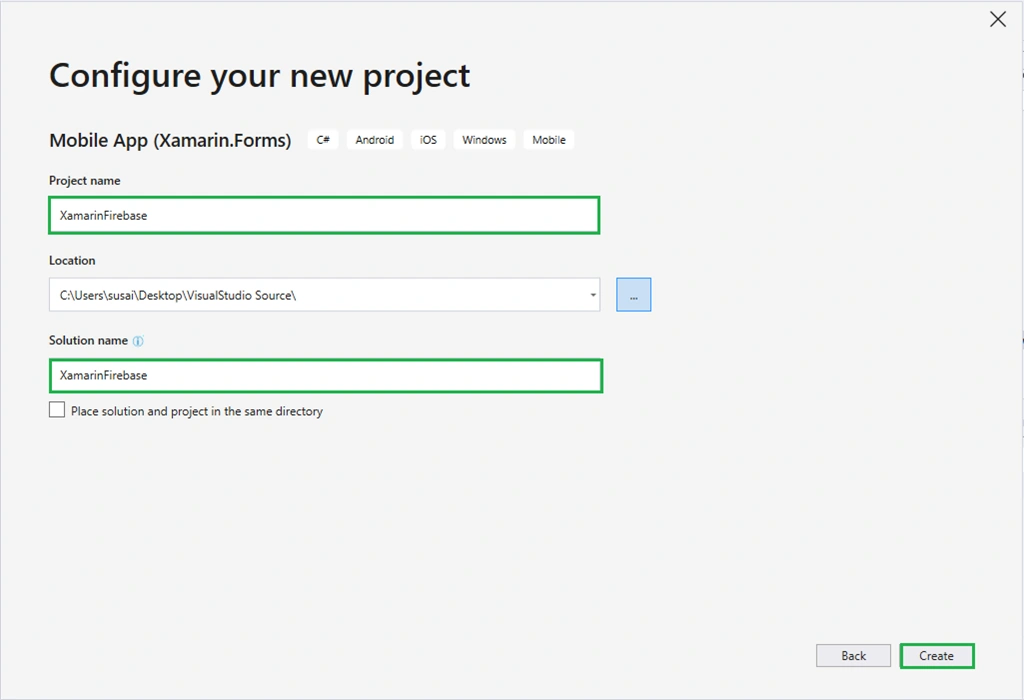
Name your app. You probably want your project and solution to use the same name as your app. Put it on your preferred location for projects and click "Create".
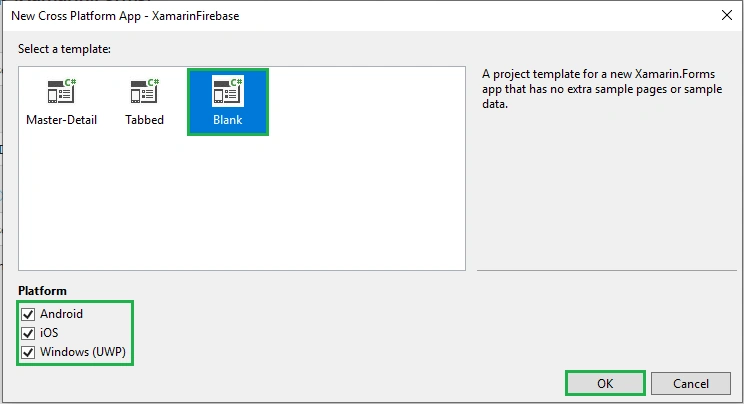
Now, select the blank app and target platforms - Android, iOS and Windows (UWP).
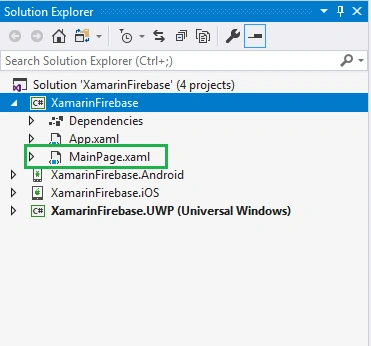
Subsequently, go to the solution. In there, you get all the files and sources of your project (.NET Standard). Now, select XAML page and double-click to open the MainPage.Xaml page.
You now have a basic Xamarin.Forms app. Click the "Play" button to try it out.
Create a project in Firebase
In this step, create a project in Firebase. Go to the following link.
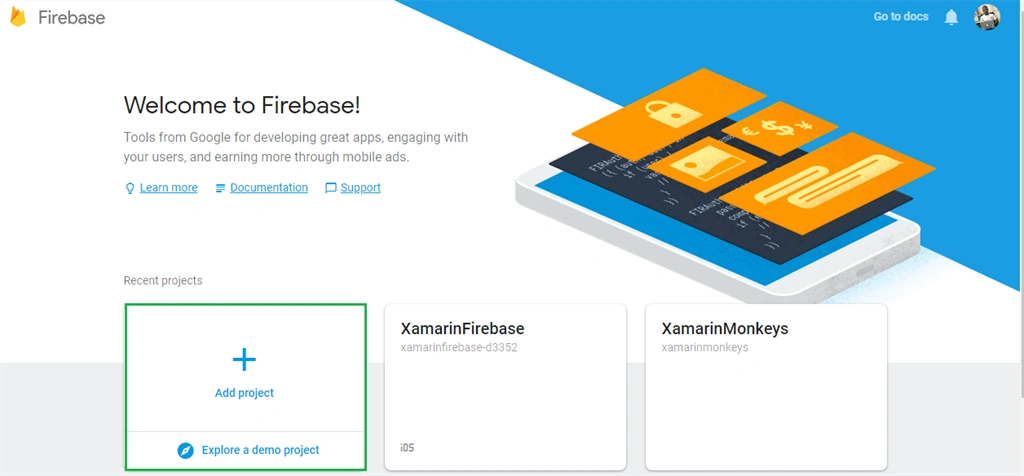
Click "Add Project".
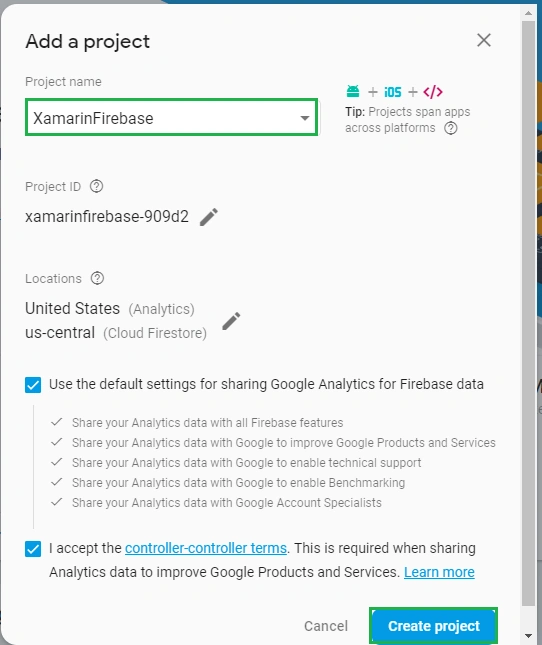
Now, give the project a name and select your country. Then, read the terms. Afterward, click "Create project".
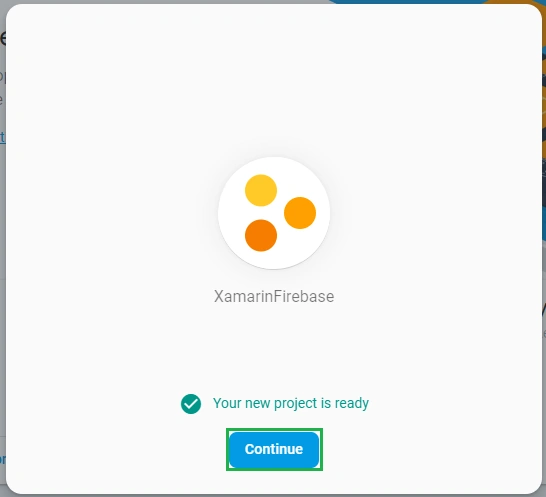
Now, your project is ready, click "Continue".
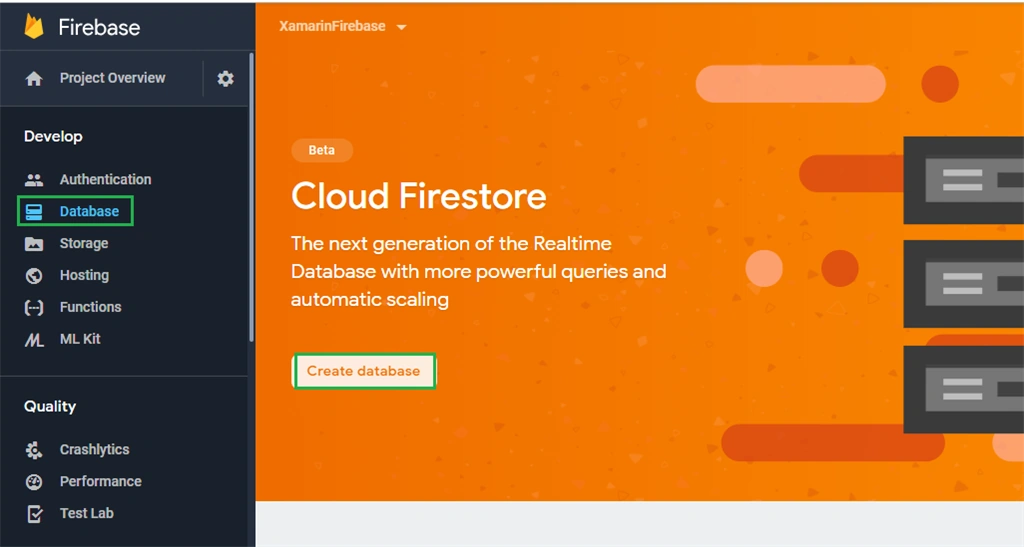
In this step, choose Database under the Project Overview. Now, click "Create database".
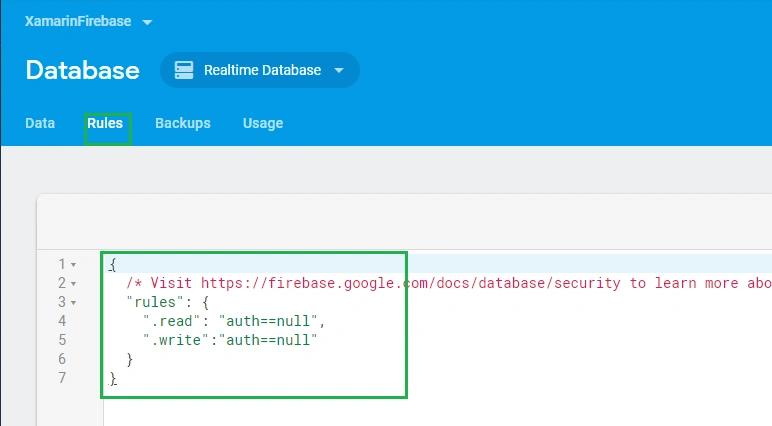
In this step, write the read and write rules.
- {
- /* Visit https://firebase.google.com/docs/database/security to learn more about security rules. */
- "rules": {
- ".read": "auth==null",
- ".write":"auth==null"
- }
- }
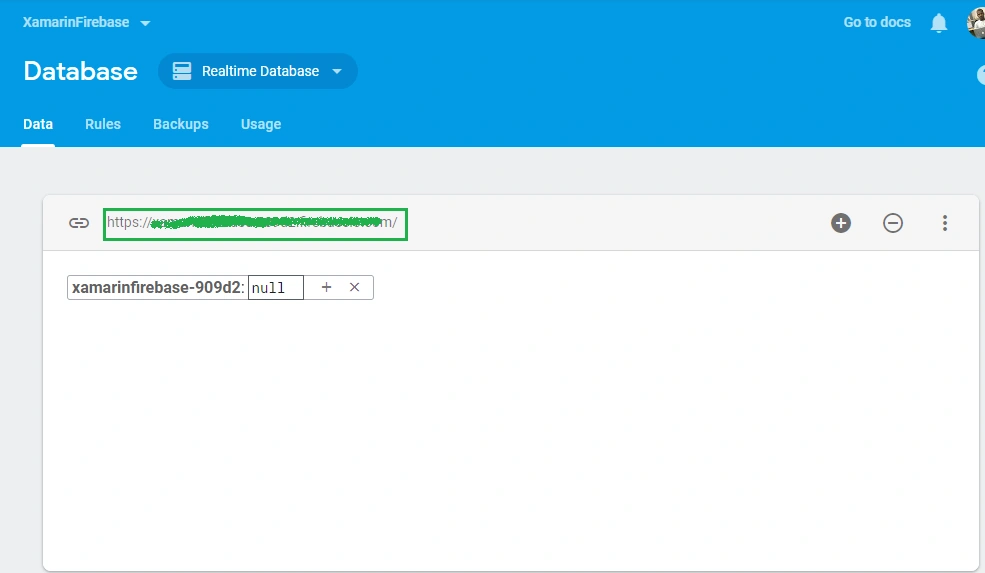
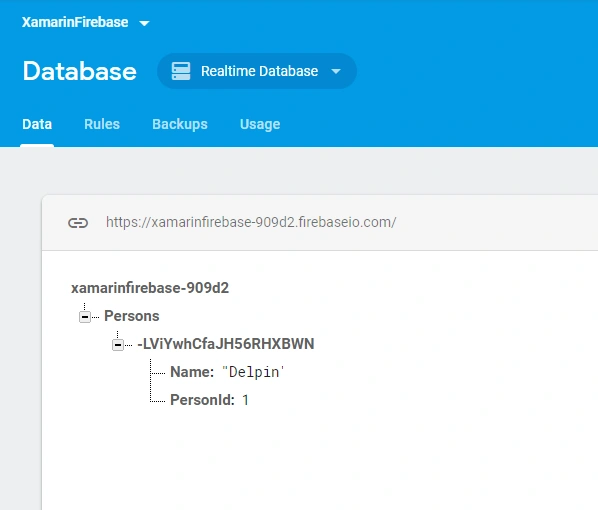
Now, your Firebase Realtime Database is ready. You can use your database API URI here.
Setting up the User Interface
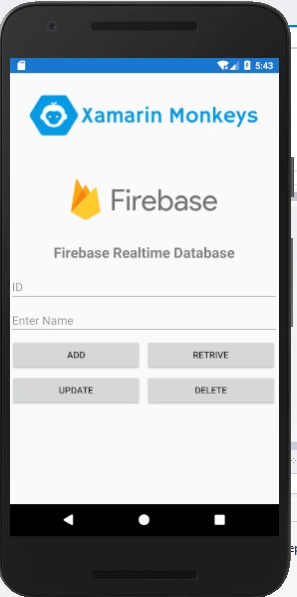
Go to MainPage.Xaml and write the following code.
MainPage.xaml
- <?xml version="1.0" encoding="utf-8" ?>
- <ContentPage xmlns="http://xamarin.com/schemas/2014/forms"
- xmlns:x="http://schemas.microsoft.com/winfx/2009/xaml"
- xmlns:local="clr-namespace:XamarinFirebase"
- x:Class="XamarinFirebase.MainPage">
- <StackLayout>
- <StackLayout>
- <StackLayout HorizontalOptions="Center" VerticalOptions="Start">
- <Image x:Name="imgBanner" Source="banner.png" ></Image>
- <Image Margin="0,0,0,10" HeightRequest="100" Source="firebase.png" ></Image>
- <Label Margin="0,0,0,10" Text="Firebase Realtime Database" FontAttributes="Bold" FontSize="Large" TextColor="Gray" HorizontalTextAlignment="Center" ></Label>
- <Entry x:Name="txtId" Placeholder="ID"></Entry>
- <Entry x:Name="txtName" Placeholder="Enter Name"></Entry>
- <StackLayout HorizontalOptions="CenterAndExpand" Orientation="Horizontal">
- <Button x:Name="btnAdd" WidthRequest="200" Text="Add" Clicked="BtnAdd_Clicked"/>
- <Button x:Name="btnRetrive" WidthRequest="200" Text="Retrive" Clicked="BtnRetrive_Clicked"/>
- </StackLayout>
- <StackLayout HorizontalOptions="CenterAndExpand" Orientation="Horizontal">
- <Button x:Name="btnUpdate" WidthRequest="200" Text="Update" Clicked="BtnUpdate_Clicked" />
- <Button x:Name="btnDelete" WidthRequest="200" Text="Delete" Clicked="BtnDelete_Clicked" />
- </StackLayout>
- <ListView x:Name="lstPersons">
- <ListView.ItemTemplate>
- <DataTemplate>
- <TextCell Text="{Binding Name}"></TextCell>
- </DataTemplate>
- </ListView.ItemTemplate>
- </ListView>
- </StackLayout>
- </StackLayout>
- </StackLayout>
- </ContentPage>
Click the "Play" button to try it out.
NuGet Packages
Now, add the following NuGet packages.
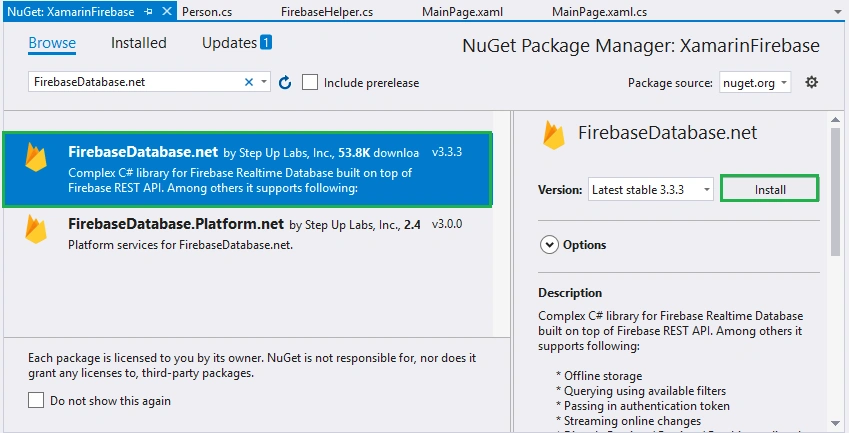
- FirebaseDatabase.net
Add FirebaseDatabase.net NuGet
Go to Solution Explorer and select your solution. Right-click and select "Manage NuGet Packages for Solution". Search for "FirebaseDatabase.net" and add Package. Remember to install it for each project (.NET Standard, Android, iOS, and UWP).
Create a Model
In this step, you can create a model for deserializing your response.
Person.cs
- namespace XamarinFirebase.Model
- {
- public class Person
- {
- public int PersonId { get; set; }
- public string Name { get; set; }
- }
- }
Connect Firebase
Now, write the following code to connect to your Firebase Realtime Database.
- using Firebase.Database;
- using Firebase.Database.Query;
- FirebaseClient firebase = new FirebaseClient("https://xamarinfirebase-xxxxx.firebaseio.com/");
Read All
Now, write the code to read all data from Firebase Realtime Database.
FirebaseHelper.cs
- public async Task<List<Person>> GetAllPersons()
- {
- return (await firebase
- .Child("Persons")
- .OnceAsync<Person>()).Select(item => new Person
- {
- Name = item.Object.Name,
- PersonId = item.Object.PersonId
- }).ToList();
- }
- FirebaseHelper firebaseHelper = new FirebaseHelper();
- public MainPage()
- {
- InitializeComponent();
- }
- protected async override void OnAppearing()
- {
- base.OnAppearing();
- var allPersons = await firebaseHelper.GetAllPersons();
- lstPersons.ItemsSource = allPersons;
- }
Click the "Play" button to try it out.
Insert
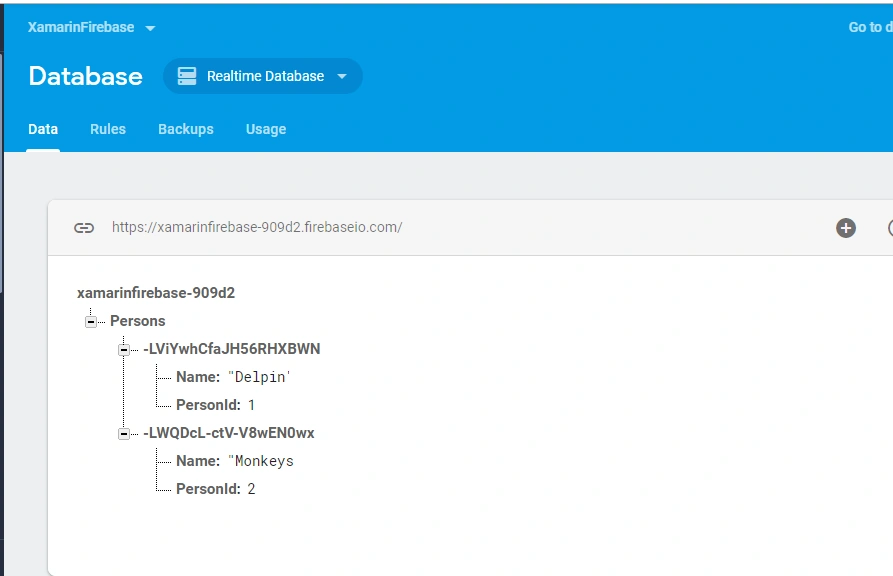
Now, write the following code to insert data into Firebase Realtime Database.
- public async Task AddPerson(int personId,string name)
- {
- await firebase
- .Child("Persons")
- .PostAsync(new Person() { PersonId=personId, Name = name });
- }
- private async void BtnAdd_Clicked(object sender, EventArgs e)
- {
- await firebaseHelper.AddPerson(Convert.ToInt32(txtId.Text), txtName.Text);
- txtId.Text = string.Empty;
- txtName.Text = string.Empty;
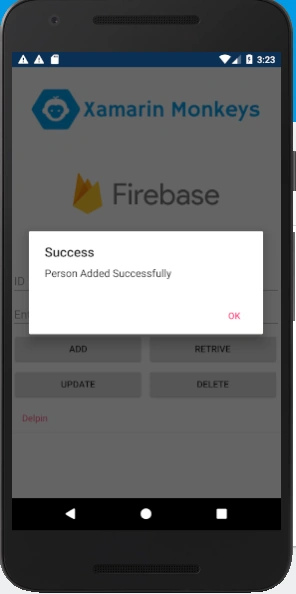
- await DisplayAlert("Success", "Person Added Successfully", "OK");
- var allPersons = await firebaseHelper.GetAllPersons();
- lstPersons.ItemsSource = allPersons;
- }
Click the "Play" button to try it out.
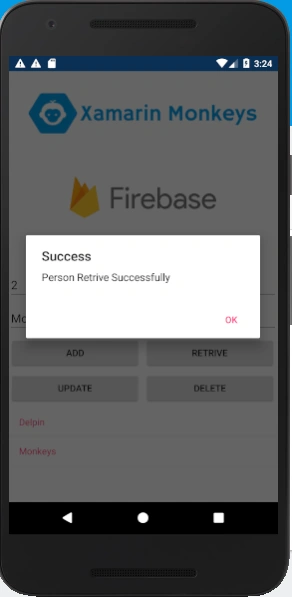
Read
Now, write the following code to read data from Firebase Realtime Database.
- public async Task<Person> GetPerson(int personId)
- {
- var allPersons = await GetAllPersons();
- await firebase
- .Child("Persons")
- .OnceAsync<Person>();
- return allPersons.Where(a => a.PersonId == personId).FirstOrDefault();
- }
- private async void BtnRetrive_Clicked(object sender, EventArgs e)
- {
- var person = await firebaseHelper.GetPerson(Convert.ToInt32(txtId.Text));
- if(person!=null)
- {
- txtId.Text = person.PersonId.ToString();
- txtName.Text = person.Name;
- await DisplayAlert("Success", "Person Retrive Successfully", "OK");
- }
- else
- {
- await DisplayAlert("Success", "No Person Available", "OK");
- }
- }
Click the "Play" button to try it out.
Update
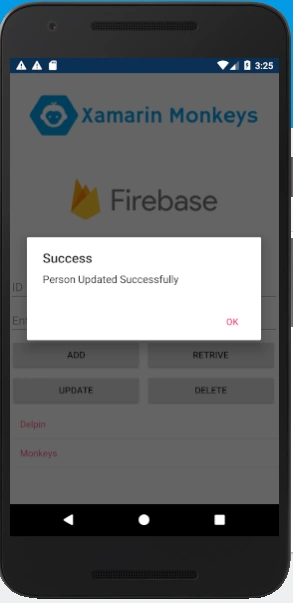
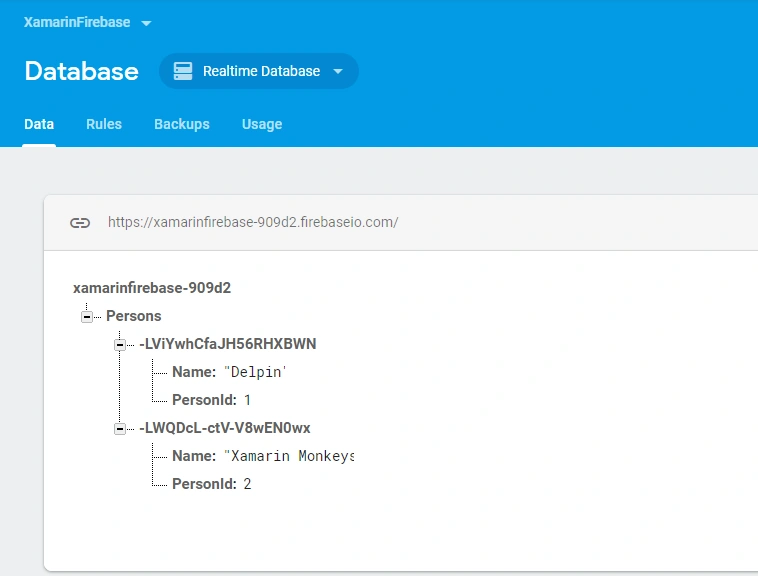
Now, write the following code to update data to Firebase Realtime Database.
- public async Task UpdatePerson(int personId, string name)
- {
- var toUpdatePerson = (await firebase
- .Child("Persons")
- .OnceAsync<Person>()).Where(a => a.Object.PersonId == personId).FirstOrDefault();
- await firebase
- .Child("Persons")
- .Child(toUpdatePerson.Key)
- .PutAsync(new Person() { PersonId = personId, Name = name });
- }
- private async void BtnUpdate_Clicked(object sender, EventArgs e)
- {
- await firebaseHelper.UpdatePerson(Convert.ToInt32(txtId.Text), txtName.Text);
- txtId.Text = string.Empty;
- txtName.Text = string.Empty;
- await DisplayAlert("Success", "Person Updated Successfully", "OK");
- var allPersons = await firebaseHelper.GetAllPersons();
- lstPersons.ItemsSource = allPersons;
- }
Click the Play button to try it out.
Delete
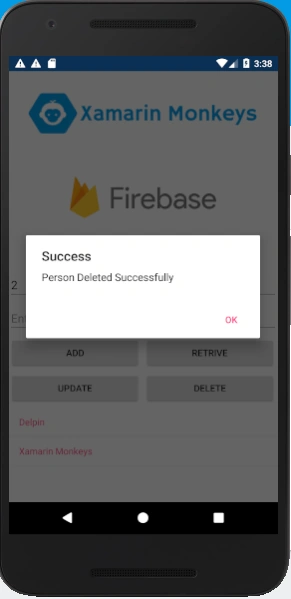
Now, write the following code to delete data from Firebase Realtime Database.
- public async Task DeletePerson(int personId)
- {
- var toDeletePerson = (await firebase
- .Child("Persons")
- .OnceAsync<Person>()).Where(a => a.Object.PersonId == personId).FirstOrDefault();
- await firebase.Child("Persons").Child(toDeletePerson.Key).DeleteAsync();
- }
- private async void BtnDelete_Clicked(object sender, EventArgs e)
- {
- await firebaseHelper.DeletePerson(Convert.ToInt32(txtId.Text));
- await DisplayAlert("Success", "Person Deleted Successfully", "OK");
- var allPersons = await firebaseHelper.GetAllPersons();
- lstPersons.ItemsSource = allPersons;
- }
Click the Play button to try it out.
Full code
FirebaseHelper.cs
- using XamarinFirebase.Model;
- using Firebase.Database;
- using Firebase.Database.Query;
- using System.Linq;
- using System.Threading.Tasks;
- using Newtonsoft.Json;
- namespace XamarinFirebase.Helper
- {
- public class FirebaseHelper
- {
- FirebaseClient firebase = new FirebaseClient("https://xamarinfirebase-909d2.firebaseio.com/");
- public async Task<List<Person>> GetAllPersons()
- {
- return (await firebase
- .Child("Persons")
- .OnceAsync<Person>()).Select(item => new Person
- {
- Name = item.Object.Name,
- PersonId = item.Object.PersonId
- }).ToList();
- }
- public async Task AddPerson(int personId,string name)
- {
- await firebase
- .Child("Persons")
- .PostAsync(new Person() { PersonId=personId, Name = name });
- }
- public async Task<Person> GetPerson(int personId)
- {
- var allPersons = await GetAllPersons();
- await firebase
- .Child("Persons")
- .OnceAsync<Person>();
- return allPersons.Where(a => a.PersonId == personId).FirstOrDefault();
- }
- public async Task UpdatePerson(int personId, string name)
- {
- var toUpdatePerson = (await firebase
- .Child("Persons")
- .OnceAsync<Person>()).Where(a => a.Object.PersonId == personId).FirstOrDefault();
- await firebase
- .Child("Persons")
- .Child(toUpdatePerson.Key)
- .PutAsync(new Person() { PersonId = personId, Name = name });
- }
- public async Task DeletePerson(int personId)
- {
- var toDeletePerson = (await firebase
- .Child("Persons")
- .OnceAsync<Person>()).Where(a => a.Object.PersonId == personId).FirstOrDefault();
- await firebase.Child("Persons").Child(toDeletePerson.Key).DeleteAsync();
- }
- }
- }
MainPage.Xaml.cs
- using XamarinFirebase.Helper;
- using XamarinFirebase.Model;
- namespace XamarinFirebase
- {
- public partial class MainPage : ContentPage
- {
- FirebaseHelper firebaseHelper = new FirebaseHelper();
- public MainPage()
- {
- InitializeComponent();
- }
- protected async override void OnAppearing()
- {
- base.OnAppearing();
- var allPersons = await firebaseHelper.GetAllPersons();
- lstPersons.ItemsSource = allPersons;
- }
- private async void BtnAdd_Clicked(object sender, EventArgs e)
- {
- await firebaseHelper.AddPerson(Convert.ToInt32(txtId.Text), txtName.Text);
- txtId.Text = string.Empty;
- txtName.Text = string.Empty;
- await DisplayAlert("Success", "Person Added Successfully", "OK");
- var allPersons = await firebaseHelper.GetAllPersons();
- lstPersons.ItemsSource = allPersons;
- }
- private async void BtnRetrive_Clicked(object sender, EventArgs e)
- {
- var person = await firebaseHelper.GetPerson(Convert.ToInt32(txtId.Text));
- if(person!=null)
- {
- txtId.Text = person.PersonId.ToString();
- txtName.Text = person.Name;
- await DisplayAlert("Success", "Person Retrive Successfully", "OK");
- }
- else
- {
- await DisplayAlert("Success", "No Person Available", "OK");
- }
- }
- private async void BtnUpdate_Clicked(object sender, EventArgs e)
- {
- await firebaseHelper.UpdatePerson(Convert.ToInt32(txtId.Text), txtName.Text);
- txtId.Text = string.Empty;
- txtName.Text = string.Empty;
- await DisplayAlert("Success", "Person Updated Successfully", "OK");
- var allPersons = await firebaseHelper.GetAllPersons();
- lstPersons.ItemsSource = allPersons;
- }
- private async void BtnDelete_Clicked(object sender, EventArgs e)
- {
- await firebaseHelper.DeletePerson(Convert.ToInt32(txtId.Text));
- await DisplayAlert("Success", "Person Deleted Successfully", "OK");
- var allPersons = await firebaseHelper.GetAllPersons();
- lstPersons.ItemsSource = allPersons;
- }
- }
- }
I hope you have understood, how to use Firebase Realtime Database with CRUD Operations in Xamarin.Forms. Thanks for reading. Please share your comments and feedback.
Happy Coding :)
densoulew metipotaPosted Oct 12, 2022, 6:06 AM
At the moment we have this structure Persons / Id , Namewhat if want to add a list and then show everything including the child list so -structure would be -> Persons/id,Name , ProductList (in this list can be an id , and a Name of object Product) so any ideas how to make it work?
densoulew metipotaPosted Oct 12, 2022, 6:04 AM
At the moment we have this structurePersons / Id , Name
Tim BelvinPosted Aug 8, 2022, 11:43 PM
It would be awesome if you updated this to include offline support
Gregorio SegotierPosted Feb 19, 2022, 11:58 AM
I have a node school, then that node has a child, whenever I update the parent node, the child just suddenly been removed. What seems to be wrong?? I'm using Putasync to the parent node.
Pat NadisPosted Mar 10, 2021, 8:26 AM
Good job, well explained. Does these explanations apply to Firebase Cloud Firestore? Any link to the article will help a lot.
Sebastian BPosted Jan 30, 2021, 12:13 PM
I cannot run the bild from where you first edit "MainPage.xaml" because I keep getting the Error "EventHandler "BtnAdd_Clicked" with correct signature not found in type "XamarinFirebase2.MainPage". ....
kiran nPosted Jan 27, 2021, 4:46 AM
Hi am using Firebasedatabase.net V 4.0.5 in Xamarin FormsI am able to insert update records very fast but while ferching single recrod it is taking above 6 sec This is my code: var pricelist = Task.Run(async () => (await firebase.Child("Price").OnceAsync<Price>()) .Where(L => L.Key == key ).ToList() ).Result;
Sourabh SharmaPosted Sep 15, 2020, 11:27 PM
Any idea to Load Data using AddEventListener in xamarin Forms.
alexis vidalPosted Jul 31, 2020, 1:04 PM
Hi, what about if i want to show any notification on mobile for changes on a espesific record on database? for example if i update PersonA name on database, i want to show a notification on xamarin forms only for that person
Gia Hiếu CaoPosted Jun 17, 2020, 10:45 AM
Sir , i do exactly what you doing but i still cant post data to firebase
Shiwam karnPosted Apr 19, 2020, 8:38 AM
If database is changed ie deleted or added or updated then howw can i fire the event for that give some working demo on that
Farooq AkhtarPosted Mar 18, 2020, 9:37 AM
Delpin Susai Raj you are this blog is my only source to do crud operation of firebase database using c# sharp and xamarin forms. Now the bottle neck for me is to join two tables of firebase using c#. I dont know how to ? I dont know how to supply ther parameters in join clause of Linq query . please explain....... Anticpated Thanks. public async Task<List<CustomersTransactions>> DueDateQuery(string duedate) { return (await firebase .Child("CustomersTransactions") .Child("CustomersDetail") .OnceAsync<CustomersTransactions>()).Select(item => new CustomersTransactions { Type = item.Object.Type, Description = item.Object.Description, SaleAmount = item.Object.SaleAmount, RecievedAmount = item.Object.RecievedAmount, DueDate = item.Object.DueDate, CopyNumber = item.Object.CopyNumber, PageNumber = item.Object.PageNumber, SaleMan = item.Object.SaleMan, RefferedBy = item.Object.RefferedBy }).Where(a => a.DueDate == duedate).Join( /* I want to get Name column of "CustomersDetail" depending on same ID of as in "CustomersTransactions" here */ ).ToList(); }
Shiwam karnPosted Mar 9, 2020, 3:23 PM
Sir how can i use auto increment id pls help me..i did by adding manualy in database by postman but then each inserting i am updating the value...but this method sucks..
Тарас ПилипчинPosted Mar 7, 2020, 9:37 AM
How to do primary or another key, and auto increment? With SQLite i can write [Primary key]!
Brendan BrownePosted Feb 27, 2020, 10:46 AM
How to make work offline with xamarin forms?
Pieter BeetsmaPosted Oct 2, 2019, 8:55 AM
Thanks for your Example! Helped me a lot. Possible to show an example on how to use subscribe? I am having trouble using it. Thank you.
Jason RagasaPosted Jul 5, 2019, 2:22 AM
FirebaseDatabase.Net is conflicting with Xamarin.LiveReload
Lalfak ZualaPosted Jul 3, 2019, 1:47 AM
Works for me.But how will i upload image in Realtime Database or how will i bind with Firebase Storage?
Filipe PlucenioPosted May 6, 2019, 8:46 PM
JsonConvert.SerializeObject on insert item.
Filipe PlucenioPosted May 6, 2019, 8:45 PM
Public async Task AddPerson(int personId, string name){ await firebase .Child("Persons") .PostAsync(JsonConvert.SerializeObject(new Person() { PersonId = personId, Name = name })); }
Mohamad MahmoudPosted Apr 22, 2019, 8:59 AM
Why persons have a child then have a fields, how i can create this structure because i get error , i cannot create structure like it
sunil kumarPosted Apr 15, 2019, 1:57 AM
Got issue like "Failed to create JavaTypeInfo for class: Android.Support.V4.View.Accessibility.AccessibilityManagerCompat/IAccessibilityStateChangeListenerImplementor due to System.IO.DirectoryNotFoundException: Could not find a part of the path '...\obj\Debug\81\android\src\mono\android\support\v4\view\accessibility\AccessibilityManagerCompat_AccessibilityStateChangeListenerImplementor.java'. at System.IO.__Error.WinIOError(Int32 errorCode, String maybeFullPath) at System.IO.FileStream.Init(String path, FileMode mode, FileAccess access, Int32 rights, Boolean useRights, FileShare share, Int32 bufferSize, FileOptions options, SECURITY_ATTRIBUTES secAttrs, String msgPath, Boolean bFromProxy, Boolean useLongPath, Boolean checkHost) at System.IO.FileStream..ctor(String path, FileMode mode, FileAccess access, FileShare share, Int32 bufferSize) at Xamarin.Android.Tools.Files.CopyIfStreamChanged(Stream stream, String destination) at Xamarin.Android.Tasks.Generator.CreateJavaSources(TaskLoggingHelper log, IEnumerable`1 javaTypes, String outputPath, String applicationJavaClass, Boolean useSharedRuntime, Boolean generateOnCreateOverrides, Boolean hasExportReference)" Solution : Https://developercommunity.visualstudio.com/content/problem/521034/failed-to-create-javatypeinfo.html
Manoj PawanePosted Feb 27, 2019, 3:40 AM
Hello Delpin, Appreciate your hardwork for such good article, just want to learn how to use cloud firestore in place of realtime database.
unicom appPosted Feb 15, 2019, 10:38 PM
Please help. I have this problem after request the data.
Diock ManPosted Feb 9, 2019, 12:09 AM
Hey have you done it already? I really need it, I've tried multiple times but I don't really get it.
Diock ManPosted Feb 7, 2019, 9:40 PM
How is it going?
Diock ManPosted Feb 5, 2019, 7:28 AM
Using firebase Auth and that it will maintain a session after logging in. Thabk you.
Diock ManPosted Feb 5, 2019, 12:42 AM
I badly needed it, thank you for being attentive.
Diock ManPosted Feb 5, 2019, 12:41 AM
Hey, I already solve this. Thank you, and can you please help me with android and ios login/logout system? I struggle a lot in authentication.
Diock ManPosted Jan 31, 2019, 12:17 AM
Can you help me? I'm having a trouble with this tutorial, I really need it today. thank you.\