

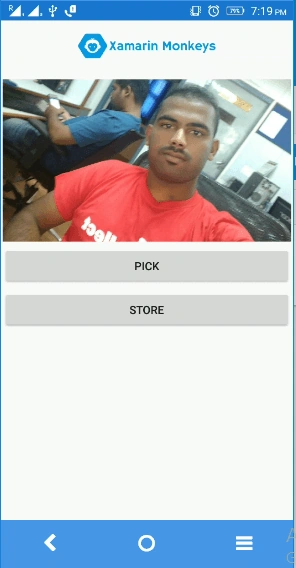
 .
.Forms code runs on multiple platforms - each of which has its own filesystem. This means that reading and writing files are the most easily done tasks using native file APIs on each platform. Alternatively, embedded resources are also a simpler solution to distribute the data files with an app.
Firebase
Firebase gives you functionality like analytics, databases, messaging and crash reporting so you can move quickly and focus on your users.

Build apps with Firebase
- Real-time Database
- Notifications
- Authentication
- Hosting
Prerequisites
- Visual Studio 2017(Windows or Mac)
Start by creating a new Xamarin.Forms project. You’ll learn more by going through the steps yourself.
Choose the Cross-platform App project under Visual C#-->Cross-platform in the New Project dialog.
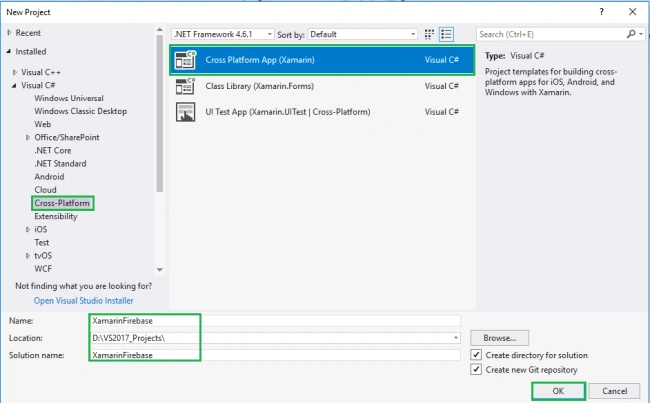
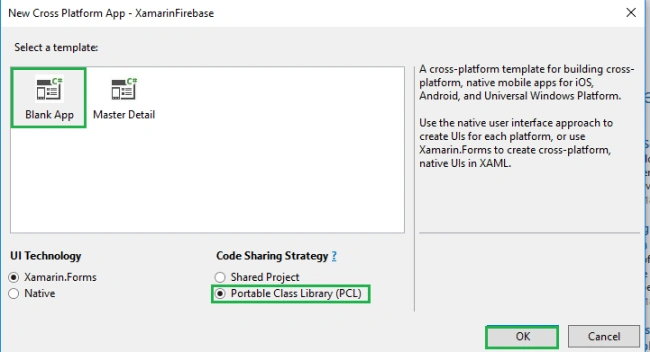
Now, Select the Blank App and Choose Portable Class Library (PCL).
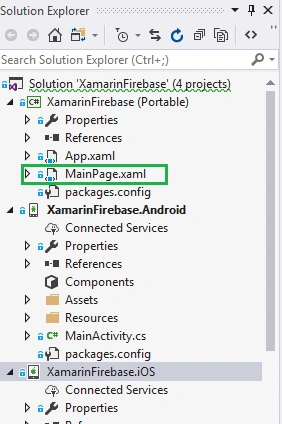
Subsequently, go to the solution. In there, you get all the files and sources of your project (PCL). Now, select XAML page and double-click to open the MainPage.Xaml page.
You now have a basic Xamarin.Forms app. Click the Play button to try it out.
You now have a basic Xamarin.Forms app. Click the Play button to try it out.
Create a project in Firebase
In this step, create a project in Firebase. Go to the following link.
Click "Add Project".

Now, Give the project name and select your country then Read the terms. Afterward, click "Create project".
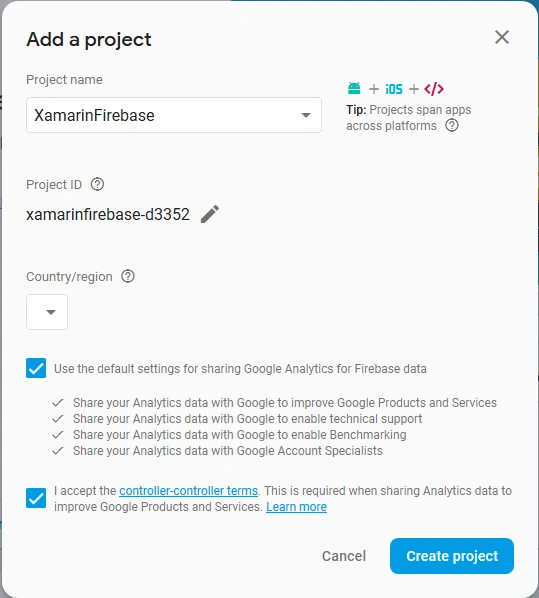
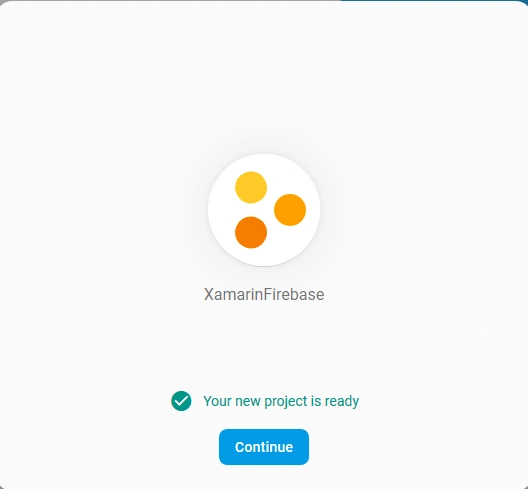
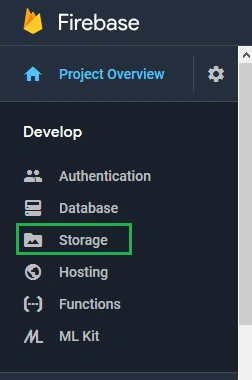
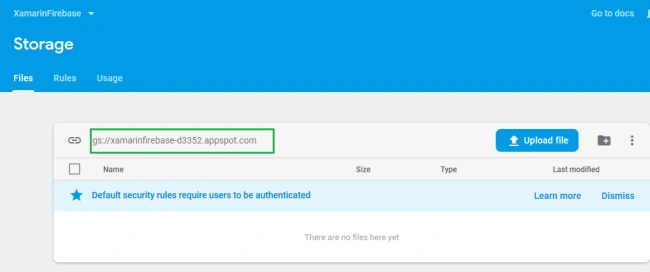
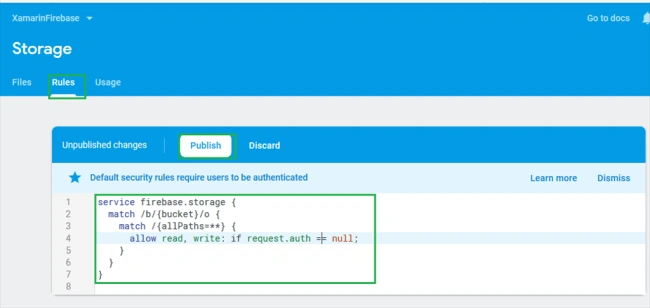
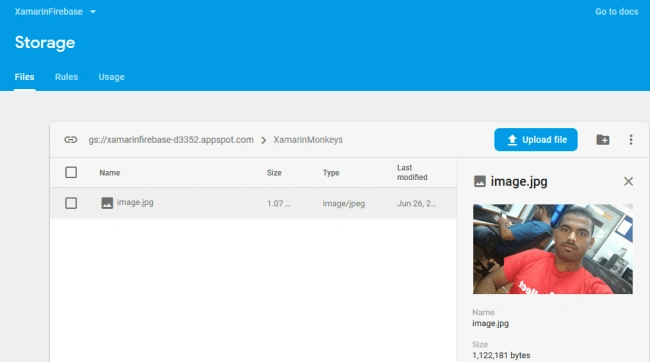
Now, you will change the following Storage Rules Afterward, click "Publish".
Setting up the User Interface
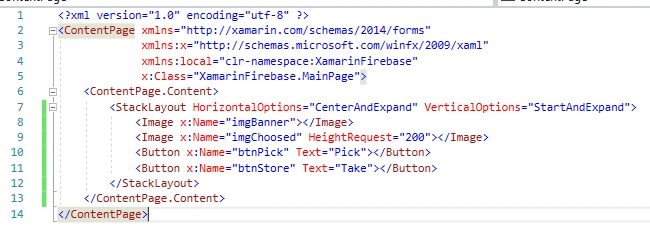
Go to MainPage.Xaml and write the following code.
MainPage.xaml
- <?xml version="1.0" encoding="utf-8" ?>
- <ContentPage xmlns="http://xamarin.com/schemas/2014/forms"
- xmlns:x="http://schemas.microsoft.com/winfx/2009/xaml"
- xmlns:local="clr-namespace:XamarinFirebase"
- x:Class="XamarinFirebase.MainPage">
- <ContentPage.Content>
- <StackLayout HorizontalOptions="CenterAndExpand" VerticalOptions="StartAndExpand">
- <Image x:Name="imgBanner"></Image>
- <Image x:Name="imgChoosed" HeightRequest="200"></Image>
- <Button x:Name="btnPick" Text="Pick" Clicked="btnPick_Clicked"></Button>
- <Button x:Name="btnStore" Text="Store" Clicked="btnStore_Clicked"></Button>
- </StackLayout>
- </ContentPage.Content>
- </ContentPage>
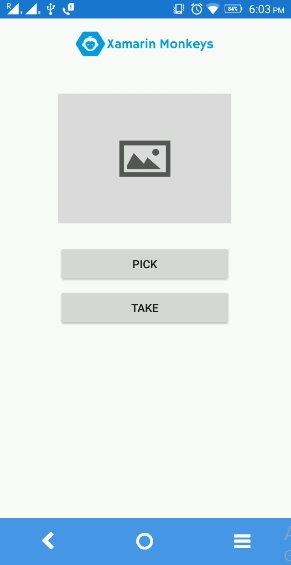
Click the Play button to try it out.
NuGet Packages
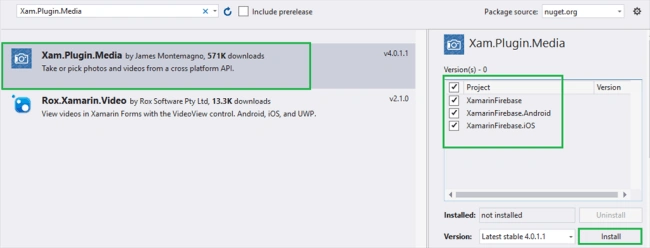
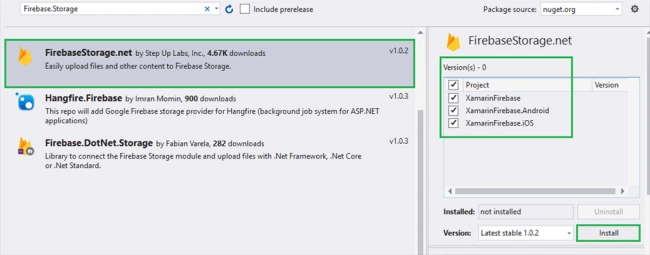
Now, add the following NuGet Packages.
- Xam.Plugin.Media
- Firebase.Storage
Xam.Plugin.Media
Firebase.Storage
Permissions - for Android
In this step give required permissions to your app. The following permissions are a must for this app.
- CAMERA
- READ_EXTERNAL_STORAGE
- WRITE_EXTERNAL_STORAGE
- <?xml version="1.0" encoding="utf-8"?>
- <manifest xmlns:android="http://schemas.android.com/apk/res/android" android:versionCode="1" android:versionName="1.0" package="com.companyname.XamarinFirebase">
- <uses-sdk android:minSdkVersion="15" />
- <uses-permission android:name="android.permission.CAMERA" />
- <uses-permission android:name="android.permission.READ_EXTERNAL_STORAGE" />
- <uses-permission android:name="android.permission.WRITE_EXTERNAL_STORAGE" />
- <application android:label="XamarinFirebase.Android">
- <provider android:name="android.support.v4.content.FileProvider" android:authorities="com.companyname.XamarinFirebase.fileprovider" android:exported="false" android:grantUriPermissions="true">
- <meta-data android:name="android.support.FILE_PROVIDER_PATHS" android:resource="@xml/file_paths"></meta-data>
- </provider>
- </application>
- </manifest>
Go to Solution—>Android —>Right click—>New—>Xml—> file_paths.xml
Now, write the following code to get file paths.
file_paths.xml
- <?xml version="1.0" encoding="utf-8" ?>
- <paths xmlns:android="http://schemas.android.com/apk/res/android">
- <external-files-path name="my_images" path="Pictures" />
- <external-files-path name="my_movies" path="Movies" />
- </paths>
Now, write the following code to pick an image from your device.
MainPage.xaml.cs
- private async void btnPick_Clicked(object sender, EventArgs e)
- {
- await CrossMedia.Current.Initialize();
- try
- {
- file = await Plugin.Media.CrossMedia.Current.PickPhotoAsync(new Plugin.Media.Abstractions.PickMediaOptions
- {
- PhotoSize = Plugin.Media.Abstractions.PhotoSize.Medium
- });
- if (file == null)
- return;
- imgChoosed.Source = ImageSource.FromStream(() =>
- {
- var imageStram = file.GetStream();
- return imageStram;
- });
- await StoreImages(file.GetStream());
- }
- catch (Exception ex)
- {
- Debug.WriteLine(ex.Message);
- }
- }
- private async void btnStore_Clicked(object sender, EventArgs e)
- {
- await StoreImages(file.GetStream());
- }
- public async Task<string> StoreImages(Stream imageStream)
- {
- var stroageImage = await new FirebaseStorage("xamarinfirebase-d3352.appspot.com")
- .Child("XamarinMonkeys")
- .Child("image.jpg")
- .PutAsync(imageStream);
- string imgurl = stroageImage;
- return imgurl;
- }
MainPage.Xaml.cs
- using Firebase.Storage;
- using Plugin.Media;
- using Plugin.Media.Abstractions;
- using System;
- using System.Collections.Generic;
- using System.Diagnostics;
- using System.IO;
- using System.Linq;
- using System.Text;
- using System.Threading.Tasks;
- using Xamarin.Forms;
- namespace XamarinFirebase
- {
- public partial class MainPage : ContentPage
- {
- MediaFile file;
- public MainPage()
- {
- InitializeComponent();
- imgBanner.Source = ImageSource.FromResource("XamarinFirebase.images.banner.png");
- imgChoosed.Source = ImageSource.FromResource("XamarinFirebase.images.default.jpg");
- }
- private async void btnPick_Clicked(object sender, EventArgs e)
- {
- await CrossMedia.Current.Initialize();
- try
- {
- file = await Plugin.Media.CrossMedia.Current.PickPhotoAsync(new Plugin.Media.Abstractions.PickMediaOptions
- {
- PhotoSize = Plugin.Media.Abstractions.PhotoSize.Medium
- });
- if (file == null)
- return;
- imgChoosed.Source = ImageSource.FromStream(() =>
- {
- var imageStram = file.GetStream();
- return imageStram;
- });
- await StoreImages(file.GetStream());
- }
- catch (Exception ex)
- {
- Debug.WriteLine(ex.Message);
- }
- }
- private async void btnStore_Clicked(object sender, EventArgs e)
- {
- await StoreImages(file.GetStream());
- }
- public async Task<string> StoreImages(Stream imageStream)
- {
- var stroageImage = await new FirebaseStorage("xamarinfirebase-d3352.appspot.com")
- .Child("XamarinMonkeys")
- .Child("image.jpg")
- .PutAsync(imageStream);
- string imgurl = stroageImage;
- return imgurl;
- }
- }
- }
Thanks for reading. Please share comments and feedback.
mokem tiagoPosted Dec 14, 2020, 5:41 AM
Hi, i get a firestore exception when trying to store the image
Mayur GudiPosted May 5, 2020, 5:57 PM
I want to do the same thing for .mp3 files. Please suggest for this. I need to upload and download files to/from firebase storage. While downloading, I want to store it in memory stream and play whenever needed. While uploading, I need the link of file uploaded and save that URL in database. Basically I'm making karaoke app for my B.Tech. project. For that I need these things to work. Please Help
Ivan MouraPosted Apr 22, 2020, 7:34 PM
Hi, there is a way to do this same operation using the Xamarin.Firebase.Storage pugin (https://www.nuget.org/packages/Xamarin.Firebase.Storage/).I tried to make it look more but it didn't work
Chiz BelarminoPosted Dec 26, 2019, 3:53 AM
Mine is not stored as an image/jpeg. It is stored as an application/x-www-form-urlencoded. I don't know what happened.
Lalfak ZualaPosted Jul 3, 2019, 1:45 AM
Can you upload a Tutorial for uploading image to Firebase Realtime database binding with Firebase Storage?
James MountneyPosted Apr 26, 2019, 8:38 PM
Hey Delpin, nice work, how do you retrieve the image from firebase storage and display in an imageview?
Muhammad ZubairPosted Apr 23, 2019, 12:55 AM
How i can change or update the stored image in firebase storage.i need to do this because i am creating a profile page where users can change or update their profile picture.how i can do this.please help me
Lim BengPosted Feb 3, 2019, 12:29 AM
I have an exception message in the method btnPick_Clicked(). The exception message is "Storage permission(s) are required.". How to avoid this?
jonathan rodriguesPosted Dec 13, 2018, 1:52 PM
Error: No resource found that matches the given name (at 'resource' with value '@xml/file_paths'). I have this msg error what's wrong? where i create a file_paths.xml? i dont understand thats step. sorry
jonathan rodriguesPosted Dec 13, 2018, 1:50 PM
Great post! thanks!
אבי חדדPosted Oct 20, 2018, 2:57 PM
I need to get the file from the firebase back to the media file property
אבי חדדPosted Oct 20, 2018, 11:34 AM
Now I want some how to get the files back in to media file
אבי חדדPosted Oct 20, 2018, 11:33 AM
Hello my friend, great post... fit to my project