This application is developed in Visual Studio 2015.
If you want to install Xamarin and MongoDB, then please use the following procedure.
- Download and install Xamarin.
- Download and install MongoDB
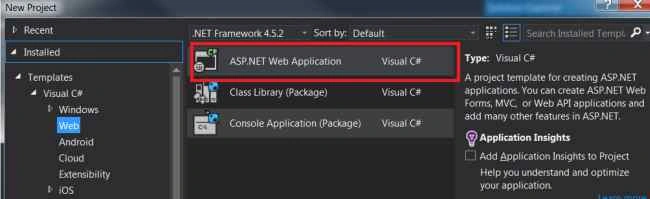
First, create a Web API project to interact with MongoDB and Xamarine App.
Add one Class Library project to implement the MongoDB interaction.
Add MongoDB driver packages using Nuget Packages
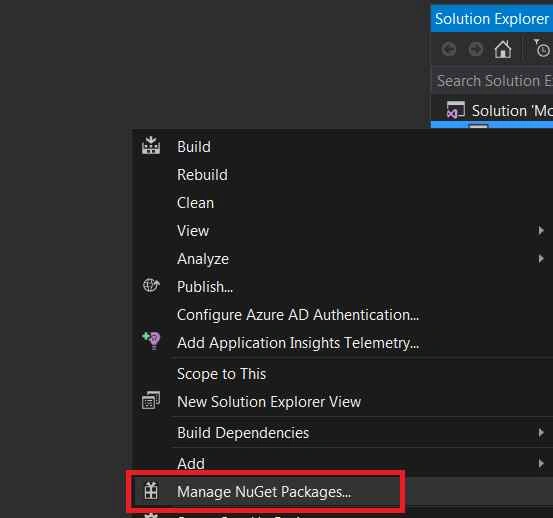
Now you are able to see the reference DLL related to MongoDB

1. Create one class MongoHelper.
- public class MongoHelper<T> where T : class
- {
- public MongoCollection<T> Collection { get; private set; }
-
- public MongoHelper()
- {
- var con = new MongoConnectionStringBuilder("server=127.0.0.1;database=galary");
-
- var server = MongoServer.Create(con);
- var db = server.GetDatabase(con.DatabaseName);
- Collection = db.GetCollection<T>(typeof(T).Name.ToLower());
- }
- }
This class is for creating a connection to MongoDB.
2. Create one class MobileService.
This class actually has the CRUD logic implementation to interact with MongoDB.
- public class MobileService
- {
- private readonly MongoHelper<Mobile> _mob;
-
- public MobileService()
- {
- _mob = new MongoHelper<Mobile>();
- }
-
- public void Create(Mobile mob)
- {
- _mob.Collection.Save(mob);
- }
-
- public void Edit(Mobile mob)
- {
- _mob.Collection.Update(
- Query.EQ("_id", mob.MobileID),
- Update.Set("Name", mob.Name)
- .Set("Details", mob.Details));
- }
-
- public void Delete(ObjectId postId)
- {
- _mob.Collection.Remove(Query.EQ("_id", postId));
- }
-
- public IList<Mobile> GetMobiles()
- {
- return _mob.Collection.FindAll().ToList();
- }
-
- public Mobile GetMobile(ObjectId id)
- {
- var mob = _mob.Collection.Find(Query.EQ("_id", id)).Single();
-
- return mob;
- }
- }
3. The class Mobile is the model for the data interaction.
- public class Mobile
- {
- [BsonId]
- public Guid ID { get; set; }
- public int MobileID { get; set; }
- public string Name { get; set; }
- public string Details{ get; set; }
- }
4. Use the following code to add a new item.
- serv.Create(new Mobile { ID= Guid.NewGuid(), MobileID = 1, Name = "Apple", Details = "Testing Application" });
5. Using this code you can retrieve all the data records from MongoDB.
- var datalst = serv.GetMobiles();
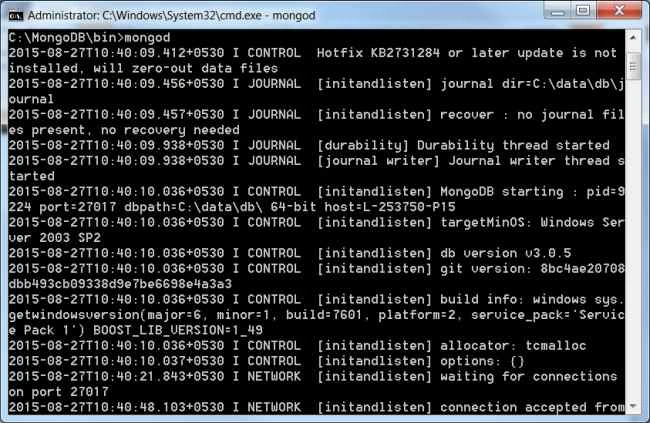
For testing the application first start the MongoDB service on your local system.
The following is the procedure to start with MongoDB.
Go to a command prompt snd enter:
C:\MongoDB\bin>mongod
The press Enter. Then the MongoDB service is started.
Here's the screenshot.
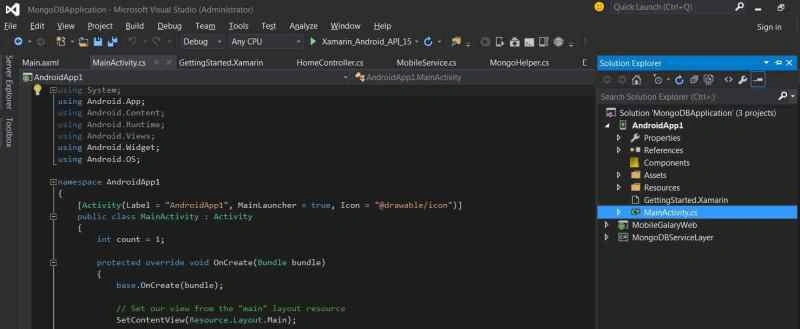
Add a Xamarin project to the solution.

Now you can see the Xamarin project has been added to the solution:
When the Xamarin application is running absolute file you will be able to see the following screen.

Now we can call the WebAPI from the Xamarin application.
Here's the code that is calling the WPI from Xamarin code:
- [Activity(Label = "AndroidApp1", MainLauncher = true, Icon = "@drawable/icon")]
- public class MainActivity : Activity
- {
- int count = 1;
-
- internal Task<JsonValue> JsonObject { get; private set; }
-
- protected override void OnCreate(Bundle bundle)
- {
- base.OnCreate(bundle);
-
- SetContentView(Resource.Layout.Main);
-
- string url = "http://localhost/MobileGalaryWeb/API/values";
- var request = HttpWebRequest.Create(url);
-
- request.ContentType = "application/json";
- request.Method = "GET";
- Button button = FindViewById<Button>(Resource.Id.MyButton);
-
-
- button.Click += delegate {
-
- using (HttpWebResponse response = request.GetResponse() as HttpWebResponse)
- {
- if (response.StatusCode != HttpStatusCode.OK)
- Console.Out.WriteLine("Error fetching data. Server returned status code: {0}", response.StatusCode);
- using (StreamReader reader = new StreamReader(response.GetResponseStream()))
- {
- var content = reader.ReadToEnd();
- if (string.IsNullOrWhiteSpace(content))
- {
- Console.Out.WriteLine("Response contained empty body...");
- }
- else
- {
- Console.Out.WriteLine("Response Body: \r\n {0}", content);
- }
- button.Text = string.Format(content);
-
- }
- }
- };
- }
- }


DANIELA ESPINOZAPosted May 2, 2017, 10:31 PM
Ayuda plis, necesito como poder armar un proyecto simple que tenga tecnologias node,azure, xamarin,mongodb,react-native
Anbu ManiPosted May 18, 2016, 8:56 AM
Nice
Manoj KulkarniPosted Apr 11, 2016, 12:02 AM
Nice
S.Ravi KumarPosted Mar 25, 2016, 9:06 PM
Nice one, thanks for sharing
Amit PrabhuPosted Sep 1, 2015, 5:19 AM
Thanks a lot
Hashim ShafiqPosted Aug 30, 2015, 9:44 PM
nice
Santhakumar MunuswamyPosted Aug 29, 2015, 4:42 AM
Good article. Thanks for sharing
RakeshPosted Aug 28, 2015, 4:41 AM
Nice share
Rajeesh MenothPosted Aug 27, 2015, 1:30 PM
Thank you for sharing
Pankaj Kumar ChoudharyPosted Aug 27, 2015, 12:05 PM
Nice Explain ......
Gowtham KPosted Aug 27, 2015, 10:12 AM
Good one
Gowtham RajamanickamPosted Aug 27, 2015, 9:44 AM
good
Mohammed IbrahimPosted Aug 27, 2015, 8:37 AM
nice
Karthikeyan KPosted Aug 27, 2015, 7:46 AM
Good one...Thanks for share
Yashwanth MuthineniPosted Aug 27, 2015, 7:28 AM
Good one
Upendra Pratap ShahiPosted Aug 27, 2015, 7:11 AM
nice share