
In the past few years SOAP has emerged as one of the most widely used standards in distributed environments. Far beyond communicating with objects in remote leases, it may also define an extensible XML messaging framework to exchange XML messages between Internet objects. According to its definition, SOAP can be used with a variety of transport protocols such as HTTP, TCP, SMTP and even MSMQ.
The most popular implementations for the development of Web Services have been built on HTTP. In such an environment, however, it is very difficult to use many of the most attractive potentialities of Web Services since they need the asynchronous communication mechanisms found in TCP, SMTP or MSMQ. For this reason, any Web Services development technology should provide support so that the same logic of a Web Service might be consented by different communication protocols. Specifically, in the .NET environment some technologies like Web Services Enhancements (WSE) for Microsoft.NET and the recent Code Name Indigo have come out allowing for the development of Web Services over a variety of communication protocols, including TCP and the others.
The WSE is an Add-on to the .NET Framework. It provides additional Web Services support mostly for the various Web Services Architecture (WSA) specifications. This technology represents specific functionalities that will increase the Web Services potentialities. Based on standards, full interoperability is guaranteed among Web Services of high requirements. Actually, WSE 2.0 provides support for specifications like WS-Policy, WS-Security Policy and WS-Addressing among others implemented on WSE 1.0. Additionally, WSE 2.0 offers a rich messaging API to develop Web Services over other transports like TCP and recently over SMTP. In this article we explain the XML-Messaging capabilities of WSE 2.0 and we try to demonstrate how to use these potentialities to build XML-Based-Messaging applications.
XML messaging:
Besides the traditional way of communicating through HTTP, the WSE 2.0 provides additional communication protocols to interact either with Web Services like TCP and In-Process (client and server running in the same process).
The communication pattern is expressed by means of an URI that should correspond to the following syntax:
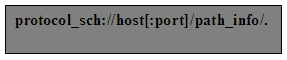
- Protocol_sch represents the protocol used for the communication with the Web Service.
- Port expresses the port where to send the messages.
- Path represents the localization of the resources that make up the Web Services inside a host.
An HTTP destination is represented by:
http://MyHost/MyPath.
In the case of TCP,
soap.tcp://MyHost/MyPath.
Lower level messaging
A distributed environment based on XML messaging is made up of objects that you/they send messages and objects that you/they receive messages. In this case, one is often made to think in terms of sender and receiver instead of client and server. Many times, client and server terms may be confusing in a model since some models like Publisher-Subscriber may represent more than a typical client-server model.
To send and receive SOAP messages, WSE 2.0 introduces the notion of SOAPSender and SOAPReceiver classes in order to build low level messaging applications. Flexibility and emphasis on XML messaging can be increased by these applications, although they require XML and SOAP skilled developers to work directly with SOAP messages.
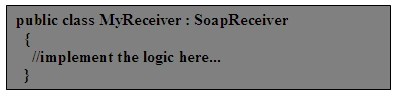
In WSE 2.0 the SoapEnvelope class represents the content of a SOAP message. This class derives from XmlDocument and provides additional functionality to work with SOAP message parts. The base class for receiving SOAP messages is the SOAPReceiver class. You must inherit from this class to implement your own receiver:
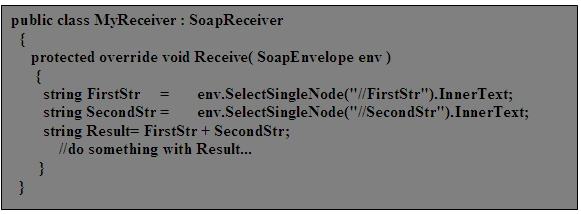
The next step is to override the receive method and process the SOAP messages to perform the required operations. The following example shows how to process a SOAP message to concatenate two strings.
In the application hosting the Web Service you need to register the SOAPReceiver to start receiving SOAP messages:
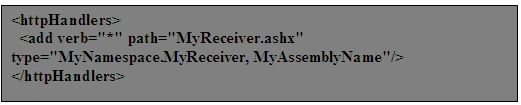
In case the Web Service uses the HTTP protocol, it must be registered as part of the Web.Config file in the ASP.NET application. The following code adds a handler to all messages targeted at.

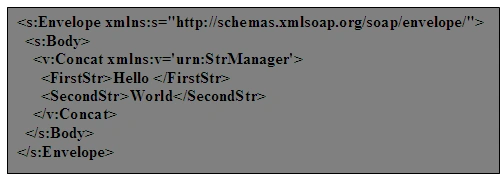
To send messages to the Web Services use the SoapSender class. This class provides the ability to transmit a SoapEnvelope via TCP or HTTP protocol to a specified destination. But first create a SOAPMessage using the SOAPEnvelope class. The following message is an example of the concatenation of two strings.
The following code shows how to create these messages by using the SoapEnvelope class.
SoapEnvelope CreateConcatMessage()
{
SoapEnvelope env = new SoapEnvelope();
env.CreateBody();
env.Body.InnerXml = "<v:Concat xmlns:v='urn:StrManager'>
<FirstStr>Hello</FirstStr>
<SecondStr>World</SecondStr>
</v:Concat>";
return env;
}
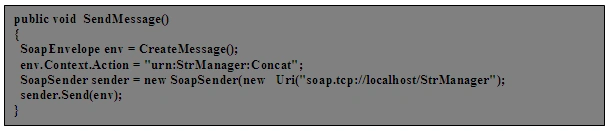
To send a SOAP message with the SoapSender class, first instantiate a SoapSender object and assign the destination URI to it. Next, to identify an operation, specify the message action through the SoapEnvelope.Context.Action property. Finally, call the Send method and pass in the SoapEnvelope object you want to send:
So far, the Web Service has received a SOAP message and performed the required operation. In most of the cases, however, the client expects some response from the operation. To develop this task the receiver must use a SOAPSender object in order to send a response message and the client must implement a SoapReceiver to receive that SOAP message. Now the original SOAP message must contain the address for sending the response message. This can be done by setting the ReplyTo property in the SoapContext object. ReplyTo is an element of WS-Addressing specification that represents an address to send the response messages.
Now the Web Service receives the message, performs the operation, creates an instance of SoapSender and uses the ReplyTo address to send a response message just as the client does. In the Lower Level Messaging examples we use this method to send response messages to the client.
Higher level messaging
The use of SoapSender and SoapReceiver in Web Services can become tedious due to all the additional functionalities to be implemented. Inspecting the SOAP message to identify the operation that the client invokes and correlating the messages are tasks that must always be carried out manually while developing Web Services based on SoapReceiver and SoapSender.
WSE 2.0 provides two additional classes (SoapService and SoapClient) to implement the tasks previously described. By means of these two classes it is possible to use all the potentialities of SoapReceiver and SoapSender and to abstract the handling level of the SOAP messages.
To implement your Web Service simply create a new class inheriting from SoapService and then implement the operations that you want to support. A simple SoapService looks like this:
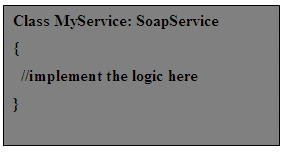
For each SOAP operation within the Web service, add a method to the class and assign the SoapMethodAttribute attribute to the method. The SoapMethodAttribute indicates that a method can be called by clients through Internet. The method must have one parameter of either the SoapEnvelope type or an XML serializable type and a return value of the SoapEnvelope type or the XML serializable type. The SoapMethodAttribute allows you to specify the SOAP Action for the SOAP operation.
The following code shows our implementation of a StrManager:
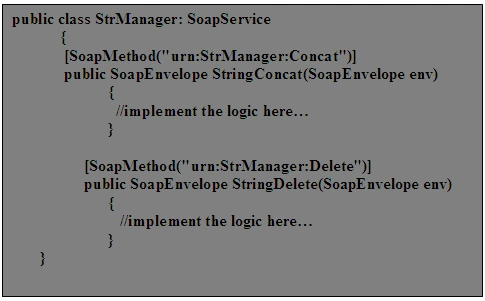
The Web Service can receive SOAP messages as a SoapEnvelope or an XML serializable object. If a SOAP message contains a serializable object it can be serialized inside the Body of a SOAP message.
Next, register the Web Service in the application that creates the SoapService instance like in the SoapSender and SoapReceiver example. The code to register a SoapService looks like this:

Now the WebService is ready to receive SOAP messages. In the sample code of Higher Level Messaging you can find the complete implementation of a StrManager Web Service.
In order to develop a client capable of sending messages to a SoapService instance, you should declare a class deriving from the SoapClient class:

The SoapClient class defines methods to send messages to a Web Service and to receive response messages from that service. To send messages you can use the following methods:
| Method | Description |
| SendOneWay | Sends a request message to a Web Service and do not wait for a response message. |
| SendRequestResponse |
Sends a request message to a Web Service and block the current thread until a response message is received. You can implement an asynchronous version of this method by using BeginSendRequestResponse. |
| Send |
Provides the same functionality as SoapSender. |
Finally, develop methods for sending messages to a SoapService instance. To perform this task you should define methods having the SoapMethodAttribute assigned to them. The following code shows and implementation of a StrManagerClient:
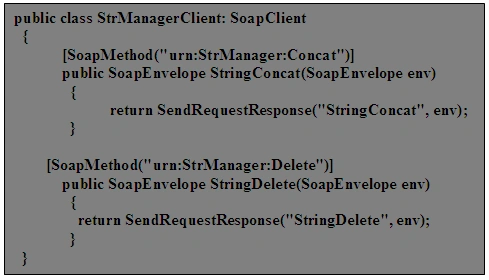
The SoapService and SoapClient classes simplify the development of XML messaging applications in their different scenarios. We have provided another example with the same functionality as the previous one but using SoapService and SoapClient.
Using HTTP protocol
Up to this point, all the examples present the Web Service and the client using the TCP protocol. WSE 2.0 includes other protocols as In-Process and HTTP. WSE 2.0 allows the use of the same Web Service with different communication protocols. The separation between the logic and the communication interface increases the chance to use the Web Services in the most heterogeneous environments.
In the code samples of this article you can find a service and two applications to host the Web Service, one using the TCP protocol and the other the HTTP protocol. In the client application (Figure 1.) you may choose the protocol to communicate with the Web Service.
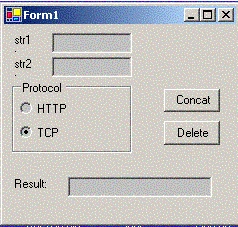
Figure 1: The client user interface.
Conclusion
WSE 2.0 provides various classes to develop SOAP via HTTP or TCP applications. Both SoapSender and SoapReceiver implement the basic functionality to send and receive SOAP messages. WSE 2.0 also provides a high level API to develop Web Services through SoapService and SoapClient. The use of these APIs enlarges the horizon for the development of Web Services with high communication requirements.
garystewart247Posted Aug 20, 2007, 12:20 PM
The code examples are not posted. Can you provide? Thank you! Gary