
Introduction
Despite advancements in network and processor speeds, performance remains a key concern among application developers. So whether you are writing an XML Web service, pushing image bitmaps to a video card, or even engineering that next great processing chip, you will invariably want to consider utilizing a universal mechanism for improving performance: a cache.
In this At Your Service column, we will look at how you as a developer and consumer of XML Web services can utilize caching. We'll take a look at ways you can do application-level caching with ASP.NET, and will take a look at HTTP caching and its application for XML Web services. Finally, we will look at how we can take the sample MSDN Pencil Company's Discovery service and implement a caching strategy that makes sense for providing a pencil catalog that is updated daily.
Questions to Ponder When Considering Caching Options
There are a number of ways you could implement various caching capabilities when creating an XML Web service or consuming an XML Web service. However, not all mechanisms for implementing a cache will effectively enhance performance, or even offer the perception of enhanced performance. You must analyze what makes sense in your particular usage scenario. Here are some questions you will want to ask yourself when considering caching functionality for your XML Web service:
How much of my data is dynamic?
It is hardly a foregone conclusion that caching is always a good idea. For instance, if the data returned from an XML Web service is always different, then caching may not help much. However, just because data is dynamic, it doesn't mean that caching is out of the question. If even a portion of the response is relatively static, caching could improve your Web server's performance. Consider a scenario where information is changing, but not changing with each and every request? If you are receiving hundreds of requests a second for your temperature service, for example, you might want to send back cached data for most requests, and only update the data every 5 minutes or so.
Is my data private?
In many cases an XML Web service will deal with user-specific data. This tends to decrease the usefulness of caching—but don't write off caching just because you are dealing with user-specific data. Say your XML Web service has a small number of users; it might make sense to cache information for each user, particularly if the user might request the same information multiple times. Even if a user does not request the same information every time, there may be a common instance of a class that could be referenced for each request from that same user. Be careful when caching private information, however, because bugs in this kind of code may allow private data to be compromised. To play it safe, it might be wise for your code to enforce access restrictions.
Does my XML Web service use resources that I can share between requests?
Caching is not limited to simply caching responses. You may be able to gain significant performance enhancements by caching any sort of application data or resources. It might make sense to keep around a dataset, for instance, to handle multiple queries. The response data may vary depending upon the specific queries on the dataset, but the dataset data itself may remain the same for many requests.
Can I predict the use of future resources?
Consider the usage scenarios for your XML Web service. Are there behaviors that you can predict? Say, for instance, that an XML Web service allows consumers to search for a particular article, and then allows them to download that article. It may make sense to assume that once a successful search has been performed for an article, a download request will soon follow. Your XML Web service can start the potentially lengthy process of loading the article into memory (perhaps from a file or a database), so that it is all set to respond once it receives the request to download the article.
Where do I cache my XML Web service's data?
The correct answer to this question may often be, "everywhere." But what are the different options for caching data? To answer this question let's take a look at the potential XML Web service scenario shown in Figure 1.
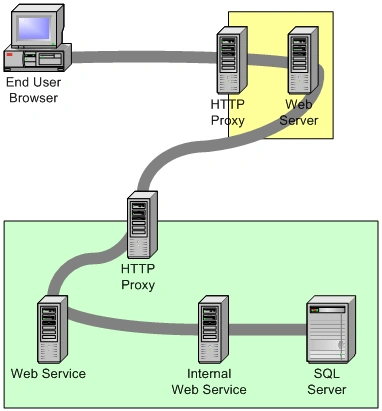
Figure 1. Caching possibilities for one XML Web service scenario
The figure starts in the upper left with an end user browsing to the Web site located in the yellow box. Unbeknownst to the user, the Web site sits behind an HTTP proxy server. The Web server then makes a SOAP request to a Web service in a different organization (represented by the green box). The SOAP request also goes through an HTTP proxy. The first Web service must then forward the request to a second, internal Web service, the internal Web service queries a Microsoft® SQL Server for the data required, and the response is finally returned. The SQL data is used to build the internal Web service response, and the internal Web service response is used to build the response to the initial Web service. The Web site uses the Web service response to create an HTML page that is returned to the end-user browser.
All this happens through the various proxies and routers along the way. So where can the response data be cached? At every point in this scenario: The SQL Server could cache query results. The internal Web service could cache the SQL query results. The initial Web service could cache the results from the internal Web service, and the green organization's HTTP proxy could cache the results as well. The Web server could cache the Web service's response. The yellow organization's proxy could cache the Web server's response, and the end-user's browser could cache the HTML page.
When will my data expire?
One of the key problems when designing caching strategies is determining when the data in the cache should be removed from the cache. Sometimes this is fairly simple to determine, since a process that updates the data may run at regular intervals. However, there may be other situations where the data is updated at relatively random intervals. In either case, the key is to figure out the optimal time interval for updating the cache, so that a balance can be achieved between the harm of returning stale data against the performance improvements provided by returning cached information. Once you have figured out this optimal interval, you can include that information with your data, so that the caching systems can update their data appropriately.
How do I notify consumers of my XML Web service that my data will expire?
The answer to this question depends upon how you are doing your caching. It may make sense for the client application to cache the data. If this is the case, then you need to inform the client application when the data expires. Presumably, applications will need you to include expiration information in the data being returned. For your Web service, this may mean adding a field to the XML response that specifically states an expiration time.
If you are depending on other pre-built solutions for performing your cache, these usually provide mechanisms for indicating an expiration time. In the case of using HTTP caching, you can set the HTTP headers that indicate to proxies and client systems when the data expires. ASP.NET includes a cache class that you can insert data into. When inserting the data, you have the ability to specify when the data will be removed from the cache.
Can I depend on the data being in the cache?
The short answer is, no. Almost every caching mechanism ever designed has an algorithm for removing old information from the cache. Data can be removed because it expired, but it can also be removed because it has not been accessed recently and there is other data to be added to the relatively limited cache resource. Therefore, most caching mechanisms do not guarantee that data will remain in the cache. This is particularly true of shared caching mechanisms, such as HTTP proxy caches, or even ASP.NET caches.
What ramifications will there be if consumers of your XML Web service do not use cached data?
There are a number of reasons why data may not be cached. As mentioned above, it could simply be that higher priority data replaced your application's data in the shared cache. It could also be that the developer writing the code to access your XML Web service is not being responsible about reusing data previously acquired. When designing your XML Web service, take into account the possibility for performance improvements based off of caching scenarios, but also allow for cases where your data does not get cached for any number of reasons. You will need to be able to deal with situations where caching is not working optimally.
Caching Scenarios
Now that we have seen some of the issues to consider when evaluating caching possibilities, we will look at what those possibilities are for XML Web service developers. First we will look at two approaches to caching—one at the application level and one at the protocol level. Then we will check out the capabilities ASP.NET provides for implementing caching at both those levels.
Application Caching
"Application" is a word that is overused these days. For the sake of this discussion, I'm using "application" in the sense of the "application layer." Therefore "application" encompasses both the XML Web service and the client accessing the XML Web service, where a developer might write code that is impacted by caching.
Therefore it makes sense that "application caching" refers to writing code for the XML Web service, or for the client that would perform some sort of caching. In the XML Web service, caching logic may take the form of storing reusable class instances in memory. It could also be response data that doesn't change over many requests.
Client-side application caching is caching where there is code written on the client to store the information from an XML Web service response, so that the client does not need to send another request the next time the response data is needed.
Providing the support for caching usually means indicating the expiration of the data as well. When an expiration time is fixed, it is possible that the period can simply be documented and hardcoded in the client without specifically indicating the expiration of a specific XML Web service response. There are many cases, however, where there will be no implied expiration time, in which case expiration information may need to be included with the data to be cached. In the case of application caching, this may mean that returned data needs a new field that includes the expiration. Since the expiration time of the data is basically meta-information that describes the data, the appropriate place for this information is where meta-information for a SOAP message is supposed to be stored—in the SOAP headers element.
HTTP Caching
HTTP provides a rich mechanism for caching information. In the HTTP specification, there are guidelines for system services to provide caching capabilities. Basically, HTTP proxies and client computers provide caching capabilities for free to developers writing applications that use HTTP. But there are limits to the applicability of the HTTP cache to XML Web services.
XML Web services today are primarily accessed through SOAP messages in the body of an HTTP POST request. Unlike HTTP GET requests, HTTP POST requests have a body that is outside the scope of HTTP. Therefore HTTP protocol implementations on proxies and clients will have no ability to intelligently determine how to cache responses to HTTP POST requests. ASP.NET does have support for invoking Web methods through HTTP GET requests, but this mechanism is mostly provided for debugging purposes and is not supported by most other SOAP toolkits.
ASP.NET Caching Capabilities
One of the nice things about developing XML Web services on ASP.NET is that you get to take advantage of a lot of functionality that developers of Web Form applications have been using for some time. ASP.NET has rich cache support built into it, which we can use to make our job easier when providing caching capabilities for XML Web services. As of the writing of this article, Rob Howard has started a multi-part series in his Nothing But ASP.NET column on ASP.NET caching capabilities. Take a look at this in order to better understand the specific ASP.NET capabilities in regards to caching. I will focus on which of those mechanisms might help someone writing an XML Web service.
In ASP.NET, there are basically three different approaches to caching: ASP.NET output caching, HTTP response caching, and ASP.NET application caching. The output cache provides a way to inform ASP.NET that the response built for a particular page can be returned to any further requests for that page. Instead of executing the ASPX script for future requests, the response from the previous request is immediately returned. You can specify that a whole page be added to the output cache or just the output from a specific ASP.NET user control. There are mechanisms for setting an expiration as well as ways to cache multiple views of a page based on Web form input.
For XML Web services, you can take advantage of the ASP.NET output cache by adding the CacheDuration parameter to the WebMethod attribute in your Web method declaration. The CacheDuration parameter indicates the number of seconds to hold the response in the ASP.NET output cache. The following code shows how you would use the CacheDuration parameter to cause the response to be stored in the output cache for 60 seconds.
Join the conversation! Your thoughts help the community grow.