

In this article, we will see, how we can get rid of an error “Your current settings do not allow file to be downloaded” in Windows Server 2012. You will get this error, whenever you try to download a file in your Server. For me, it was one of Azure Virtual Machine. Here, I am going to share with you a quick fix, which you can do when you face this issue. I hope you will like this.
Background
As I said, I wanted to install Web Matrix in my virtual machine. Thus, I can install WordPress and MySQL for one of my Websites.
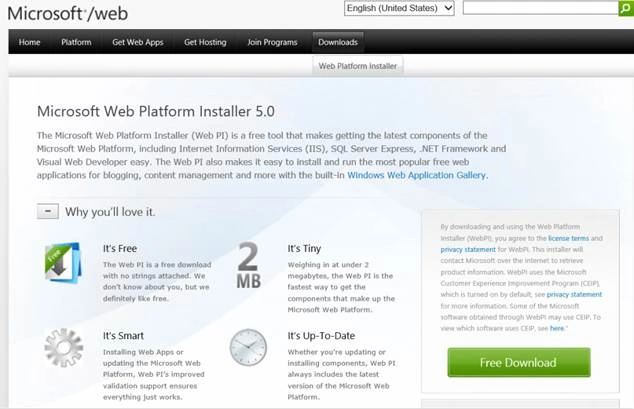
Download Microsoft Web Platform Installer.
When I tried that, I got an error as follows:
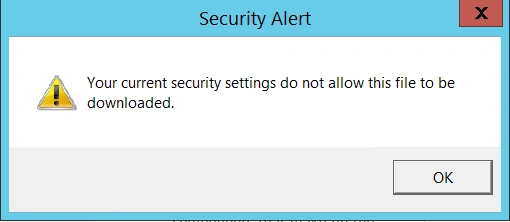
Alert – Your current settings do not allow this file to be downloaded.
Steps to fix your current settings do not allow the file to be downloaded
Step 1: Go to your Internet Options of your Internet Explorer.
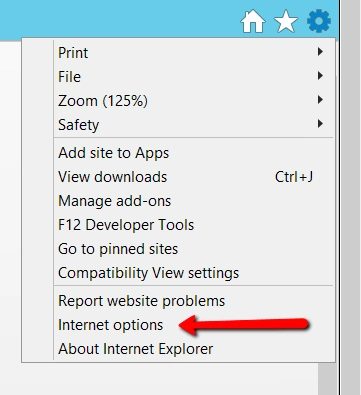
Internet_Options
Step 2: Go to your Security tab -> Internet -> Custom level.
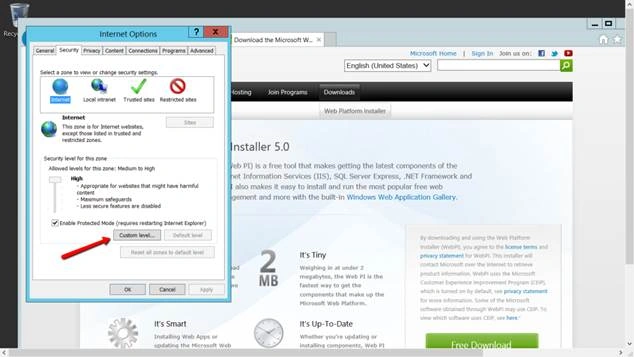
Step 2: Go to your Security tab -> Internet -> Custom level.
Security_Tab
Step 3: Go to Downloads and enable it.
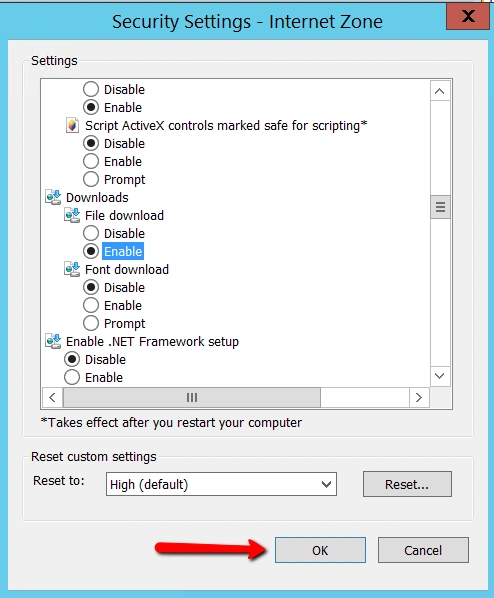
Step 3: Go to Downloads and enable it.
Enable_Downloads
Step 4: Click Yes and OK.
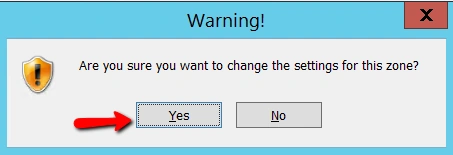
Step 4: Click Yes and OK.
Warning_for_setting_change
Now, if you try to download it again, you won’t get the error. Hope it helps.

Now, if you try to download it again, you won’t get the error. Hope it helps.
After_setting_change
Conclusion
Did I miss anything, which you may think is required? Have you found this post useful? I hope, you liked this article. Please share your valuable suggestions and feedback with me.
Your turn. What do you think?
A blog isn’t a blog without comments, but try to stay on the topic. If you have a question unrelated to this post, you’re better off posting it on C# Corner, Code Project, Stack Overflow, ASP.NET Forum, instead of commenting here. Tweet or Email me a link your question there and I’ll definitely try to help, if I can.
Conclusion
Did I miss anything, which you may think is required? Have you found this post useful? I hope, you liked this article. Please share your valuable suggestions and feedback with me.
Your turn. What do you think?
A blog isn’t a blog without comments, but try to stay on the topic. If you have a question unrelated to this post, you’re better off posting it on C# Corner, Code Project, Stack Overflow, ASP.NET Forum, instead of commenting here. Tweet or Email me a link your question there and I’ll definitely try to help, if I can.
Please read this article in my blog here.
Pho PhamPosted Feb 28, 2022, 6:12 AM
Thank you so much bro
Sibeesh VenuPosted Sep 21, 2016, 3:06 AM
Subash Thanks
SubashPosted Sep 21, 2016, 12:43 AM
Thank you bro
Sibeesh VenuPosted Sep 6, 2016, 5:28 AM
Bhushan Gawale Thanks much for the information.
Sibeesh VenuPosted Sep 6, 2016, 5:27 AM
Vignesh Mani Thanks much
Sibeesh VenuPosted Sep 6, 2016, 5:27 AM
Delpin Susai Raj Thanks much
Sibeesh VenuPosted Sep 6, 2016, 5:27 AM
Rakesh Thanks much
Sibeesh VenuPosted Sep 6, 2016, 5:27 AM
Raja Thanks much
Sibeesh VenuPosted Sep 6, 2016, 5:26 AM
Nikhil Sangani Thanks much
Bhushan GawalePosted Aug 29, 2016, 2:56 AM
Thanks for sharing, there is another alternative to do the same but that's brutal in terms of security. Server Manager > de-select advance browser protection
Vignesh ManiPosted Aug 28, 2016, 9:05 AM
Good one
Delpin Susai RajPosted Aug 28, 2016, 3:45 AM
Good
RakeshPosted Aug 28, 2016, 2:11 AM
Good info
RajaPosted Aug 27, 2016, 7:37 AM
Good one...
Nikhil SanganiPosted Aug 26, 2016, 11:26 PM
Good