

Let me paint a quick picture for you.
Imagine you've spent months setting up your Jenkins environment. Your pipelines are running smoothly, your team is shipping code faster than ever, and everything just works. Then one morning, you get a message from your security team: "We think someone accessed build information they shouldn't have." Your stomach drops.
This is exactly the kind of scenario that the Jenkins Security Advisory published on February 18, 2026 is warning us about. And if you're running Jenkins 2.550 or earlier — or LTS 2.541.1 or earlier — you need to pay attention right now.
Don't worry if you're not a security expert. By the time you finish reading this, you'll know exactly what went wrong, why it matters, and what you need to do to protect yourself. No confusing jargon, no unnecessary technical walls. Just clear, honest information.
First, Let's Talk About What Jenkins Actually Is
Before we dive into the vulnerabilities, let's quickly make sure we're all on the same page about Jenkins itself.
Jenkins is one of the most popular open-source automation tools in the world. It helps software development teams automate repetitive tasks — things like testing code, building applications, and deploying software to servers. Think of it as the behind-the-scenes engine that keeps modern software teams moving fast.
Because Jenkins sits at the heart of so many development workflows, it often has access to sensitive information — build logs, deployment credentials, source code, and more. That's exactly why security vulnerabilities in Jenkins are taken so seriously. A weakness in Jenkins isn't just a small inconvenience; it can become a door that attackers walk right through into your entire software supply chain.
With that context in mind, let's talk about what was just discovered.
Vulnerability #1: The Stored XSS Problem (SECURITY-3669 / CVE-2026-27099)
Severity: High
This one has a long name — "Stored Cross-Site Scripting vulnerability in node offline cause description" — but the concept behind it is actually pretty easy to understand once you break it down.
What Is XSS, Anyway?
Cross-Site Scripting, or XSS, is one of the oldest tricks in the attacker playbook. Here's the simple version: it happens when an attacker is able to inject malicious code (usually JavaScript) into a website or application, and that code then runs in the browser of anyone who views that page.
Think of it like this. Imagine a public bulletin board at your office where anyone can post notes. Now imagine someone sneaks in a note that, when you read it, automatically dials a phone number and reads out your personal information. That's essentially what XSS does — it hides harmful instructions inside content that looks completely normal.
What Specifically Went Wrong in Jenkins?
Starting from Jenkins version 2.483, Jenkins introduced a feature that lets administrators write a description when they mark a node (a machine that Jenkins uses to run jobs) as "temporarily offline." This description was designed to contain HTML so it could be formatted nicely — bold text, links, that kind of thing.
The problem? Jenkins versions up to 2.550 failed to properly escape this description field when a user submitted it through the "Mark temporarily offline" option.
In plain English: Jenkins was taking whatever someone typed into that description box and displaying it directly on the page without checking if it contained anything dangerous. An attacker with the right permissions — specifically Agent/Configure or Agent/Disconnect permission — could type malicious JavaScript code into that description box. Then, whenever another user (maybe an admin) viewed that node's status page, the malicious code would run silently in their browser.
What Could an Attacker Actually Do?
This is where it gets serious. With a successful XSS attack, an attacker could:
Steal session cookies, which could let them hijack an admin's account entirely
Redirect users to fake login pages designed to steal credentials
Perform actions on behalf of the victim without their knowledge
Extract sensitive data displayed on the Jenkins dashboard
And the word "stored" in "Stored XSS" means the malicious code isn't just a one-time trick — it stays saved in the system and attacks every single person who visits that page until it's removed.
Who Reported It?
Credit goes to Muhammed Niazy (Wolfman), who discovered and responsibly reported this vulnerability through the Jenkins Bug Bounty Program, which is sponsored by the European Commission. That program exists specifically to reward researchers who find and report security issues responsibly rather than exploiting them — and it's working.
Vulnerability #2: The Build Information Leak (SECURITY-3658 / CVE-2026-27100)
Severity: Medium
This second vulnerability is a little more subtle but still very much worth your attention. It's called a "Build information disclosure vulnerability through Run Parameter."
What's a Run Parameter?
When you trigger a build in Jenkins, you can pass in parameters — think of them like instructions or settings that customize how the build runs. One type of parameter is called a Run Parameter, which lets you reference a specific previous build as part of a new build. It's a useful feature for workflows where one job depends on the output of another.
So What's the Problem?
Here's the issue: Jenkins versions up to 2.550 didn't properly check whether the user triggering the build actually had permission to access the build they were referencing in that Run Parameter.
In other words, if an attacker had Item/Build and Item/Configure permissions, they could reference a build from a completely different project — one they weren't supposed to have access to — and Jenkins would just... accept it. No questions asked.
Through this loophole, an attacker could figure out:
Whether a specific job exists in the Jenkins instance (even if they're not supposed to know about it)
Whether a specific build number exists for that job
The display name of that build, if it exists
Now, you might think, "Okay, that doesn't sound that bad. So they know a job exists — big deal." But think about it from an attacker's perspective. Knowing what jobs and builds exist can reveal a lot about an organization's internal projects, deployment schedules, and infrastructure. It's like being able to see the table of contents of a confidential document — you may not have the full details, but you know a lot more than you should.
Who Found This One?
This vulnerability was discovered and reported by Suman Roy (you can find more about him at sumanroy.in), also through the Jenkins Bug Bounty Program. Another great example of responsible security research making the community safer.
Which Versions Are Affected?
Let's make this crystal clear:
You are vulnerable if you're running:
Jenkins Weekly version 2.550 or any version before it
Jenkins LTS version 2.541.1 or any version before it
You are safe if you've updated to:
Jenkins Weekly 2.551
Jenkins LTS 2.541.2
There's also a partial mitigation worth knowing about: if you're on Jenkins 2.539 or newer (including LTS 2.541.1), enforcing the Content Security Policy (CSP) header can help reduce the risk from the XSS vulnerability. However, this is a band-aid, not a cure. The right move is still to update.
How to Fix This: Step-by-Step
Okay, here's the part you actually came for. Let's get your Jenkins instance protected.
Step 1: Check your current Jenkins version. Log into your Jenkins dashboard, click on "Manage Jenkins," and look for the version number. It's usually displayed at the bottom right of the page as well.
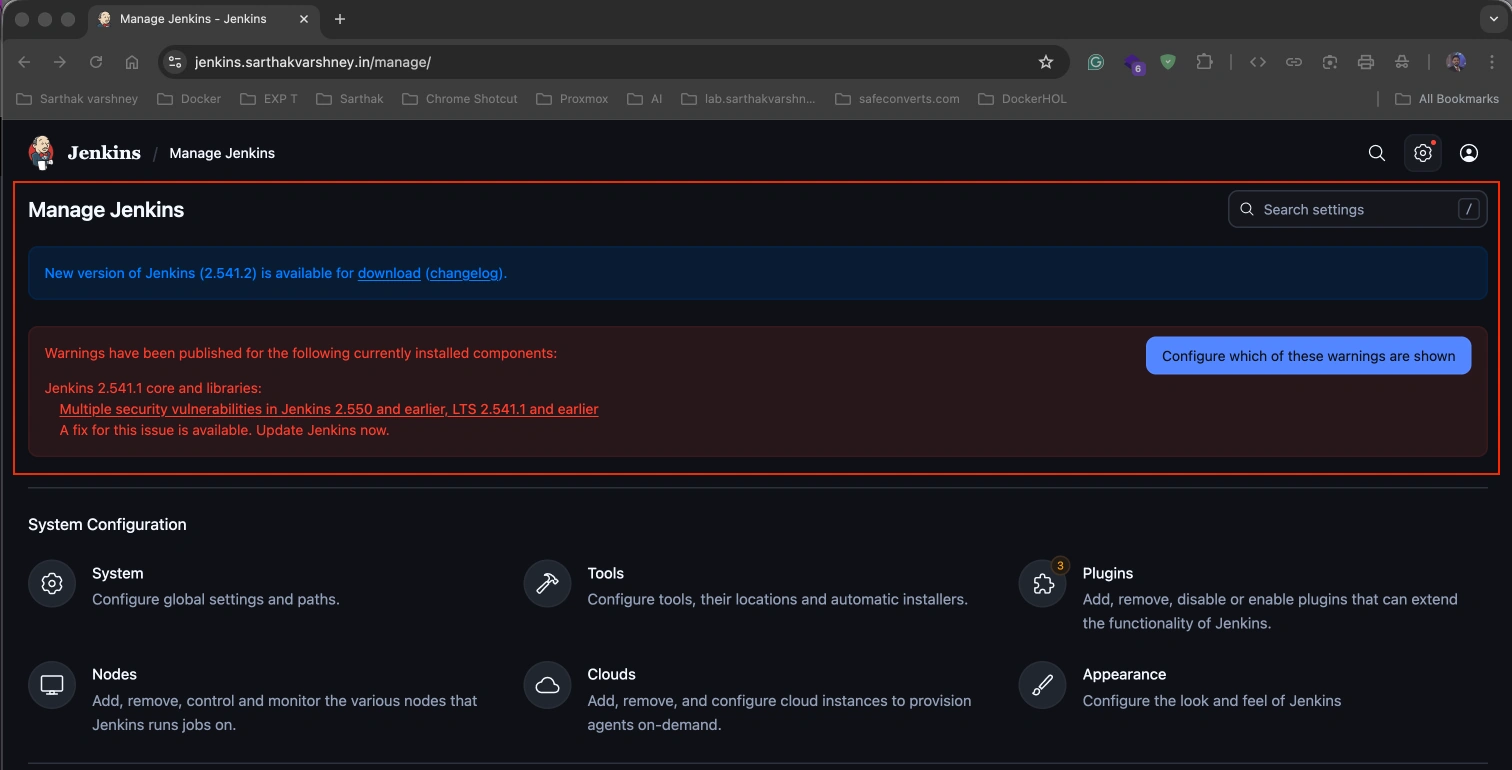
Step 2: Back up your Jenkins data. Before any update, always back up your Jenkins home directory. This includes your job configurations, build history, and plugin data. It takes a few minutes and can save you hours of headaches if something goes wrong.
Step 3: Update Jenkins. Head to "Manage Jenkins" → "Manage Plugins" (for plugins) or follow your installation method for the core update. If you installed Jenkins via a package manager like apt or yum, you can update through the command line. If you used a WAR file, download the latest version from jenkins.io and replace it.
Step 4: Restart Jenkins. After updating, restart your Jenkins instance and verify the new version number appears on the dashboard.
Step 5: Review permissions. While you're in security mode, take a moment to audit who in your organization has Agent/Configure, Agent/Disconnect, Item/Build, and Item/Configure permissions. Limit these to only the people who genuinely need them.
The Bigger Picture: Why This Matters Beyond Jenkins
It's easy to look at a security advisory like this and think, "Okay, I'll update eventually." But here's the honest truth: the longer you wait, the more risk you carry.
Security researchers found these vulnerabilities and reported them responsibly. That's great. But once an advisory is published publicly, the entire world — including people with bad intentions — knows exactly where the weakness is. The clock starts ticking the moment an advisory goes live.
The Jenkins Bug Bounty Program, sponsored by the European Commission, is doing important work by incentivizing researchers to report vulnerabilities through proper channels. But the whole system only works if the rest of us hold up our end of the deal and actually apply the fixes in a timely manner.
Conclusion: Don't Wait on This One
Two vulnerabilities. One high severity, one medium. Both affecting Jenkins versions that are widely deployed across thousands of organizations right now. Both fixable with a single update.
The XSS vulnerability could let an attacker hijack admin sessions and take control of your entire Jenkins environment. The build information leak could expose details about internal projects and infrastructure that should remain confidential.
The fix is simple: update to Jenkins Weekly 2.551 or Jenkins LTS 2.541.2.
If you manage a Jenkins instance, schedule that update today — not next week, not after the next sprint. Today. And if you know someone else who runs Jenkins, share this with them. The best security culture is one where we look out for each other.
Stay safe out there, and keep those pipelines running securely.
Source: Jenkins Security Advisory 2026-02-18 — https://www.jenkins.io/security/advisory/2026-02-18/
CVE References: CVE-2026-27099 (SECURITY-3669), CVE-2026-27100 (SECURITY-3658)
Join the conversation! Your thoughts help the community grow.