

What are Filters and their Benefits?
Filters give us the facility to run a piece of code before or after any stage in the request processing pipeline.
The benefits of filters
- Reusability: Instead of writing code for each action, we write it one time and then use it
- Extensible: They give us the facility to do some ABC action before the method and some XYZ operation after that method.
Types of Filters
- Authorization Filters: Top most in running order to check the user is authorized.
- Resource Filters: It runs after authorization and before another request pipeline.
- Action Filters: It runs before and after an action method is called
- Exception Filters: It is used to handle global exceptions; it gets executed when an unhandled exception occurs.
- Result Filters: These run when the action method has been executed and before and after the execution of action results.
Action Filters in .Net Core
Action filters run immediately before and after an action method is called. It can do a couple of things e.g. changing the passed arguments and changing the results.
How to Implement Action Filters?
- Global
- Custom Action Based
The following steps are the same for both
- Create your filter by inheriting a class from the IActionFilter interface
- It will ask you to implement those two methods OnActionExecuted and OnActionExecuting
- OnActionExecuted runs after the method and the other one before the method gets called.
Global Action Filter
After creating that filter, you need to add it to the services container for controllers.
public class GlobalFilter: IActionFilter {
  public void OnActionExecuted(ActionExecutedContext context) {
    Console.WriteLine("Global Action Executed");
  }

  public void OnActionExecuting(ActionExecutingContext context) {
    Console.WriteLine("Global Action is Executing");
  }
}
public void ConfigureServices(IServiceCollection services) {
  services.AddMvc().SetCompatibilityVersion(CompatibilityVersion.Version_2_2);
  services.AddHangfire(x =>
    x.UseSqlServerStorage("Data Source=DJHC573\\MYSYSTEM;Initial Catalog=Hangfire-DB;Integrated Security=true;Max Pool Size = 200;"));
  services.AddHangfireServer();
  services.AddMvcCore(options => {
    options.Filters.Add(new GlobalFilter());
  });

}
That’s all you need to do, so this one will run whenever any action gets called.
Custom Action-Based Filter
- Add your filter in Startup.cs, if you have multiple filters, add them in a similar fashion.
- Add ServiceFilter(typeof(YourFilter)) at your controller level or action level, that’s all.
public class NewsletterFilter: IActionFilter {
  public void OnActionExecuted(ActionExecutedContext context) {
    Console.WriteLine("Action is Executed");
  }

  public void OnActionExecuting(ActionExecutingContext context) {
    Console.WriteLine("Action is Executing");
  }
}

public void ConfigureServices(IServiceCollection services) {
  services.AddMvc().SetCompatibilityVersion(CompatibilityVersion.Version_2_2);
  //services.AddHangfire(x =>
  //x.UseSqlServerStorage("Data Source=DJHC573\\MYSYSTEM;Initial Catalog=Hangfire-DB;Integrated Security=true;Max Pool Size = 200;"));
  //services.AddHangfireServer();
  services.AddMvcCore(options => {
    options.Filters.Add(new GlobalFilter());
  });
  services.AddScoped < NewsletterFilter > ();

}
public class ValuesController: ControllerBase {
  // GET api/values
  [ServiceFilter(typeof (NewsletterFilter))]
  [HttpGet]
  public ActionResult < IEnumerable < string >> Get() {
    return new string[] {
      "value1",
      "value2"
    };
  }
}
When I applied Global Action Filter and Newsletter (Custom Filters) on the same controller, it executed like this.
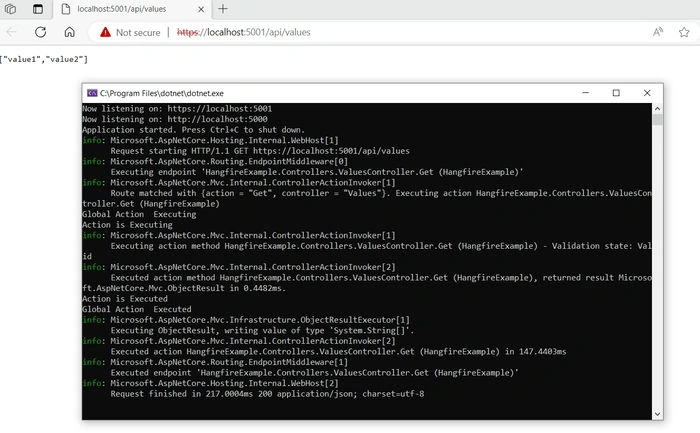
*If we want an asynchronous action filter, then we can inherit from IAsyncActionFilter instead of IActionFilter it has an extra method OnActionExecutionAsync which takes action context and delegate in parameters.
Join the conversation! Your thoughts help the community grow.