

- Open SharePoint 2010 Management Shell by going to Start | All Programs | SharePoint | Microsoft SharePoint 2010 Products | SharePoint 2010 Management Shell (Run as Administrator).
- Run the following script.
Powershell Script:
##Add a link for the specified user using SharePoint 2010 web service in powershell
$uri="http://serverName:10736/sites/ECT2/_vti_bin/UserProfileService.asmx?wsdl"
## $accountName is a string that contains the account name for which you need to add the link
[String]$accountName="domainName\userName"
## $name ia a string that contains the title for the link
[String] $name="Link"
## $url ia a string that contains the url for the link
[String] $url="http://www.link.com"
## $group is a string that contains the name of the group for the link
[String]$group="General"
## $privacy is used to represent the privacy level
## For more information on Privacy Enumeration please refer http://msdn.microsoft.com/en-us/library/websvcuserprofileservice.privacy.aspx
$privacy="Public"


## Web Service Reference - http://Site/_vti_bin/UserProfileService.asmx
$userProfileWebServiceReference = New-WebServiceProxy -Uri $uri -UseDefaultCredential
$QuickLinkData =$userProfileWebServiceReference.AddLink($accountName,$name,$url,$group,$privacy)
## $QuickLinkData - Return value will be [UserProfileService Web service].QuickLinkData - Please refer http://msdn.microsoft.com/en-us/library/websvcuserprofileservice.quicklinkdata.aspx
Write-Host -ForegroundColor Green "New link added successfully"
$QuickLinkData
Output: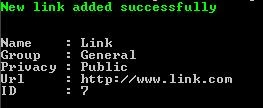
ShanePosted Oct 21, 2018, 5:46 PM
#For SharePoint Online O365 [System.Reflection.Assembly]::LoadWithPartialName("Microsoft.SharePoint.Client") | Out-Null [System.Reflection.Assembly]::LoadWithPartialName("Microsoft.SharePoint.Client.Runtime") | Out-Null [System.Reflection.Assembly]::LoadWithPartialName("Microsoft.SharePoint.Client.UserProfiles") | Out-Null # please specify your tenantname $tenantName = "YourTenantName" $mySiteUrl = "https://$tenantName.tafensw-my.sharepoint.com"; $adminUrl = "https://$tenantName-admin.sharepoint.com"; $creds = Get-Credential -Message "Please specify the admin credentials" Write-Host "Starting operation" -ForegroundColor Yellow $credentials = New-Object Microsoft.SharePoint.Client.SharePointOnlineCredentials($creds.UserName, $creds.Password) ##Add a link for the specified user using SharePoint web service in powershell $upService = New-WebServiceProxy -Uri ("$adminUrl/_vti_bin/UserProfileService.asmx?wsdl") -UseDefaultCredential False $upService.Credentials = $credentials $uri = New-Object System.Uri($adminUrl) $container = New-Object System.Net.CookieContainer $container.SetCookies($uri, $credentials.GetAuthenticationCookie($adminUrl)) $upService.CookieContainer = $container ## $accountName is a string that contains the account name for which you need to add the link [String]$accountName="i:0#.f|membership|[email protected]" ## $name ia a string that contains the title for the link [String] $name="Link" ## $url ia a string that contains the url for the link [String] $url="http://www.link.com" ## $group is a string that contains the name of the group for the link [String]$group="General" ## $privacy is used to represent the privacy level ## For more information on Privacy Enumeration please refer http://msdn.microsoft.com/en-us/library/websvcuserprofileservice.privacy.aspx $privacy="Private" $QuickLinkData =$upService.AddLink($accountName,$name,$url,$group,$privacy) ## $QuickLinkData - Return value will be [UserProfileService Web service].QuickLinkData - Please refer http://msdn.microsoft.com/en-us/library/websvcuserprofileservice.quicklinkdata.aspx Write-Host -ForegroundColor Green "New link added successfully" $QuickLinkData