Step 1
First, consider the below code for your cshtml page for image uploading.
- <div class="col-xs-12" style="border-bottom: 1px solid #dddddd;">
- <div class="col-xs-4">
- <div class="col-xs-7"> <label class="file-upload-btn btn btn-primary form-control" id="ImageUpload2">
-
- <input type="file" class="file-upload-input imageUpload" accept="image/*" name="imageFile" id="imggallery" multiple="true" style="width: 95px" onchange="angular.element(this).scope().uploadFiles(this)" id="demo-uploader" ng-model="UserPhoto">
-
- <label for="file-1"><svg xmlns="http://www.w3.org/2000/svg" width="20" height="12" viewBox="0 0 20 17"><path d="M10 0l-5.2 4.9h3.3v5.1h3.8v-5.1h3.3l-5.2-4.9zm9.3 11.5l-3.2-2.1h-2l3.4 2.6h-3.5c-.1 0-.2.1-.2.1l-.8 2.3h-6l-.8-2.2c-.1-.1-.1-.2-.2-.2h-3.6l3.4-2.6h-2l-3.2 2.1c-.4.3-.7 1-.6 1.5l.6 3.1c.1.5.7.9 1.2.9h16.3c.6 0 1.1-.4 1.3-.9l.6-3.1c.1-.5-.2-1.2-.7-1.5z" /></svg> <span>Select File</span></label></label>
- </div>
- </div>
- <div class="col-xs-2" style="width:8.666667%;margin-left:3%;">
- <div class="form-group"> <button type="submit" ng-click="PostPutCImage()" class="btn btn-primary btn-block">Save</button> </div>
- </div </div>
Step 2
Add multiple images in your desgin page and allocate some space for your image list.
- $scope.EventImageUpload = function() {
- $images = $('.imageOutput')
- $(".imageUpload").change(function(event) {
- readURL(this);
- });
- $scope.listEventimage = [];
-
- function readURL(input) {
-
- $scope.imagedata = "";
- if (input.files && input.files[0]) {
- $.each(input.files, function() {
- var reader = new FileReader();
- reader.onload = function(e) {
- var fileSize = input.files[0].size;
- if (fileSize > 2000000) {
- $scope.imgupload = "";
- $scope.Photo = "";
- $('#toast-container04').css({
- "display": "block"
- });
- return false;
- }
- var canvas = document.createElement("canvas");
- var imageElement = document.createElement("img");
- imageElement.setAttribute('src', e.target.result);
- canvas.width = imageElement.width;
- canvas.height = imageElement.height;
- var context = canvas.getContext("2d");
- context.drawImage(imageElement, 0, 0);
- var base64Image = canvas.toDataURL("image/jpeg");
- var profile = base64Image.replace(/data:image\/jpeg;base64,/g, '');
- var url = input.value;
- var ext = url.substring(url.lastIndexOf('.') + 1).toLowerCase();
- if (ext == 'jpg') {
- ext = "jpeg";
- }
- var result = e.target.result.replace("data:image/" + ext + ";base64,", "");
- $scope.imgupload1 = result;
- $scope.imagedata = profile;
- var $el = $('<div style="float:left;padding-left:20px"><ul class="file-list" ><li class="file template-download fade in" style="width:104%"><img class="file-link" id="Clear" src="' + e.target.result + '" padding=15px width=150px height=150px/><button style="position:relative;width: 39%; margin-bottom: 4%;left: 30%;" class="file-delete-btn delete" id="dltbutton" data-ng-click = ClearImage("' + e.target.result + '") title="Delete">delete</button></li></ul></div>').appendTo('.imageOutput');
- $compile($el)($scope);
- $scope.listEventimage.push({
- Image: $scope.imagedata,
- ImageId: 0
- });
- }
- }
- $("#eventimage").show(); reader.readAsDataURL(this);
- });
- }
- }
Step 3
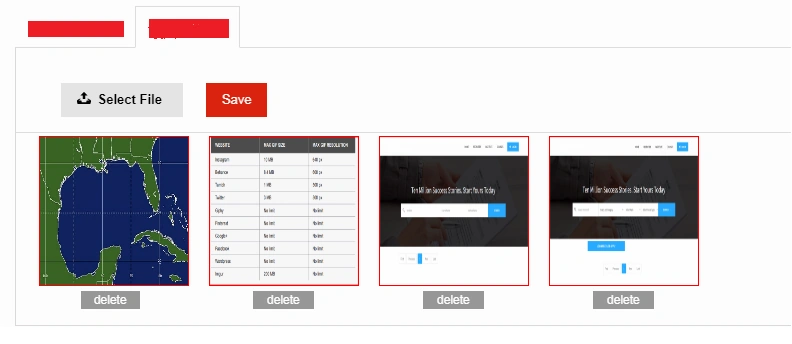
Next, add image display list. It is wise if possible to add multiple images at a time.
 Step 4
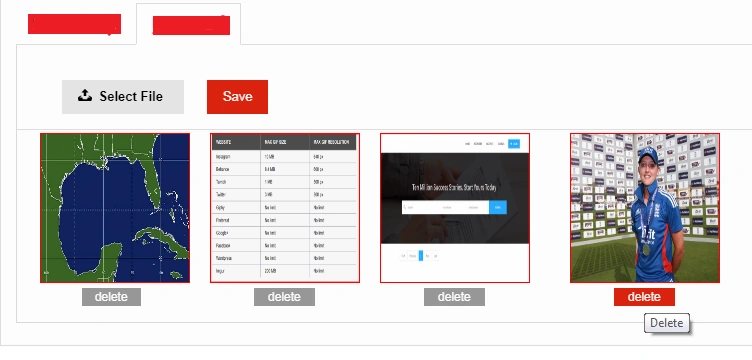
If the user wishes to remove one image, click the "Delete" button, remove data from the database, and then once again load the image data.
After deleting the image, we call this method.
- $scope.listEventimage = [];
-
- angular.forEach(imagedata, function(a) {
- $scope.imagedata = database images.
- $scope.Imageid = database images id;
- var $el = $('<div style="float:left;padding-left:20px">' + '<td><img class="file-link" id="Clear" src="' + 'data:image/png;base64, ' + $scope.imagedata + '" padding=15px width=150px height=150px /><button style="position:relative;width: 39%; margin-bottom: 4%;left: 30%;" id="dltbutton" class="file-delete-btn delete" data-ng-click="DeleteCEventImage(' + $scope.Imageid + ')">delete</button></td>' + '</div>').appendTo('.imageOutput');
- $compile($el)($scope);
- $scope.listEventimage.push({
- Image: database images,
- ImageId: database images id
- });
- });
I hope this blog is helpful to you.


Hamid KhanPosted Sep 11, 2017, 12:37 PM
Could you please upload the source code.................
Nandhini SPosted Aug 10, 2017, 3:51 AM
Nice blog.... Keep it up.....