

Introduction
A PDF header and footer presents consistent information in the page margins throughout a PDF, for example, a date, page numbering, the title of the overall document, or author’s name. In this blog, you will learn how to insert text, image, page count, and page numbers in PDF header and footer space, by using free Spire.PDF component in C#.
Background
This library offers a class named PdfPageTemplateElement, which represents a page template that can be used as header, footer, watermark or stamp. The template can contain any type of elements including dynamic fields, such as PdfPageCountField, PdfPageNumberField, etc.
To make the code easy to read, I pre-created two customized functions AddHeader() and AddFooter() that generated the header template and the footer template respectively. Invoking the function in main method, we can apply the template to a newly-build or an existing PDF document to get the same information.
Using the code
Part 1. Add image and text in header space.
- static void AddHeader(PdfDocument doc, PdfMargins margin)
- {
- //Get the size of first page
- SizeF pageSize = doc.Pages[0].Size;
- //Create a PdfPageTemplateElement object that will be
- //use as header space
- PdfPageTemplateElement headerSpace = new PdfPageTemplateElement(pageSize.Width, margin.Top);
- headerSpace.Foreground = true;
- doc.Template.Top = headerSpace;
- //Draw image at the top left of header space
- PdfImage headerImage = PdfImage.FromFile(@"logo.jpg");
- float width = headerImage.Width / 7;
- float height = headerImage.Height / 7;
- headerSpace.Graphics.DrawImage(headerImage, 0, 0, width, height);
- //Draw text at the top right of header space
- PdfTrueTypeFont font = new PdfTrueTypeFont(new Font("Arial", 9f, FontStyle.Bold|FontStyle.Italic), true);
- PdfStringFormat format = new PdfStringFormat(PdfTextAlignment.Right);
- String headerText = "\nAnnual Financial Report\n2017/03/24";
- float x = pageSize.Width;
- float y = 0;
- headerSpace.Graphics.DrawString(headerText, font, PdfBrushes.Black, x, y, format);
- }
- static void Main(string[] args)
- {
- //Create a new PDF document
- PdfDocument doc = new PdfDocument();
- //Add two pages in it
- PdfPageBase page = doc.Pages.Add();
- doc.Pages.Add();
- //Set the margin
- PdfUnitConvertor unitCvtr = new PdfUnitConvertor();
- PdfMargins margin = new PdfMargins();
- margin.Top = unitCvtr.ConvertUnits(2.54f, PdfGraphicsUnit.Centimeter, PdfGraphicsUnit.Point);
- margin.Bottom = margin.Top;
- margin.Left = unitCvtr.ConvertUnits(4.17f, PdfGraphicsUnit.Centimeter, PdfGraphicsUnit.Point);
- margin.Right = margin.Left;
- //Call AddHeader method to add header information
- AddHeader(doc, margin);
- //Save the file
- doc.SaveToFile("PDF_Header.pdf");
- doc.Close();
- }
Result

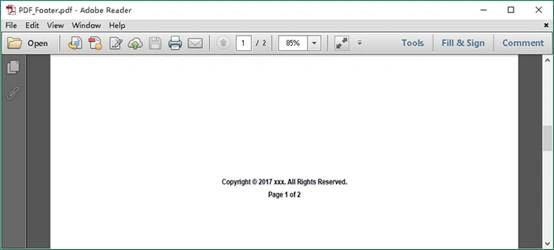
Part 2. Add text and automatic page numbering at the center of footer space.
- static void AddFooter(PdfDocument doc, PdfMargins margin)
- {
- //Get the size of first page
- SizeF pageSize = doc.Pages[0].Size;
- //Create a PdfPageTemplateElement object that will be
- //used as footer space
- PdfPageTemplateElement footerSpace = new PdfPageTemplateElement(pageSize.Width, margin.Bottom);
- footerSpace.Foreground = true;
- doc.Template.Bottom = footerSpace;
- //Draw text at the center of footer space
- PdfTrueTypeFont font = new PdfTrueTypeFont(new Font("Arial", 9f, FontStyle.Bold), true);
- PdfStringFormat format = new PdfStringFormat(PdfTextAlignment.Center);
- String headerText = "Copyright © 2017 xxx. All Rights Reserved.";
- float x = pageSize.Width / 2;
- float y = 15f;
- footerSpace.Graphics.DrawString(headerText, font, PdfBrushes.Black, x, y, format);
- //Create page number automatic field
- PdfPageNumberField number = new PdfPageNumberField();
- //Create page count automatic field
- PdfPageCountField count = new PdfPageCountField();
- //Add the fields in composite field
- PdfCompositeField compositeField = new PdfCompositeField(font, PdfBrushes.Black, "Page {0} of {1}", number, count);
- //Align string of "Page {0} of {1}" to center
- compositeField.StringFormat = new PdfStringFormat(PdfTextAlignment.Center,PdfVerticalAlignment.Middle);
- compositeField.Bounds = footerSpace.Bounds;
- //Draw composite field at footer space
- compositeField.Draw(footerSpace.Graphics);
- }
- static void Main(string[] args)
- {
- //Create a new PDF document
- PdfDocument doc = new PdfDocument();
- //Add two pages in it
- PdfPageBase page = doc.Pages.Add();
- doc.Pages.Add();
- //Set the margin
- PdfUnitConvertor unitCvtr = new PdfUnitConvertor();
- PdfMargins margin = new PdfMargins();
- margin.Top = unitCvtr.ConvertUnits(2.54f, PdfGraphicsUnit.Centimeter, PdfGraphicsUnit.Point);
- margin.Bottom = margin.Top;
- margin.Left = unitCvtr.ConvertUnits(4.17f, PdfGraphicsUnit.Centimeter, PdfGraphicsUnit.Point);
- margin.Right = margin.Left;
- //Call AddFooter method to add header information
- AddFooter(doc, margin);
- //Save the file
- doc.SaveToFile("PDF_Footer.pdf");
- doc.Close();
- }
Result
Join the conversation! Your thoughts help the community grow.