

Hi All,
Next step towards Office 365 development is uploading /adding a web part page in “SitePages” library of team site. The site is not publishing site so we couldn’t like upload the empty page and then apply PageLayout.
So we will require a local copy of page having appropriate zones. Example of page (default.aspx) structure (this page is just for reference):
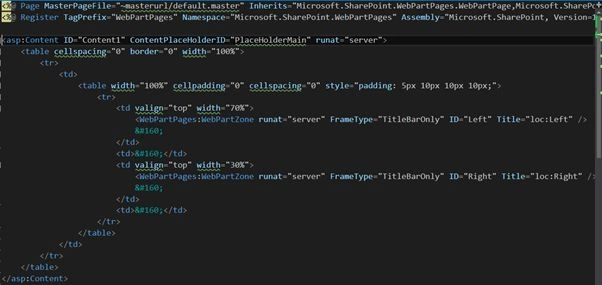
Following are the steps and script:
- Get the Microsoft.SharePoint.Client.ClientContext instance
- Get the Web instance
- Get the “Site Pages” library
- Get the root folder and files collection
- For adding file, we need to create instance of Microsoft.SharePoint.Client.FileCreationInformation. Set the properties of this instance like FileUrl, FileContent etc.
- Use the Add () method of files collection.
Script
- #Variables which we are used below
- $url = http://MyWeb.com
- $LayoutPath = “c:\default.aspx”
- $PagesLibraryTitle = “Site Pages”
- $FileNameWithExtention = “default.aspx”
- # All the above variables can be parameterised
- #Password to connect the Office 365 site
- $securePassword = ConvertTo-SecureString -String $Password -AsPlainText –Force
- #instance of Client Context
- [Microsoft.SharePoint.Client.ClientContext]$clientContext = New-Object Microsoft.SharePoint.Client.ClientContext($url)
- $clientContext.Credentials = New-Object Microsoft.SharePoint.Client.SharePointOnlineCredentials($UserName, $securePassword)
- #here assuming we are adding file to root web of site collection
- $site = $clientContext.Site
- $web = $site.RootWeb
- $clientContext.Load($web)
- $clientContext.ExecuteQuery()
- #List Collection
- $lists = $web.Lists
- $clientContext.Load($lists)
- $clientContext.ExecuteQuery()
- #Get the list
- $list = $lists.GetByTitle($PagesLibraryTitle)
- $clientContext.Load($list)
- $clientContext.ExecuteQuery()
- #Files Collection
- $files = $list.RootFolder.Files
- $clientContext.Load($files)
- $clientContext.ExecuteQuery()
- #instance of FileCreationInformation
- [Microsoft.SharePoint.Client.FileCreationInformation]$fileCreationInfo = New-Object Microsoft.SharePoint.Client.FileCreationInformation
- #Get the file content
- $fileContent = Get-Content $LayoutPath
- #convert the file content into Byte[] and set it to Content property of FileCreationInfo class
- $fileCreationInfo.Content = [System.Text.Encoding]::UTF8.GetBytes($fileContent)
- $fileCreationInfo.Url = $FileNameWithExtention #(default.aspx)
- #add the file
- $page = $files.Add($fileCreationInfo)
- $clientContext.ExecuteQuery()
Thanks
Feel free to comment / feedback / suggestions / thoughts if any or if you have any query
ajay tyagiPosted May 19, 2015, 6:28 AM
how to deploye visual web-part using csom code in o365(online)