What is Gridview ?
Displays the values of a data source in a table where each column represents a field and each row represents a record. The GridView control enables you to select, sort, and edit these items.
Events of Gridview
- RowCommand
- RowEditing
- RowDeleting
- RowUpdating
- PageIndexChanging
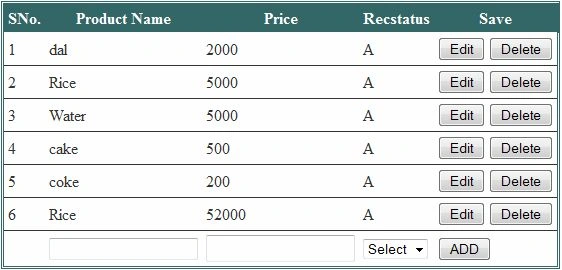
Maingrid.aspx
<%@ Page Language="C#" AutoEventWireup="true" CodeFile="Maingrid.aspx.cs" Inherits="Maingrid" %>
<%@ Register Assembly="AjaxControlToolkit" Namespace="AjaxControlToolkit" TagPrefix="cc1" %> <!DOCTYPE html PUBLIC "-//W3C//DTD XHTML 1.0 Transitional//EN" "http://www.w3.org/TR/xhtml1/DTD/xhtml1-transitional.dtd">
<html xmlns="http://www.w3.org/1999/xhtml">
<head id="Head1" runat="server">
<title></title>
</head>
<body>
<form id="form1" runat="server">
<div style="padding-left: 500px; padding-right: 40px; width: 100%">
<asp:GridView ID="GridView1" ShowFooter="True" runat="server" AutoGenerateColumns="False"
DataKeyNames="Fid" CellPadding="4" GridLines="Horizontal" PageSize="10" BackColor="White"
BorderColor="#336666" BorderStyle="Double" BorderWidth="3px" AllowPaging="True"
OnRowCommand="GridView1_RowCommand" OnRowDeleting="GridView1_RowDeleting"
OnRowEditing="GridView1_RowEditing"
OnRowUpdating="GridView1_RowUpdating" OnPageIndexChanging="GridView1_PageIndexChanging"
Style="margin-right: 0px">
<Columns>
<asp:TemplateField HeaderText="SNo.">
<ItemTemplate>
<%#Container.DataItemIndex + 1 %>
</ItemTemplate>
</asp:TemplateField>
<asp:TemplateField HeaderText="Product Name" SortExpression="Fname">
<EditItemTemplate>
<asp:TextBox ID="TextBox2" runat="server" Text='<%# Bind("Fname") %>'></asp:TextBox>
</EditItemTemplate>
<ItemTemplate>
<asp:Label ID="Label1" runat="server" Text='<%# Bind("Fname") %>'></asp:Label>
</ItemTemplate>
<FooterTemplate>
<asp:TextBox ID="txtFooterProductname" runat="server"></asp:TextBox>
</FooterTemplate>
</asp:TemplateField>
<asp:TemplateField HeaderText="Price" SortExpression="Fprice">
<EditItemTemplate>
<asp:TextBox ID="TextBox3" runat="server" Text='<%# Bind("Fprice") %>'></asp:TextBox>
<cc1:FilteredTextBoxExtender ID="TextBox3_FilteredTextBoxExtender" FilterMode="ValidChars"
runat="server" Enabled="True" FilterType="Numbers" TargetControlID="TextBox3">
</cc1:FilteredTextBoxExtender>
</EditItemTemplate>
<ItemTemplate>
<asp:Label ID="Label3" runat="server" Text='<%# Bind("Fprice") %>'></asp:Label>
</ItemTemplate>
<FooterTemplate>
<asp:TextBox ID="TxtFooterprice" runat="server" Height="21px"></asp:TextBox>
<cc1:FilteredTextBoxExtender ID="TxtFooterprice_FilteredTextBoxExtender" runat="server"
Enabled="True" FilterType="Numbers" FilterMode="ValidChars"
TargetControlID="TxtFooterprice">
</cc1:FilteredTextBoxExtender>
</FooterTemplate>
</asp:TemplateField>
<asp:TemplateField HeaderText="Recstatus" SortExpression="Recstatus">
<EditItemTemplate>
<asp:DropDownList ID="DrpStatusEdit" runat="server">
<asp:ListItem Value="0" Text="Select"></asp:ListItem>
<asp:ListItem Value="1" Text="A"></asp:ListItem>
<asp:ListItem Value="2" Text="D"></asp:ListItem>
</asp:DropDownList>
</EditItemTemplate>
<ItemTemplate>
<asp:Label ID="Label4" runat="server" Text='<%# Bind("Recstatus") %>'></asp:Label>
</ItemTemplate>
<FooterTemplate>
<asp:DropDownList ID="DrpStatus" runat="server">
<asp:ListItem Value="0" Text="Select"></asp:ListItem>
<asp:ListItem Value="1" Text="A"></asp:ListItem>
<asp:ListItem Value="2" Text="D"></asp:ListItem>
</asp:DropDownList>
</FooterTemplate>
</asp:TemplateField>
<asp:TemplateField HeaderText="Save" SortExpression="Save">
<ItemTemplate>
<asp:Button ID="btnedit" CommandName="Edit" runat="server" Text="Edit" />
<asp:Button ID="btndelete" CommandName="Delete" runat="server" Text="Delete" />
</ItemTemplate>
<EditItemTemplate>
<asp:Button ID="btnupdate" CommandName="Update" runat="server" Text="Update" />
<asp:Button ID="btnCancel" CommandName="Cancel" runat="server" Text="Cancel" />
</EditItemTemplate>
<FooterTemplate>
<asp:Button ID="Btnsave" CommandName="ADD" runat="server" Text="ADD" />
</FooterTemplate>
</asp:TemplateField>
</Columns>
<FooterStyle BackColor="White" ForeColor="#333333" />
<HeaderStyle BackColor="#336666" Font-Bold="True" ForeColor="White" />
<PagerStyle BackColor="#336666" ForeColor="White" HorizontalAlign="Center" />
<RowStyle BackColor="White" ForeColor="#333333" />
<SelectedRowStyle BackColor="#339966" Font-Bold="True" ForeColor="White" />
<SortedAscendingCellStyle BackColor="#F7F7F7" />
<SortedAscendingHeaderStyle BackColor="#487575" />
<SortedDescendingCellStyle BackColor="#E5E5E5" />
<SortedDescendingHeaderStyle BackColor="#275353" />
</asp:GridView>
</div>
<asp:ScriptManager ID="ScriptManager1" runat="server">
</asp:ScriptManager>
</form>
</body>
</html> Create Table Here I Provide Script
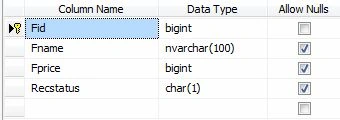
CREATE TABLE [dbo].[Food](
[Fid] [bigint] primary key IDENTITY(1,1) NOT NULL,
[Fname] [nvarchar](100) NULL,
[Fprice] [bigint] NULL,
[Recstatus] [char](1) NULL,
) 
INSERT INTO Food(Fname,Fprice,Recstatus)VALUES('Dal',2000,'A')
INSERT INTO Food(Fname,Fprice, Recstatus)VALUES('Rice',52000,'A')
// StoredProcedure [dbo].[InsertFood]
// For Inserting and Updating Records
USE [AllSampleCode]
GO
SET ANSI_NULLS ON
GO
SET QUOTED_IDENTIFIER ON
GO
ALTER proc [dbo].[InsertFood] @Fid bigint=null,
@Fprice bigint =null,
@Fname nvarchar(100) =null,
@Recstatus char(1) =null
as
DECLARE @ReturnValue int
if(@Fid =0)
begin
insert INTO Food
(
Fprice ,
Fname ,
Recstatus
)
VALUES
(
@Fprice ,
@Fname ,
@Recstatus )
SELECT @ReturnValue = SCOPE_IDENTITY()
END ELSE
begin
update Food SET
Fprice =@Fprice,
Fname=@Fname ,
Recstatus =@Recstatus
where Fid =@Fid
end IF (@@ERROR != 0)
BEGIN
RETURN -1
END
ELSE
BEGIN
RETURN @ReturnValue END
To Bind GridView Using This Method
public void bindgrid()
{
SqlCommand cmd = new SqlCommand("select * from food ", con); cmd.CommandType = CommandType.Text;
SqlDataAdapter da = new SqlDataAdapter();
da.SelectCommand = cmd;
DataTable dt = new DataTable();
da.Fill(dt);
if (dt.Rows.Count > 0)
{
GridView1.DataSource = dt;
GridView1.DataBind();
}
else
{
DataRow dr = dt.NewRow();
dt.Rows.Add(dr);
GridView1.DataSource = dt;
GridView1.DataBind();
}
} To Find Control In Gridview Footer
TextBox txtFooterProductname = (TextBox)GridView1.FooterRow.FindControl("txtFooterProductname");
TextBox TxtFooterprice = (TextBox)GridView1.FooterRow.FindControl("TxtFooterprice");DropDownList DrpStatus = (DropDownList)GridView1.FooterRow.FindControl("DrpStatus");
On RowCommand
protected void GridView1_RowCommand(object sender, GridViewCommandEventArgs e)
{
// finding controls of footer row
if (e.CommandName == "ADD") // checking command Name is same as given
{ TextBox txtFooterProductname = (TextBox)GridView1.FooterRow.FindControl("txtFooterProductname");
TextBox TxtFooterprice = (TextBox)GridView1.FooterRow.FindControl("TxtFooterprice");
DropDownList DrpStatus = (DropDownList)GridView1.FooterRow.FindControl("DrpStatus");
if (DrpStatus.SelectedIndex == 0)
{
ScriptManager.RegisterStartupScript(this, this.GetType(), "Alert", "alert('Select Status ')", true);
}
else
{
con.Open();
SqlCommand cmd = new SqlCommand("InsertFood", con);
cmd.CommandType = CommandType.StoredProcedure;
cmd.Parameters.AddWithValue("@Fid", 0);
cmd.Parameters.AddWithValue("@Fprice", TxtFooterprice.Text);
cmd.Parameters.AddWithValue("@Fname", txtFooterProductname.Text);
cmd.Parameters.AddWithValue("@Recstatus", DrpStatus.SelectedItem.Text);
cmd.ExecuteNonQuery();
con.Close();
bindgrid(); }
}}
On RowEditing
protected void GridView1_RowEditing(object sender, GridViewEditEventArgs e)
{
GridView1.EditIndex = e.NewEditIndex;
bindgrid();}
On RowDeleting
protected void GridView1_RowDeleting(object sender, GridViewDeleteEventArgs e)
{
Label txt = (Label)GridView1.Rows[e.RowIndex].FindControl("Label4");
if (txt.Text == "A")
{
int userid = Convert.ToInt32(GridView1.DataKeys[e.RowIndex].Values["Fid"].ToString());
SqlCommand cmd = new SqlCommand("Delete From Food where Fid= " + userid, con);
cmd.CommandType = CommandType.Text;
con.Open();
cmd.ExecuteNonQuery();
con.Close();
bindgrid();
}
}
On RowUpdating protected void GridView1_RowUpdating(object sender, GridViewUpdateEventArgs e)
{
Button btn = (Button)GridView1.Rows[e.RowIndex].FindControl("btnupdate");
if (btn.CommandName == "Update")
{
int userid = Convert.ToInt32(GridView1.DataKeys[e.RowIndex].Value.ToString());
TextBox TextBox2 = (TextBox)GridView1.Rows[e.RowIndex].FindControl("TextBox2");
TextBox TextBox3 = (TextBox)GridView1.Rows[e.RowIndex].FindControl("TextBox3");
TextBox TextBox4 = (TextBox)GridView1.Rows[e.RowIndex].FindControl("TextBox4");
DropDownList DrpStatusEdit = (DropDownList)GridView1.Rows[e.RowIndex].FindControl("DrpStatusEdit");
if (DrpStatusEdit.SelectedValue == "1")
{
con.Open();
SqlCommand cmd = new SqlCommand("InsertFood", con);
cmd.CommandType = CommandType.StoredProcedure;
cmd.Parameters.AddWithValue("@Fid", userid);
cmd.Parameters.AddWithValue("@Fprice", TextBox3.Text);
cmd.Parameters.AddWithValue("@Fname", TextBox2.Text);
cmd.Parameters.AddWithValue("@Recstatus", DrpStatusEdit.SelectedItem.Text);
cmd.ExecuteNonQuery();
con.Close();
} GridView1.EditIndex = -1;
bindgrid();
}
} On PageIndexChanging
protected void GridView1_PageIndexChanging(object sender, GridViewPageEventArgs e)
{
GridView1.PageIndex = e.NewPageIndex;
bindgrid();
}

Dharmendra Kumar PanditPosted Jan 30, 2020, 1:15 AM
Nice article very helpfull....
Anand NavalePosted Nov 29, 2019, 12:13 AM
Nice One ...!
Ramzanali MominPosted Oct 23, 2018, 12:00 AM
Nice Article
Anjali SharmaPosted Oct 10, 2014, 12:52 PM
Gud Article... but how to bind Dropdown, checkbox in gridview...