Introduction
In this blog, I have tried my best, to create different data sources and bind them to the GridView since data source and Grid View are very important to work in any application. In the future, if I have found any other datasource, I will append it to this write-up. Hope it will be a good reference or starting point for beginners.
Attachement : SolutionFileDownload
List of different collections used in this blog
- Bind Gridview Using Array of Object
- Bind Gridview Using One Dimensional Array
- Bind Gridview Using Two Dimensional Array
- Bind Gridview Using Multi Dimensional Array
- Bind Gridview Using ArrayList
- Bind Gridview Using GenericList
- Bind Gridview Using DataTable
- Bind Gridview Using Linq Query Result
- Bind Gridview Using XML
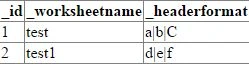
Bind Gridview Using Array with class
First, create a class.
- public class intializeheaderformat {
- public int id {
- get;
- set;
- }
- public string worksheetname {
- get;
- set;
- }
- public string headerformat {
- get;
- set;
- }
- public intializeheaderformat(int id, string wsname, string hf) {
- id = id;
- worksheetname = wsname;
- headerformat = hf;
- }
- }
- Array IHF = new [] {
- new intializeheaderformat(1, "test", "a|b|C"), new intializeheaderformat(2, "test1", "d|e|f")
- };
- GridView1.DataSource = IHF;
- GridView1.DataBind();
 Bind Grid view Using One Dimensional Array
Code - string[] arnames = {
- "karthik",
- "sachin",
- "dravid"
- };
- GridView1.DataSource = arnames;
- GridView1.DataBind();
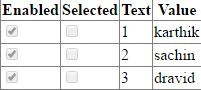
 Bind Gridview Using Two Dimensional Array Code
 - string[, ] arnameswithid = {
- {
- "1",
- "karthik"
- },
- {
- "2",
- "sachin"
- },
- {
- "3",
- "dravid"
- }
- };
- ArrayList arrList = new ArrayList();
- for (int i = 0; i < 3; i++) {
- arrList.Add(new ListItem(arnameswithid[i, 0], arnameswithid[i, 1]));
- }
- GridView1.DataSource = arrList;
- GridView1.DataBind();
 Note
Note
If we try to bind two/multi dimensional data directly to GridView, then we will get an exception with the message below.
Array was not a one-dimensional array Bind Gridview Using Multi Dimensional Array
Code - string[, ] arrtable = {
- {
- "1",
- "karthik",
- "programmer"
- },
- {
- "2",
- "sachin",
- "CA"
- },
- {
- "3",
- "dravid",
- "doctor"
- }
- };
- DataTable tempdttogetarray = new DataTable();
- tempdttogetarray.Columns.Add("ID", typeof(string));
- tempdttogetarray.Columns.Add("Name", typeof(string));
- tempdttogetarray.Columns.Add("desgination", typeof(string));
- for (int row = 0; row < arrtable.GetLength(0); row++) {
- tempdttogetarray.Rows.Add();
- tempdttogetarray.Rows[tempdttogetarray.Rows.Count - 1]["ID"] = arrtable[row, 0];
- tempdttogetarray.Rows[tempdttogetarray.Rows.Count - 1]["Name"] = arrtable[row, 1];
- tempdttogetarray.Rows[tempdttogetarray.Rows.Count - 1]["desgination"] = arrtable[row, 2];
- }
- GridView1.DataSource = tempdttogetarray;
- GridView1.DataBind();
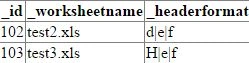
Output 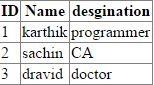 Bind Gridview Using ArrayList
Create class - public class intializeheaderformat {
-
- public int _id {
- get;
- set;
- }
- public string _worksheetname {
- get;
- set;
- }
- public string _headerformat {
- get;
- set;
- }
- public intializeheaderformat(int id, string wsname, string hf) {
- _id = id;
- _worksheetname = wsname;
- _headerformat = hf;
- }
- }
- ArrayList IHF = new ArrayList();
- intializeheaderformat objinitheader = new intializeheaderformat(102, "test2.xls", "d|e|f");
- IHF.Add(objinitheader);
- objinitheader = new intializeheaderformat(103, "test3.xls", "H|e|f");
- IHF.Add(objinitheader);
- GridView1.DataSource = IHF;
- GridView1.DataBind();
 Bind Gridview Using GenericList
 - Create Class: public class intializeheaderformat {
-
- public int _id {
- get;
- set;
- }
- public string _worksheetname {
- get;
- set;
- }
- public string _headerformat {
- get;
- set;
- }
- public intializeheaderformat(int id, string wsname, string hf) {
- _id = id;
- _worksheetname = wsname;
- _headerformat = hf;
- }
- }
- List < intializeheaderformat > lstworksheetformat = new List < intializeheaderformat > ();
- intializeheaderformat objinitheader = new intializeheaderformat(101, "test1.xls", "a|b|c");
-
-
-
-
- lstworksheetformat.Add(objinitheader);
- objinitheader = new intializeheaderformat(102, "test2.xls", "d|e|f");
- lstworksheetformat.Add(objinitheader);
- objinitheader = new intializeheaderformat(103, "test3.xls", "g|h|i");
- lstworksheetformat.Add(objinitheader);
- GridView1.DataSource = lstworksheetformat;
- GridView1.DataBind();
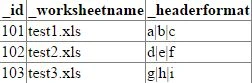 Bind Gridview Using DataTable Create DataTable
 - DataTable intializeheaderformat = new DataTable();
- intializeheaderformat.Columns.Add("Id", typeof(int));
- intializeheaderformat.Columns.Add("worksheetname", typeof(string));
- intializeheaderformat.Columns.Add("headerformat", typeof(string));
- intializeheaderformat.Rows.Add(1, "test1.xls", "a|b|c");
- intializeheaderformat.Rows.Add(2, "test2.xls", "d|e|f");
- intializeheaderformat.Rows.Add(3, "test3.xls", "g|h|i");
- GridView1.DataSource = intializeheaderformat;
- GridView1.DataBind();
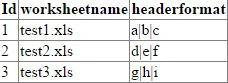 Bind Gridview Using Linq Query Result:
Linq Creation - The Three Parts of a LINQ Query - Data source
- List < intializeheaderformat > lstworksheetformat = new List < intializeheaderformat > ();
- intializeheaderformat objinitheader = new intializeheaderformat(101, "test1.xls", "a|b|c");
- lstworksheetformat.Add(objinitheader);
- objinitheader = new intializeheaderformat(102, "test2.xls", "d|e|f");
- lstworksheetformat.Add(objinitheader);
- objinitheader = new intializeheaderformat(103, "test3.xls", "g|h|i");
- lstworksheetformat.Add(objinitheader);
- Query creation
-
-
-
-
-
-
- var temptable = from tempresult in lstworksheetformat select new {
- tempresult._id, tempresult._headerformat
- };
- Query execution
- GridView1.DataSource = temptable;
- GridView1.DataBind();
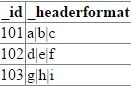
Bind Gridview using XML Datasource
- XML << ? xml version = "1.0"
- encoding = "utf-8" ? > < workbook > < sheet > < Id > 101 < /Id> < WorkSheetName > test1 < /WorkSheetName > < Format > A | B | C < /Format> < /sheet > < sheet > < Id > 102 < /Id> < WorkSheetName > test2 < /WorkSheetName > < Format > D | E | F < /Format> < /sheet > < sheet > < Id > 103 < /Id> < WorkSheetName > test3 < /WorkSheetName > < Format > G | H | I < /Format> < /sheet > < /workbook>
- DataSet ds = new DataSet("Worksheetformat");
- ds.ReadXml(Server.MapPath("~/Format.xml"));
- GridView1.DataSource = ds.Tables[0];
- GridView1.DataBind();
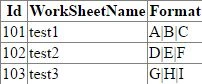
I have added this entire example as one solution file in the attachment section. I hope it was useful for you. Kindly let me know your feedback.


Join the conversation! Your thoughts help the community grow.