
- Box Selection and Multi-Line Editing is the new feature of Visual Studio 2010.
- By using Alt key we can select, delete and add multiple lines at a time.
Add:
public class Class1
{
int a;
string b;
bool a;
byte[] s;
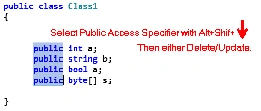
} - Above Class class1 four Different Data types with no AccessSpecifiers.
- If You Want Add Public Access Specifier to All Data Types Just You can Press
- Alt+Shift+Arrows (left,Right,up,down).
- Here We Use Alt+Shift+Down/Up.


Delete?Update: - If you want to Delete/Update Public Access Specifier.
- Similarly Use Alt+Shift+Arrows.

Join the conversation! Your thoughts help the community grow.